Most articles about AI tools for consultants are ranked lists, and most ranked lists miss the point: the right tool depends on the job being done at that moment in an engagement. A deck generator cannot do document analysis. A research assistant cannot write the proposal. A meeting notetaker cannot keep project context consistent.
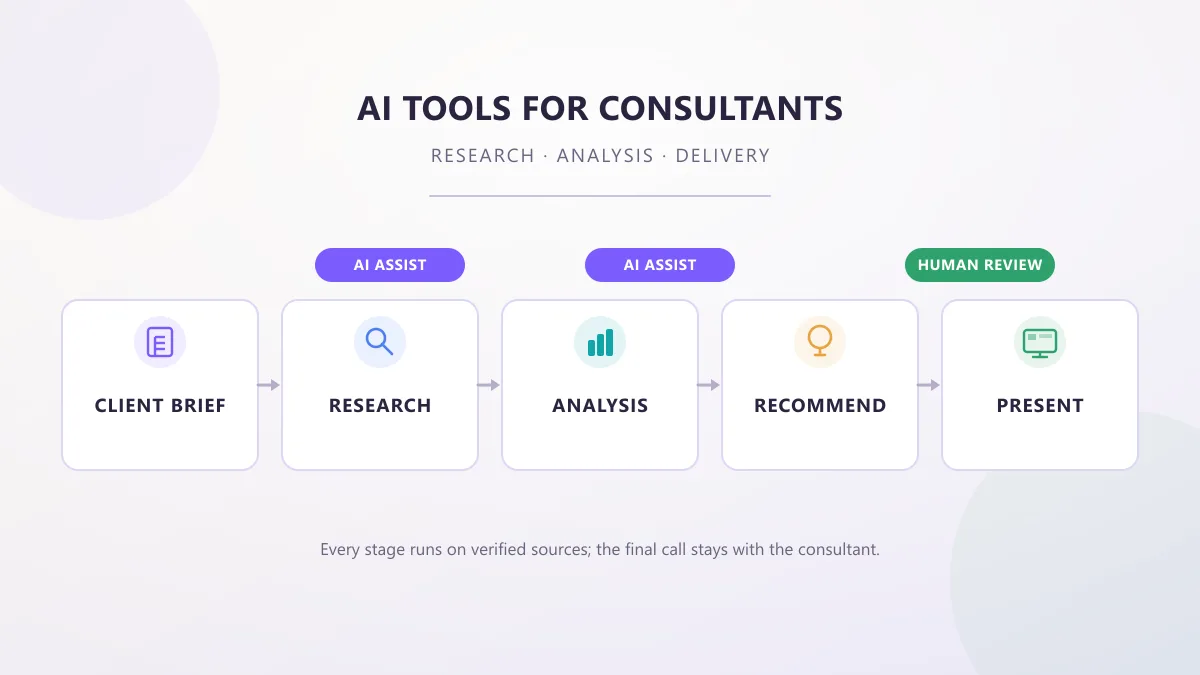
A better way to think about AI tools for consultants is by workflow. An engagement runs from client brief through research, analysis, synthesis, proposal, meeting, deliverable, presentation, follow-up, and knowledge management — and different tool categories earn their place at different stages. This article is organized that way: what the tools are, what each does in real consulting work, where human judgment stays necessary, and how to keep client data safe while using them.
The guidance here reflects current 2026 product information, verified against official sources and the vendor documentation linked at the end of this article. Pricing and features change often, so treat this as a starting map, not a substitute for the vendor's current terms.
Where AI Actually Helps in Consulting
Consultants rarely buy "AI productivity" in the abstract. They buy help with specific, recurring work: finding reliable information, absorbing large volumes of material, analyzing structured and unstructured data, preparing recommendations, drafting proposals, building slide decks, documenting meetings, organizing project knowledge, and automating repetitive administrative tasks.
That distinction matters. Some AI tools are built to generate — text, slides, images, emails. Others are built to process — read sources, summarize, compare, extract, and structure. A consultant needs both, but they fail in different ways, which is why the best setup is usually several tools, each assigned to a job it is actually good at.
The 2026 LexisNexis Future of Work research on management consulting gives a sense of the real adoption picture. The industry report found 72% of management consultants are very or extremely confident in their AI use, while 54% report using AI tools without formal approval and 73% use personal AI tools for work. Content creation is the top genAI use case (50% of consultants), 50% cite misinformation as a top concern, and 62% of consulting firms report already deploying AI agents. Findings like these are worth reading with care: adoption is real, and so is the risk of relying on unverified output.
The Consulting Workflow, From Client Brief to Deliverable
A production engagement follows a predictable arc. The table below maps each stage to what AI can genuinely help with and what should stay firmly on the human side, including which evidence needs checking.
| Stage |
What AI can help with |
What stays human |
| Client brief |
Restructure the brief into problem, scope, deliverables, constraints, and open questions |
Confirming scope and commitments directly with the client |
| Source collection |
Suggest source categories, organize files, spot coverage gaps |
Deciding which sources the client actually trusts |
| Research |
Summarize sources, extract facts, flag contradictions across documents |
Verifying every citation and the publication date of data |
| Analysis |
Test candidate hypotheses against the sources, compare scenarios |
Deciding which findings matter and why |
| Hypothesis |
Generate hypotheses to check against evidence, rank them by support |
Choosing which hypotheses the firm will validate |
| Recommendation |
Structure options, trade-offs, and risks into a decision memo |
Owning the recommendation and its caveats |
| Client deliverable |
First-draft proposal, report, or slide outline |
Final wording, numbers, and client-facing commitments |
| Presentation |
Draft slides and a talking-point structure |
Telling the story, handling questions, reading the room |
| Review |
Incorporate edits, detect changed assumptions across versions |
Sign-off against the brief and the evidence |
| Final delivery |
Package files, draft a handover note |
Client handover and relationship management |
Two rules run through the whole arc. First, AI output at every stage is a draft or a hypothesis, not a finding. Second, the further a stage gets from the source documents, the more careful the human check needs to be — a polished slide built from an unverified summary can carry a wrong number all the way to the client.
This section groups tools by the job they are used for. Pricing reflects official vendor pages current as of September 2026. Where a price can't be confirmed from the vendor, it is not quoted here.
Research and Source Discovery
Research in consulting is often about coverage and triage: did we miss a source, a competitor, a regulatory change? Perplexity answers questions with real-time web search and cited sources, which makes it practical for building a first map of a topic before opening the full documents. An answer that lacks citations is a signal to go back to primary material. Gemini bundles search-grounded answers and a Deep Research mode in its app; the free tier covers everyday use, and the Google AI Pro plan at $19.99 a month raises usage limits. Consensus and Elicit serve the narrower research job of finding and summarizing peer-reviewed academic evidence, which is useful for benchmarking studies and methodology questions.
The consultant's task is source discipline: decide which sources are authoritative, keep the raw documents, and treat the tool as an index into them, not as the truth.
Document Analysis and Synthesis
The daily consulting problem is too much material — annual reports, earnings calls, contracts, regulatory filings, interview transcripts. Claude is built for long-context reasoning and document work, with a free tier and a Pro plan at $20 a month. NotebookLM takes a different approach: you upload your sources and it answers only from them, with citations back to the uploaded material, which narrows the hallucination surface considerably. Its free tier is genuinely useful, and higher source limits come with paid Google AI plans.
Nothing here removes verification. Document tools fail by over-summarizing: they can quietly drop the exception that changes the conclusion. The consultant checks the summary against the source, especially for numbers and conditional statements.
Data and Spreadsheet Work
Consultants inherit spreadsheets from clients, build their own models, and reconcile numbers across systems. General assistants can analyze uploaded files and answer questions about them, and they are useful for sense-checking formulas and drafting analysis steps. Microsoft 365 Copilot works inside Excel, Word, and PowerPoint for organizations on Microsoft 365, with Copilot listed at $30 per user per month as an add-on and various bundled business plans.
Spreadsheets are where AI mistakes get expensive, because a wrong cell looks identical to a right one. Calculations, totals, and unit conversions should be reproduced and checked by hand. Ask the model to show its working in a separate column, then spot-check the result.
Proposals and Reports
Drafting is where consultants get the most obvious time savings: turning analysis into a structured proposal, a findings report, or an executive summary. ChatGPT and Claude both draft from a pasted brief, with free tiers for evaluation and Plus/Pro plans around $20 a month. The practical workflow is to give the model the client brief, the verified facts, and the agreed structure, then treat the output as section drafts signed off in turn.
The failure mode here is false confidence in polish. A well-written paragraph is not a verified paragraph. Assumptions the client never approved, and numbers from the wrong source, both arrive with equal fluency — which is exactly why review against the brief is the step that never gets skipped.
Client Presentations
Deck creation is a mature category. Gamma generates presentation drafts from a prompt with a free tier and paid plans (Plus around $9, Pro around $18 per user per month on annual billing per its help center), and it is SOC 2 Type II compliant per its site. Plus AI generates slides natively inside Google Slides and PowerPoint. Microsoft 365 Copilot drafts PowerPoint decks directly in the Microsoft 365 stack.
Presentations are where the consultant's own narrative still matters most. AI can produce slide skeletons and headline suggestions; it cannot know which two findings the client will fight over, or which story will land. Use the tool for the first pass, then cut the deck to the story.
Meeting Notes and Follow-Up
Fireflies.ai and Otter.ai record and transcribe calls, generate summaries, and extract action items. Fireflies publishes four plans from a permanent free tier through Pro ($10 per seat per month on annual billing), Business ($19), and Enterprise ($39, annual only), with unlimited transcription and AI summaries on every plan. Meeting capture compresses the follow-up loop: the action-item list that used to take an hour now takes a sanity check.
The limitation is context. Transcripts tell you what was said, not what it means for the engagement. Consultants still decide which actions are real, who owns them, and which client statements change the analysis.
Knowledge Management and Automation
The final category ties the engagement together over time. Notion AI adds an AI assistant to a Notion workspace (the AI add-on is $8–10 per member per month alongside standard plans), useful for keeping project context, decisions, and learnings in one searchable place. Zapier automates the glue between tools — moving meeting action items into a task list, filing deliverables into a client folder — with a free tier at 100 tasks per month and paid plans from about $20 a month.
Automation is only worth the setup when the workflow repeats. Automate follow-up emails, file organization, and status updates; do not automate the judgment steps, and keep a human approval step on anything that sends messages or changes records.
Practical Prompts Consultants Can Use
These are example prompts, written to force the model to show its work instead of giving smooth answers. Paste them into whatever tool you already use, replace the bracketed parts with your own material, and keep the instruction not to infer facts.
Research triage. For building an evidence base from a batch of sources:
Review these sources and separate, in a table: 1) verified facts, 2) assumptions, 3) conflicting claims, 4) unanswered questions. Cite the source for each factual statement, and quote the exact sentence it comes from.
Use the "assumptions" and "unanswered questions" rows as the agenda for the next client conversation. If the tool cannot give a source for a factual statement, treat that statement as unverified.
Market segmentation. For making sense of a market with limited data:
Using only the supplied sources, group the market into the segments the evidence actually supports. For each segment, list the evidence, the uncertainty, and what information is still missing. Do not add segments the sources do not mention.
Watch where the model invents a standard segmentation (for example, "premium vs. value") that no source supports. That is a cue to label the segment as a hypothesis.
Client interview synthesis. For turning a set of interview notes into analysis:
Turn these interview notes into: recurring themes, contradictions, client pain points, evidence, and open questions. Quote the note for each theme, and do not infer facts that are not stated in the notes.
The contradictions row is usually the most valuable output — it reflects the client's internal disagreement, which is where consultants earn their fee.
Proposal structure. For converting a brief into a draft proposal skeleton:
Convert this client brief into a draft proposal structure covering: problem, scope, deliverables, assumptions, dependencies, timeline, and questions requiring clarification. Label every line that is an assumption rather than a stated requirement.
Review the assumptions list against the client. Engineering this step well avoids the classic mistake of proposing on assumptions the client never approved.
Slide outline. For turning analysis into a presentation narrative:
Turn this analysis into a 10-slide executive story. For each slide give: the headline, the key evidence, a visual suggestion, and the decision or implication. Do not invent data — if a claim is not in the analysis, mark it as an open question.
The model will often propose plausible-sounding numbers. Each "open question" marker is a reminder of what still needs a source before the client sees the deck.
Data audit. For comparing two versions of a spreadsheet:
Compare these two files and list every discrepancy in values, units, and totals. For each difference, state which file contains it and what would need to be confirmed with the client before the number can be used.
Ask for the file-by-file view instead of a merged summary; the point is to see exactly where the versions disagree.
How to Keep Client Context Consistent Across an Engagement
AI models do not remember an engagement by themselves. Persistent memory exists in some products, varies by plan and setting, and should never be assumed — a new chat is a new conversation with almost no context. The reliable fix is structural: one project context document per engagement, kept in plain text, updated as decisions land, and attached or pasted into every new AI session.
A practical template:
PROJECT CONTEXT — [Client name]
- Client objective and the engagement's agreed outcome
- Scope: what is in and what is explicitly out
- Stakeholders, roles, and who decides
- Approved terminology and definitions
- Source list: which documents are authoritative
- Known facts, with the source for each
- Assumptions, flagged as assumptions
- Constraints (timeline, budget, confidentiality, approval gates)
- Unresolved questions, with the owner of each
- Latest decisions and their date
Reuse the same document as the workspace context at every stage of the workflow: research stays aligned with the brief, the proposal inherits approved terminology, the deck uses the same assumptions, and the final report reflects the latest decisions instead of an earlier draft's. When a decision changes, update the context file first — then every later AI session starts from the corrected state.
This is also the cheapest safeguard against the most common consulting failure with AI: outputs that silently drift from what the client actually agreed.
Where AI Goes Wrong in Consulting Work
These failure modes repeat across consulting teams. For each one, the cause and the practical defense.
Hallucinated facts. Models generate plausible statements that are not in any source. Defense: require citations, and treat any output you cannot trace to the supplied material as unverified.
Incorrect citations. The model names a source that does not contain the claim. Defense: open the cited page before using the claim; citation quality is part of the answer, not decoration.
Outdated market information. Training data and cached search results date quickly in fast-moving markets. Defense: check publication dates, and treat anything older than the client's own planning horizon with suspicion.
False confidence. The model states estimates as certainties, with no calibration. Defense: prompt for confidence levels and conflicting views, and phrase sensitive findings as judgments the consultant owns.
Over-summarization. The summary drops the exception, the caveat, or the small print that changes the conclusion. Defense: read the original for anything conditional, negative, or time-bound.
Losing important context. A long engagement generates dozens of chats, and each one starts colder than the last. Defense: the project context document, updated before it is shared.
Treating weak evidence as strong. A single trade article becomes "the market trend." Defense: ask for the strongest and weakest support for every claim, and grade evidence by source quality, not by how often the model repeats it.
Generic recommendations. The tool returns the standard playbook — cost cutting, digitization, better analytics — regardless of the client's specifics. Defense: instruct the model to ground every recommendation in a stated client fact, and discard recommendations it cannot.
Spreadsheet and calculation mistakes. Formulas, units, and totals fail silently. Defense: reproduce calculations independently, show working, and spot-check by hand.
Mixing client facts with model assumptions. The draft blends verified client data with invented filler, and the reader cannot tell them apart. Defense: prompt for labeled sections — "stated in the brief," "assumption," "open question."
Confidentiality and data handling mistakes. Sensitive material is uploaded to a tool whose data terms were never checked. Defense: the verification checklist in the next section, before any client file is uploaded.
Asking AI to make a judgment that requires human responsibility. A recommendation the consultant signs, a pricing commitment, or a material financial conclusion is not something a model can own. Defense: use AI to prepare and stress-test; the consultant remains accountable for the call.
Over-reliance on generated slides or proposals. Polished output short-circuits review. Defense: build the review into the workflow as a stage, and check numbers against sources before design polish makes them feel final.
Failing to distinguish facts from recommendations. The report presents the model's suggestion as an established fact. Defense: separate "what the evidence shows" from "what we recommend," and keep that separation visible in the deliverable.
Before any tool touches real client material, run it through a short evaluation with your own test inputs. This is a process recommendation, not a claim about what any specific tool will do — results vary by model, plan, and the documents involved.
Build a small test set from non-confidential material or public documents:
- Known factual questions. Ask questions you already know the answer to, and check how often the tool gets them right.
- Source-heavy questions. Give it a document and ask for claims with exact quotes; count how many quotes are accurate.
- Ambiguous scenarios. Give it a short, muddled client scenario and see whether it asks clarifying questions or charges ahead with assumptions.
- Structured data. Give it a small spreadsheet with deliberate errors and see whether it catches them.
- Document comparison. Give it two versions of the same document and check whether it finds the real differences.
- Contradiction detection. Plant two conflicting statements in different documents and see whether it notices.
- Repeatability. Run the same prompt twice and compare: wildly different outputs are a warning for anything you will reuse.
Evaluate what you observe — accuracy, source quality, consistency, transparency about uncertainty, the human correction burden, and the privacy controls available on the plan you would actually use. If a tool fails the test set on things you already know, it will not suddenly perform better on things you do not.
Confidentiality, Privacy, and Client Data
Consultants routinely handle material that must not leave the client's control: financials, strategy documents, customer and employee data, contracts, proprietary research, and internal presentations. Before uploading any of it into an AI tool, verify the vendor's documented terms directly:
- Data use and training. Does the vendor state whether your uploaded content is used to train or improve models? Read the data-use policy, not the marketing page.
- Retention. How long is your content kept, and can it be deleted on request?
- Access controls. Who inside the vendor can see your data, and under what conditions?
- Enterprise controls. Does the plan you are considering actually include the controls you need — SSO, admin logging, data residency, encryption — or are those reserved for a higher tier?
- Client restrictions. Some clients prohibit certain tools or require explicit approval before data is shared with any third party.
- Contractual requirements. Your engagement contract or NDA may define where client data may be stored and processed; check the wording before you assume.
Concrete, documented examples: Fireflies' Enterprise tier lists HIPAA compliance, SSO/SCIM, private storage, and custom data retention on its official pricing page. Microsoft publishes its own data, privacy, and security documentation for Microsoft 365 Copilot, including how it handles your organization's data when Copilot is used in apps like Word and Excel. None of that is a substitute for checking the vendor's current terms against your client's specific requirements.
Two cautions. First, certifications are specific commitments — a logo on a marketing page is not the same as reviewed, current documentation. Second, this is practical guidance, not legal advice; a consultant's data obligations come from their contracts and applicable law, and a qualified professional should review anything uncertain.
Start from the job, not the marketing. The decision sequence below filters the category down to one or two tools instead of building a subscription pile.
Name the bottleneck. Write down the single job that is slowest or most error-prone this quarter — research synthesis, proposal drafting, decks, meeting follow-up, knowledge capture — and evaluate tools against that job first. One well-chosen assistant beats three overlapping subscriptions.
Match the tool to the task. A meeting notetaker does not replace a research assistant, and a deck generator does not analyze documents. Buy per job, and favor tools that are transparent about their sources.
Test with your own material. Use the evaluation framework above with non-confidential documents before committing. The tool that passes on your documents is the tool that will help on client work.
Check data terms before client data. If the plan you need does not meet the confidentiality requirements of your engagements, it does not matter how good the output is.
Use free tiers for the first month. ChatGPT, Claude, Gemini, Perplexity, NotebookLM, Gamma, Fireflies, and Notion all offer free or trial access. A month of free usage reveals which tool actually saves time before any money moves.
Budget for two tools, not ten. A reasonable solo setup in 2026 is one general assistant for research and drafting (around $20 a month) plus one specialist — meeting notes or decks — chosen from whichever job burns the most hours. Firms add collaboration features and enterprise controls as the team grows.
Frequently Asked Questions
What are AI tools for consultants?
AI tools for consultants are software assistants for the knowledge work of an engagement: finding and checking sources, summarizing documents, analyzing data, drafting proposals and reports, building slide decks, capturing meeting notes, and organizing project knowledge. Most are general assistants like ChatGPT, Claude, and Gemini, plus specialized tools for research, decks, meetings, and automation.
What consulting tasks can AI actually handle?
The most reliable tasks have clear inputs and clear outputs: research triage, source summaries, document comparison, drafting first versions of proposals and slide outlines, meeting transcription and action items, and routine admin such as formatting and follow-up messages. Strategic framing, final recommendations, client commitments, and anything that depends on judgment stay with the consultant.
What are the best free AI tools for consultants?
ChatGPT, Claude, Gemini, and Perplexity all have genuinely useful free tiers for research and drafting. NotebookLM is free and well suited to source-grounded analysis. Gamma and Fireflies have free tiers for light deck and meeting use. Start free, test with your own documents, and upgrade only when a paid tier solves a verified bottleneck.
How do consultants use AI for research and analysis?
Typically in a loop: ask a tool to organize sources and extract facts, check the citations against the original documents, then use the structured output as the starting point for analysis. Tools that ground answers in supplied sources, such as NotebookLM, or cite search results, such as Perplexity, reduce the checking burden. Verification remains the consultant's job because models can return confident but wrong statements.
Can AI write client-ready proposals and reports?
AI can produce a strong first draft — structure, scope, timeline, even slide skeletons. It should not produce the final version unattended. Proposals contain commitments, assumptions, and numbers the consultant owns; every draft needs a review pass against the client brief, the source material, and the firm's standards.
How much do AI tools for consultants cost?
Most general assistants are about $20 a month — ChatGPT Plus, Claude Pro, Google AI Pro, and Perplexity Pro all sit near that mark, with free tiers below. Meeting notes and deck tools run from free to roughly $10–20 per user per month, while Microsoft 365 Copilot adds about $30 per user per month to a Microsoft 365 plan. A solo consultant typically needs one or two paid tools, not a full stack.
Sources and How This Was Verified
This article was researched and fact-checked against primary official sources in September 2026. Pricing was verified against vendor pricing pages where available; where a figure could not be confirmed from an official source, it was not published here. Survey statistics are attributed to the LexisNexis Future of Work 2026 research. This article is a methodology guide, not a product test: no hands-on tool testing was claimed or performed for this piece.
| Claim |
Source |
Status |
| 72% of management consultants are very or extremely confident in their AI use; 54% use AI without formal approval; 73% use personal AI tools for work; 50% cite misinformation as a top concern; 62% of firms deploy AI agents |
LexisNexis Future of Work 2026: Management Consulting Industry Report (reported via LexisNexis community insights, June 2026) |
Verified (survey-reported) |
| Content creation is the top genAI use case for consultants (50%); 58% cite faster decision-making as genAI's primary benefit |
LexisNexis Future of Work 2026: Management Consulting Industry Report (community insights) |
Verified (survey-reported) |
| ChatGPT has free and paid tiers; Plus is $20/month |
OpenAI pricing page |
Verified |
| Claude has free and paid tiers; Pro is $20/month |
Anthropic pricing page |
Verified |
| Google AI Pro is $19.99/month; free Gemini tier available |
Google AI / Gemini pricing information |
Verified |
| Perplexity has a free tier and Pro plan at $20/month |
Perplexity pricing page |
Verified |
| NotebookLM is free to use; higher limits via paid Google AI plans |
Google NotebookLM site and Google AI plan docs |
Verified |
| Gamma free tier; Plus around $9, Pro around $18 per user per month (annual billing); SOC 2 Type II compliance claimed |
Gamma pricing page and help center |
Verified |
| Fireflies four plans: Free, Pro $10, Business $19, Enterprise $39 per seat per month (annual billing); unlimited transcription and AI summaries on all plans; Enterprise lists HIPAA, SSO/SCIM, private storage, custom data retention |
Fireflies pricing page and knowledge base |
Verified |
| Otter.ai transcribes and summarizes meetings |
Otter.ai product site |
Verified |
| Notion AI add-on ~$8–10 per member per month; Free/Plus/Business workspace plans |
Notion pricing page |
Verified |
| Zapier free tier (100 tasks/month) and paid plans from about $20/month |
Zapier pricing page |
Verified |
| Microsoft 365 Copilot add-on at $30/user/month; Business bundles with Copilot at $23.50–32/user/month |
Microsoft 365 Copilot pricing page |
Verified |
| Plus AI generates slides natively inside Google Slides and PowerPoint |
Plus AI product site |
Verified |
| Consulting AI adoption landscape and tool categories |
IBM Think: AI tools for consulting |
Verified (industry explainer) |
Primary sources
Recommended Reading