Generative AI Invoice Reconciliation Software: How It Works
Invoice reconciliation is really several different workflows. Learn the difference, what generative AI can and cannot automate in each, and how to test a tool before you buy.

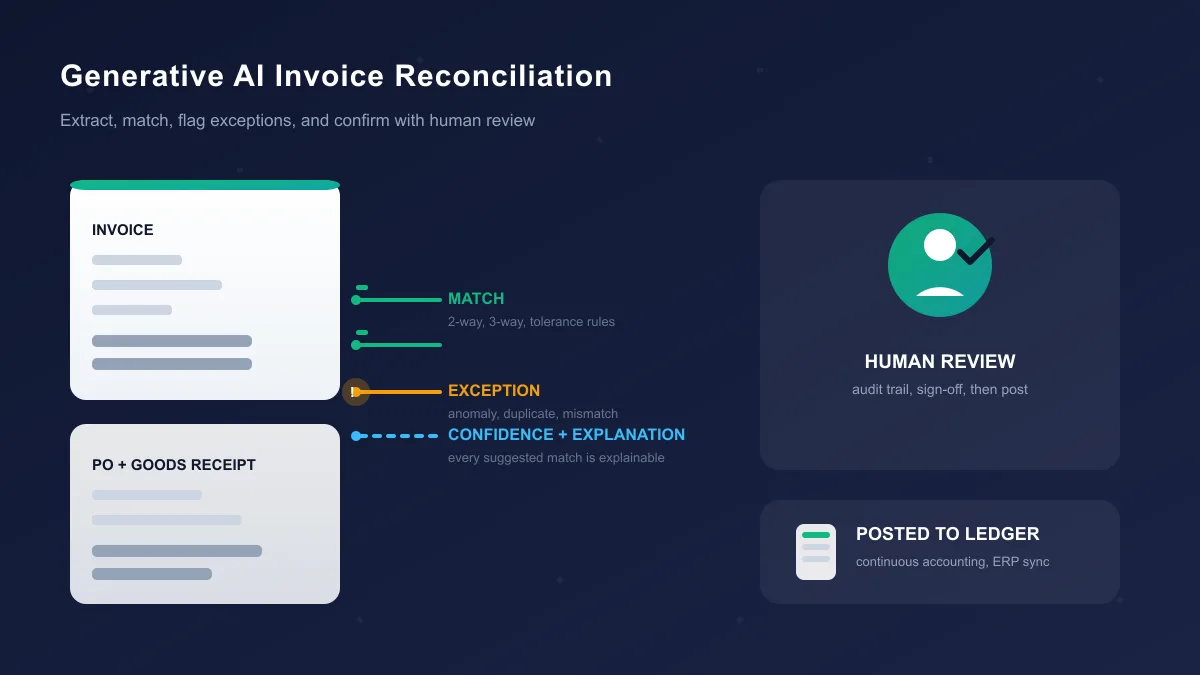

Invoice reconciliation is really several different workflows. Learn the difference, what generative AI can and cannot automate in each, and how to test a tool before you buy.
Search for "generative AI invoice reconciliation software" and you get vendors promising to shrink your accounts payable team. The phrase itself is the problem — it covers several different jobs, and most of those products are good at one of them. One tool reads a messy PDF cleanly, another checks thousands of invoices against purchase orders, a third matches payments to invoices at the bank, a fourth balances AP against your ERP at month end.
So before you look at any product, answer a question most demos will not ask: which reconciliation workflow do you have? This guide walks through the distinct workflows, what actually sits behind the "generative AI" label, what current tools document about themselves, and how to test any of them on your data.
A reconciliation compares two records that should agree and gets every difference found, explained, and cleared. "Invoice reconciliation" is that idea wherever invoices are involved. Seven versions show up in practice.
The invoice is checked against the purchase order that authorized it — vendor, currency, and total at the header; item, quantity, and price at line level. It catches "we never ordered that" and basic pricing errors, but it cannot tell you whether the goods arrived.
The standard control for PO-based purchasing. Invoice, PO, and goods receipt are compared so what you ordered, received, and were billed agree on quantity, price, and totals. HighRadius defines it that way: "2-way matching verifies the invoice against the PO. 3-way matching adds a third document: the goods receipt (GRN)." This is where duplicate-paying, over-billing, and quantity disputes live.
Suppliers send statements listing the invoices, credit notes, and payments they consider outstanding. Reconciling one means checking every line against your records: which invoices are still open, which payments the supplier missed, which credit notes you never received, which lines duplicate something already paid. Missing invoices and unapplied credits surface here.
Two versions exist. In AP you compare payments you issued against the invoices they were meant to clear, and flag any payment that settles the wrong invoice or none at all. In AR it is cash application: matching customer payments, often cryptic bank lines, back to the open invoices they pay. Same logical problem from opposite ends of the ledger.
Aggregate, split, and partial payments break naive matching. A customer pays $10,000 and one bank line clears five $2,000 invoices. A supplier credits three invoices with one credit note. A deduction makes a payment cover part of an invoice. One-to-one tools fail here; the useful ones handle one-to-many and split matches and put failures on screen.
Duplicate invoices, invoices against closed POs, line items far above contract price, duplicate payments, suspicious vendor changes — all exceptions. Some products treat these as a separate class, run detection on top of normal matching, and route anomalies to the fraud or audit team rather than the daily AP queue. It is the workflow where anomaly models and "agents" add the most over older rule systems.
The broadest version: reconciling subledger and bank data at month-end close, checking that everything posted balances, and documenting reconciling items for auditors. Invoices matter only indirectly — they feed the subledger, and the reconciliation compares that to the bank and general ledger. If your problem is "balance sheet reconciliations take three weeks," you need a different category than someone who wants invoice-to-PO matching.
The products below are grouped by these workflows for that reason.
Vendors use "AI" loosely. Separate the techniques, because they fail differently and audit differently.
OCR and intelligent document processing turn scanned invoices and statements into text and fields. This is reading, not reasoning, and it struggles with handwriting, rotated scans, and unusual layouts.
Deterministic rules are exact, auditable logic: "clear the invoice only if reference, amount, and due date all match." They never hallucinate; they just raise an exception for every minor variance.
Fuzzy matching accepts near-matches using string and numeric similarity — "Apple Inc." against "APPLE INC," or $1,249.99 against $1,250.00 within a tolerance. ReconArt, for instance, documents string-similarity fuzzy matching with user-configurable confidence thresholds and weighted match keys.
Machine learning learns patterns from your history: which GL code a repetitive vendor should get, which invoices usually match, which payment patterns look like fraud. HighRadius describes ML and GenAI both being used for capture and matching; Ramp describes agents that learn coding behavior from past invoices.
Embeddings place text and structure in a vector space so semantically similar records can be compared. They power much of intelligent matching and are still probabilistic.
Generative AI and large language models read unstructured content, pull fields out of messy layouts, summarize why a match failed, draft a reply to a supplier, classify invoices as PO or non-PO, and answer questions in plain language. Basware's InvoiceAI is explicit: it "leverages generative AI, AI agents, natural language processing and deep learning" across the invoice lifecycle. Microsoft's Financial Reconciliation agent uses generative AI to analyze matching results and write a summary with insights.
Agentic AI — and the looser marketing word "agents" — plans and runs several steps across tools: capture, code, match, route an exception, draft an email, post to the ERP. BlackLine describes Verity Prepare as a multi-agent system that gathers supporting documents, matches transactions, identifies reconciling items, and assembles audit-ready reconciliations. Tipalti documents AI agents for invoice capture, PO matching, invoice scanning, tax-form scanning, ERP sync, reporting, and bill approvals.
RPA robots click through interfaces. RPA articles keep getting "AI" retrofitted, but a robot that repeats clicks does not read or reason.
The pattern to remember: in almost no product is generative AI the matching engine. Matching stays on rules, fuzzy logic, and ML, because exact arithmetic should not run on a probabilistic model; the generative layer sits around the edges — extraction, explanations, summaries, natural-language questions. Ask the vendor which layer does what, and test each layer on your data. Our guide to AI agents for business covers how agents fit into operations more broadly.
A run follows the same rough sequence in every tool; only the screens differ:
None of this requires generative AI. It typically shows up at steps 2, 7, and 8: reading messy documents, explaining why a match failed, and drafting the summary a reviewer reads.
Everything below comes from each vendor's own materials, checked on September 22, 2026. Nothing is ranked or scored, and none of it replaces testing on your data.
HighRadius targets mid-market and enterprise AP. Its invoice matching software documents automatic two-way and three-way line-item matching against PO and goods-receipt data from your ERP, with variance checks on price, quantity, freight, and tax, configurable tolerance rules, and exception routing. It reports a 90 percent PO-invoice auto-match rate and 95 percent invoice capture accuracy — its own figures, not ones we verified. The company has described shifting to outcome-based pricing, so expect a custom quote.
Tipalti bundles invoice capture and GL coding, two- and three-way PO matching, approvals, payments, and reconciliation back into your ERP, and describes AI agents for invoice capture and PO matching plus an AI Assistant. Published pricing starts at CAD 139 per month for AP Automation with unlimited users, plus per-invoice and per-payment fees — that figure was on Tipalti's Canada pricing page when we checked.
Basware built InvoiceAI on its e-invoicing network and documents both generative AI and AI agents. The matching side includes SmartPDF, which converts PDFs into structured data; an AP Matching Agent that explains matching failures and suggests next actions; and Guardian for AP, which flags missing or invalid PO data. Statement matching is a separate product. Pricing is quote-based — public pricing was not verified.
Ramp (Bill Pay) targets growing companies and small business. It documents 99 percent OCR accuracy on invoice capture, two-way and three-way matching, fraud and over-billing checks, and AI agents that learn coding behavior from your history. A free plan covers OCR capture, basic approvals, and ACH, card, and check payments, with paid plans on top. That figure is vendor-reported marketing.
Vic.ai is an AI-first AP platform that processes invoices end-to-end with machine learning and confidence scores, routing high-confidence invoices toward payment and flagging the rest for review. See our Vic.ai review for pricing notes.
GEP (Quantum Intelligence) documents an agentic layer for invoice management: a Reconciliation Agent that aligns invoices to POs, contracts, and receipts, and an Anomaly Detection Agent for duplicates and mismatches, with multi-way matching and exception routing to buyers. Pricing is custom — public pricing was not verified.
Cointab frames reconciliation as "Side A versus Side B" and documents a matching engine built on rule-based, fuzzy, and subset-sum algorithms — subset-sum being how one payment clears several invoices. It claims SOC 2 Type II and ISO 27001 compliance on its site. It lists tiered monthly plans, but the figures differed between page versions we checked, so confirm the current price.
Procuros works the B2B food and grocery trade network. One product reconciles retailer payments to supplier invoices for suppliers, flagging underpayments and deductions; another does AI-assisted three-way matching of invoices, POs, and goods receipts for retailers. Pricing is behind a demo — public pricing was not verified.
FlowParse reads invoice PDFs, scans included, validates the fields against each other, and exports to Excel, CSV, JSON, and Xero. Its API includes a reconcile endpoint that matches invoices to bank payments. A free tier covers 10 pages a month, and the company states GDPR compliance.
InvoiceHive pairs invoice extraction with bank-statement parsing, including MT940 files: it extracts invoices and bank lines, flags anomalies such as duplicates and mismatches, scores matches with confidence, and keeps payables, receivables, and bank lines in one review workflow. You can start free; paid tiers sell through the product — public pricing was not independently verified.
BlackLine is the record-to-report platform. Its Verity Prepare agent automates reconciliation preparation — gathering supporting documents, matching transactions, and identifying reconciling items — and BlackLine says it keeps explainability and human control in place. Verity AI also includes generative summarization that BlackLine says runs on its own secure infrastructure, does not train generalized models on customer data, and trains custom ML models only with explicit permission. Pricing is custom — public pricing was not verified.
ReconArt covers bank, credit card, AP/AR, intercompany, and the month-end close. It documents fuzzy matching with configurable confidence thresholds and weighted match keys, plus an AI Assistant that builds matching rules from natural language and explains its own logic. Licensing is edition-based with no published list price — public pricing was not verified.
Microsoft ships a Financial Reconciliation agent inside Copilot for Finance. You upload two datasets, typically two Excel workbooks — an SAP balance on one side, bank or subledger on the other — and it suggests reconciliation vectors, splits the output into unmatched and potentially matched groups, explains in plain language why items remain unmatched, and writes a summary. It runs assistive or autonomous and logs a traceability ID for every step — a working example of generative AI running a reconciliation workflow end to end, worth studying even if you do not use Microsoft.
Two patterns hold across all of these. Every serious tool keeps a human review step with an audit trail — autonomy shrinks the queue, it does not remove it. A demo that goes vague about which layer does what is itself information.
Every product that auto-clears invoices works from a tolerance window and a confidence threshold. Tolerances say how far a value can drift — 0.5 percent on amount, one unit on quantity, seven days on date. Confidence says how sure the system is that two records describe the same economic event.
The failure modes sit in the gap between the two. A wide tolerance quietly waves through small over-billing: 1 percent on a large invoice book adds up while each invoice looks fine. A strict tolerance buries the team in false flags. And a confidence score only means what your own population says it means — a vendor's 98 percent on its benchmark data says almost nothing about your invoice mix.
This is why explaining a match is not a nice-to-have; it is the audit interface. Microsoft's agent explains an unmatched item by showing related transactions. Basware's AP Matching Agent explains matching failures and links them to your rules. ReconArt shows the logic it applied to a rule you wrote. BlackLine frames Verity as "transparent reasoning plus human oversight." During an evaluation, generate an anomaly and ask the vendor to walk you through the tool's explanation. If the answer is a score and nothing else, your auditor will ask the same thing.
If your team still reconciles in spreadsheets, our AI for Google Sheets guide is a practical way to prototype matching logic before committing to a platform.
Each technique has its own failure mode, and none of them are exotic.
Extraction fails on handwriting, rotated scans, and layouts the model has not seen; a silently misread amount is worse than a missing one. Rules fail on anything outside what they were written for, which is why variances still reach a human. Fuzzy matching mistakes similar-but-different references — two vendors with near-identical names, invoice numbers one digit apart. ML and embeddings can be confidently wrong, and their mistakes look like the model is working. Generative AI can explain a match fluently while being wrong about the reasoning, which is why its explanation serves a reviewer rather than replacing one.
Data quality dominates all of it. Duplicate vendor masters, stale POs, and messy bank feeds make any matcher worse. Which failures you actually get depends on source data, model quality, matching method, validation, permissions, workflow design, and the human review sitting behind it.
A short warning: this is a recommended evaluation methodology, not a report of tests we ran. We have not evaluated the products above and cannot vouch for them on your data. Run the comparison yourself.
The shape is simple: build a golden file on your own data, let the tool chew through it, and compare every decision against human-known truth.
Step 1. Pick one workflow and one legal entity. Testing three at once teaches you nothing.
Step 2. Export three to six months of real data: invoices, POs and goods receipts (if relevant), bank or payment statements, and exception reports. Your quirks are the point.
Step 3. Build the golden file by hand: someone marks every line "match," "exception," or "needs review." On 500 to 1,000 records this takes a few hours — the most valuable in the evaluation.
Step 4. Seed known edge cases deliberately; the composition below is a design target, not a measurement.
| Category | Share of test set | What it is |
|---|---|---|
| Clean one-to-one matches | ~70% | Identical references, clear amounts, easy |
| Near-matches | ~10% | Whitespace, case, and abbreviation differences (Acme vs ACME Inc.) |
| Genuine exceptions | ~6% | Wrong amount, wrong date, duplicate line, closed vendor, exceeded PO |
| One-to-many | ~5% | One payment or credit note clears several invoices |
| Many-to-one | ~4% | Several payments settle a single invoice |
| Fraud-relevant | ~3% | Same reference, different amount; duplicated invoice number, changed bank details |
| Unstructured | ~2% | Missing references that legitimately require human review |
Step 5. Fix your three metrics before the tool runs: exact-match rate (true matches auto-cleared), false-flag rate (clean records wrongly flagged), and missed-exception rate (true exceptions auto-cleared — the dangerous number).
Step 6. Run the tool on the same data and export every decision, including the ones it auto-processed. Count your three metrics yourself; do not take the vendor's dashboard averages.
Step 7. Check explanations. For fifty matches the tool got right and the exceptions it flagged, ask it to show the reasoning, then compare with what your team wrote by hand.
Step 8. Leave it read-only for two weeks while your team keeps doing the real work, and compare decisions daily. Operating problems surface here: noisy exports, slow routing, approval chains that fight your process.
Step 9. Only then switch on auto-posting for that one audited workflow and keep everything else manual.
Step 10. Test the exit. Export everything the system holds, documents and audit log included, and confirm nothing is trapped in a format your ERP cannot import.
Step 11. Ask the vendor to walk one anomaly end-to-end before you sign: from bank line to flagged exception to reviewed disposition in the audit trail. If that demo does not happen live, that is your answer.
If a tool cannot survive steps 6 to 11 on your data, its demo metrics do not matter. A two-week, single-workflow test is also how you avoid the classic rollout mistake — a "better" tool just speeding up a broken process. Our roundup of the best AI automation tools covers that pattern.
Duplicate invoices and duplicate payments are the classic AP error and fraud pattern — the strongest case for anomaly detection on top of ordinary matching. The signals are familiar: an invoice number already in the system with a different amount, a vendor record edited right before payout, a payment against a closed PO, an amount far outside a vendor's normal range, bank details changed weeks before a large payment. Ramp documents duplicate-invoice monitoring and over-billing checks in its Bill Pay fraud suite. GEP documents an Anomaly Detection Agent for duplicates and mismatches. HighRadius markets real-time anomaly detection across its financial close products. Tipalti includes fraud detection in its platform controls.
The generative layer helps, but only honestly. An LLM can write a coherent paragraph about why a flagged anomaly looks suspicious — useful for routing it to the right person. It cannot certify fraud. An explanation is a decision aid, not evidence; keep the fraud call with a human investigator and treat the write-up as a first draft of the case file. Our AI agent security guide is worth reading before you give any tool posting rights.
You will upload invoices containing bank details, tax IDs, and sometimes contracts. Get precise answers in writing to these:
All certification language above is vendor-reported. Verify the certificate and its scope with the vendor or the certifying body.
The realistic cost is a subscription plus variable fees, and the variable part hides the budget surprises.
Tipalti's published example is instructive: CAD 139 per month for AP Automation with unlimited users, plus per-invoice and per-payment fees. A company processing 5,000 invoices a month pays a very different total than one processing 50,000. HighRadius has announced outcome-based pricing with custom KPIs. Basware, GEP, BlackLine, and ReconArt quote per-organization; public pricing was not verified for any of them. Cointab lists monthly tiers, but the figures changed between page versions we checked, so confirm the current number. Ramp publishes a free Bill Pay tier; FlowParse offers 10 free pages a month; InvoiceHive offers a free start.
Implementation is a real line item: cleaning vendor master data, wiring bank feeds, mapping GL codes, and defining the tolerance rules that turn the tool on. Vendors quote "time to value" in weeks; single-entity workflows land around that, while multi-entity rollouts take quarters.
Vendors publish impressive outcomes — BlackLine reports early adopters cutting up to 92 percent of manual reconciliation preparation time, Basware cites over 200 hours a year saved on manual non-PO invoice processing, HighRadius reports a 90 percent PO-invoice auto-match rate, and Ramp reports 99 percent OCR accuracy. Treat them as vendor-reported marketing from their customer base, not predictions for your environment. The honest ROI math: count the hours you spend on that workflow today, apply the reduction the tool achieves on your golden file, and compare against subscription plus implementation. If you do not know the before number, buy nothing yet. For small businesses weighing these platforms against simpler options, our AI tools for small business guide has a wider frame for the decision.
Small teams can prototype the whole idea cheaply: a spreadsheet-plus-AI setup (our AI for Google Sheets guide), a bookkeeping matcher like Booke AI inside QuickBooks or Xero, or a lightweight AP platform. The jump from "bookkeeping help" to "enterprise reconciliation platform" costs thousands, so test before you climb.
What is generative AI invoice reconciliation software?
Software that uses AI to compare invoices against other records — purchase orders, goods receipts, bank or payment statements, or general ledger entries — and to prepare that comparison for human review. Most products combine several techniques: OCR to read documents, rules and fuzzy matching or machine learning to find matches, and generative AI models to extract messy data, flag exceptions, and explain why a match did or did not happen.
Is invoice reconciliation one workflow or several?
It is several. Common ones include two-way matching (invoice against purchase order), three-way matching (invoice, PO, and goods receipt), invoice-to-payment reconciliation, vendor statement reconciliation, matching one payment that clears many invoices, exception and anomaly detection, and broader transaction or account reconciliation at month-end close. Different tools target different workflows, so the first buying decision is which one you actually have.
How is generative AI different from OCR and rule-based matching?
OCR turns a scanned document into text. Rule-based matching applies fixed logic such as "reference number equals amount equals date." Generative AI models can read poorly structured data, summarize context, explain exceptions in plain language, and answer questions, but they are probabilistic. In practice vendors combine all of these: deterministic rules for what must be exact, fuzzy matching and machine learning for what is close, and generative AI for extraction, explanation, and exception handling.
What is a three-way match?
A three-way match compares three documents before payment: the supplier invoice, the purchase order, and the goods receipt note. The system checks that what you ordered, received, and were invoiced for agree on quantity, price, and totals. It is the standard control for PO-based purchasing and it is where most automated invoice matching claims are focused.
Can generative AI match invoices without human review?
For clean, high-confidence cases, yes — vendors will auto-match invoices that fall inside tolerance rules. For anything else, no. Finance teams still review exceptions and low-confidence matches, and audit standards generally require evidence of that review. The useful question is not whether AI replaces review but how small the review queue becomes and whether the tool can explain what it did for each line that reaches a person.
How should we test these tools before we buy?
Run a controlled test on your own data: pull a few months of real invoices and statements, build a golden file where a human has decided each line is a match, an exception, or needs review, and seed known edge cases like duplicates, partial payments, and one-to-many payments. Compare the tool's decisions against that file, count false flags and missed exceptions, and check that every suggested match has an explanation you can follow. A two-week parallel run on one workflow is enough to learn whether a tool fits.
The rule that decides whether generative AI invoice reconciliation software is worth buying has not changed: match the tool to the workflow, verify it on your own data, and keep a human attached to every line that matters. The vendors change, the models change; the workflow taxonomy does not.
Get our best AI tool reviews and guides delivered to your inbox each week. No spam, unsubscribe anytime.

Written by
Editorial Team
The AI Tools Vault editorial team researches, tests, and reviews the best AI tools across every category.
More reading on guides & how-to
 Guides & How-To
We break down Higgsfield AI's features, pricing, free access and best alternatives, so you can decide if the subscription is worth it for your videos.
 Jawad Fiaz
 Guides & How-To
The free AI background removal tools still worth using after remove.bg closes in December 2026 — Photoroom, Adobe Firefly, Canva, Clipdrop and rembg, with free-tier limits checked in October 2026.
Jawad Fiaz Guides & How-To
Six free AI photo enhancers, six different deals. What each free tier really allows, what AI cannot recover, and how to check a result before trusting it.
Jawad Fiaz