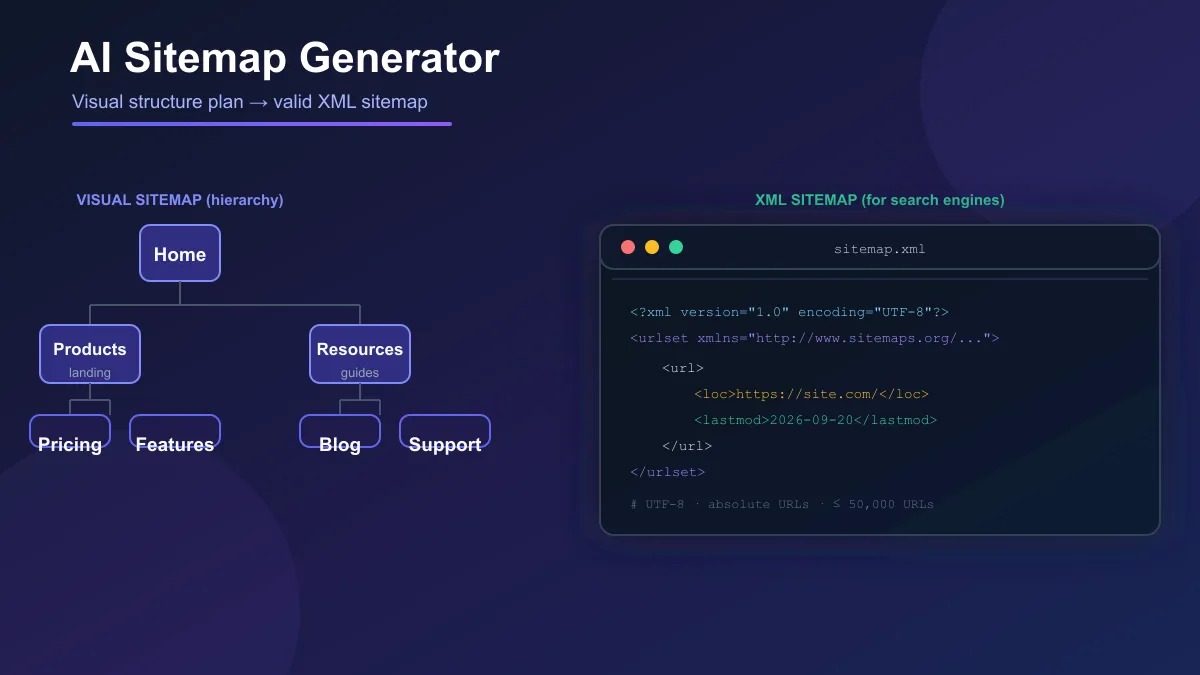
Search "AI sitemap generator" and you mostly get tool lists. Few explain the detail that decides whether a tool suits you: an AI sitemap generator can be building two completely different things.
One kind plans your site for humans — a visual diagram of pages you review with your team. Another produces a technical XML file for search engines. People often assume the second comes out of the first, or that a sitemap "fixes" SEO. Neither holds. Here is what each type does, how Google treats a sitemap, and how to check the XML before submitting it.
What Is an AI Sitemap Generator?
An AI sitemap generator takes an input — a sentence describing your business, existing page content, or a list of URLs — and returns a proposed website structure. The output can be:
- a visual sitemap: an editable diagram of pages in a hierarchy
- a page list: a flat inventory of suggested pages
- navigation groups: pages organized into menus and sections
- content structure: suggested sections and blocks per page
- an XML sitemap: a file of URLs formatted for search engines
- internal linking suggestions: which pages should link to which
Two things to check before you buy: not every AI sitemap generator outputs a valid XML sitemap (many stop at the visual plan), and not every XML sitemap generator uses AI — simple crawlers just mirror your site into a compliant file. Both do a different job.
Visual Sitemap vs. XML Sitemap vs. HTML Sitemap
The word "sitemap" covers several formats:
| Format |
Purpose |
Audience |
Typical output |
| Visual sitemap |
Plan page hierarchy and navigation |
People: designers, clients, stakeholders |
A diagram you can edit and share |
| XML sitemap |
Tell search engines which URLs to consider |
Search engine crawlers |
A machine-readable .xml file |
| HTML sitemap |
Help visitors find pages |
Site visitors |
A page that links to important pages |
| Website architecture |
Decide how pages and content relate |
The whole planning process |
Documents: site maps, navigation plans |
| AI-generated structure |
Hypothesize pages and hierarchy from a description |
Drafting phase |
A proposed sitemap you still review |
The key distinction: an AI-generated visual sitemap is not automatically a valid XML sitemap.
A tree diagram helps your team agree on structure before building. An XML sitemap is a technical deliverable that follows the sitemaps protocol and lists URLs you are willing to have discovered. Many projects need both, but they are separate steps.
What AI Can and Cannot Do With Site Structure
AI helps most when the work is idea generation and organization:
- brainstorming page ideas from a business description
- producing a first inventory of pages
- grouping related pages into sections
- suggesting parent/child relationships
- proposing an initial content plan for each page
- organizing large sets of pages for migration or redesign
None of it needs your actual priorities, which is why it is fast — and why review matters. AI cannot decide which pages must exist to convert, which legal pages you need, or which URLs stay out of search. Let AI handle brainstorming, grouping, and organization at scale; keep humans responsible for business priorities, the final hierarchy, canonicals, indexability, and XML validation.
How to Review an AI-Generated Sitemap Before Using It
Work through this checklist before you build a single page:
1. Delete pages with no purpose. If you cannot name the audience and the job a page does, remove it.
2. Merge duplicate topics. Two pages covering the same intent will compete in search.
3. Cut thin pages. A page that will never justify its own content — a sentence under an AI-generated heading — should be deleted, and its topic given to a parent page.
4. Fix wrong parent/child relationships. Each page should sit under the section a visitor would expect. "Pricing" under "Blog" is a structural error.
5. Break up overly broad categories. A section that would hold forty unrelated pages needs sub-divisions; a two-page category with no clear theme may need merging.
6. Add missing commercial pages. AI often omits pricing, plans, request-a-demo, or contact-conversion pages — for a commerce or service site, these are the whole point.
7. Add support and compliance pages. Terms, privacy policy, help or FAQ pages may be legally required, and AI drafts rarely include them all.
8. Collapse duplicated product or service pages. One service sold two ways should not get separate pages.
9. Mark pages that should stay out of search. Thank-you pages, admin areas, archived content, or staging pages should never appear in an XML sitemap — some should carry a noindex directive.
10. Walk the navigation as a visitor. Easy access to important pages helps users and crawlers, but there is no universal Google rule requiring every page to be within three clicks. Treat depth as a practical judgment.
11. Question every URL the AI wants in the XML sitemap. Include only URLs you want considered for search.
A Practical Workflow for AI-Assisted Site Planning
A reliable order of operations keeps the AI useful and the human in charge:
- Write the business description. Two or three sentences: what the site sells, for whom, and the main actions visitors should take.
- Generate a proposed page inventory. Let the AI suggest pages and sections from that description.
- Review and cut. Apply the checklist above.
- Define parent/child relationships. Decide the hierarchy yourself.
- Map the navigation. Turn the hierarchy into menus a visitor can follow.
- Generate the XML sitemap only when the structure is stable, using URLs you control.
- Check canonical URLs. Each entry should be the absolute, canonical version.
- Validate, publish, submit. Verify the file, add it in Google Search Console, and watch for errors.
How to Build and Validate an XML Sitemap
Google supports the formats defined by the sitemaps protocol; XML is the most common. Per Google's Search Central documentation:
- Use fully qualified, absolute URLs (for example,
https://www.example.com/, not /mypage.html).
- Use UTF-8 encoding.
- Follow XML format rules, including entity escaping for special characters.
- Keep a single sitemap to 50,000 URLs and 50 MB; use a sitemap index file for larger sites.
- Include the canonical URLs you want Google to consider — one URL per piece of content.
Here is a minimal valid example:
<?xml version="1.0" encoding="UTF-8"?>
<urlset xmlns="http://www.sitemaps.org/schemas/sitemap/0.9">
  <url>
    <loc>https://www.example.com/</loc>
    <lastmod>2026-09-20</lastmod>
  </url>
  <url>
    <loc>https://www.example.com/pricing</loc>
    <lastmod>2026-09-20</lastmod>
  </url>
</urlset>
Two statements from Google's documentation set expectations:
Submitting a sitemap is merely a hint; Google may not download it or use it for crawling.
A sitemap does not guarantee indexing or ranking. It helps with discovery, especially for new or large sites, but the pages still need to be worth indexing.
A sitemap also affects only files in its own directory tree unless submitted through Search Console — put it at the root or submit it directly.
What About lastmod, Priority, and Changefreq?
Most generators add <lastmod>, <priority>, and <changefreq> because older guides told them to. Google's current guidance:
- Google ignores
<priority> and <changefreq> entirely.
- Google uses
<lastmod> only when the value is consistently and verifiably accurate — for instance, when it matches the page's actual modification time.
Practical consequences:
- Do not let a generator set
priority="1.0" or changefreq="daily" as an SEO trick — the values are ignored.
- Do not invent
<lastmod> dates to make a site look fresh. A date that never matches the real page is worse than none.
- Do populate
<lastmod> accurately when your CMS handles it reliably, so Google can recrawl changed URLs sooner.
Sitemap Errors Worth Checking For
Run this quality check before you submit a generated sitemap:
- HTTP status: every URL returns
200, not 404 or 5xx.
- Canonical URLs: each entry is the exact, preferred version of the page.
- Hostname: entries match your canonical domain.
- No accidental redirects: a URL should not appear in the sitemap only to redirect elsewhere.
- No duplicates: the same URL appears once.
- No irrelevant URLs: query-parameter junk, tag or filter URLs, and staging pages stay out.
- Indexability: pages meant to rank must not carry a
noindex directive or be blocked in robots.txt.
- Correct syntax: the file parses as valid UTF-8 XML with properly escaped values.
- Size limits: under 50,000 URLs and 50 MB per file.
Most validity issues are ordinary hygiene, not a penalty problem: an erroring URL in a sitemap does not "penalize" your site; it just wastes the hint and the crawl.
A Practical Example: Reviewing This Site's Sitemap
Here is the check I ran on this website's own sitemap while writing this guide (25 September 2026).
Before: the generator produced the file from the site structure, the build discovered the URLs, and I reviewed the crawl output.
After (review):
- The file listed 467 URLs, all absolute, all on the canonical
https://www.aitoolsvault.site/ domain, with no duplicate <loc> entries.
- I sampled the homepage, this article, and two pages it links to; each returned HTTP 200.
- Nothing needed removing, because the build only emits public, intended-for-search pages — but I still checked for query-string URLs, redirects, and noindexed pages.
That is the minimum pass before submitting any generated sitemap: count the URLs, verify canonical form, check for duplicates, and spot-check status codes.
These are the products in current discussions, grouped by what they actually do. Pricing was checked against official pages on 25 September 2026.
AI visual sitemap planning
Octopus.do — Generates a visual sitemap from a short text description, with page hierarchies, content blocks, and SEO meta tags; you can also crawl an existing URL into an editable diagram. Sitemap.xml export is on all plans; PNG, PDF, TXT, CSV, and XML exports arrive on Pro. Pricing per its pricing page: Free ($0, one project), Pro at $16/month or $14/month billed yearly, Team at $24 per user/month or $20 billed yearly.
Slickplan — A planning suite built around a visual sitemap builder, with an AI assistant that proposes structure and labels. Pricing per its pricing page: 14-day free trial, plans from $10.79/month billed annually (Basic), with Pro, Team, and Agency tiers above it.
Visual sitemaps from crawling existing sites
VisualSitemaps — Crawls a live site — including password-protected pages — into a visual sitemap with screenshots. A fit for redesigns and competitor research, not for planning from scratch. Pricing per its pricing page: Free with 25 page crawls per month, paid from $29/month or $22/month billed yearly.
XML sitemap generation
XML-Sitemaps.com — Free, no-registration crawling of a URL into XML, HTML, and text sitemaps up to 500 pages. A separate PRO-Sitemaps service from around $2.44/month adds automatic updates and reports for larger sites. No AI in the core product.
Crawling, sitemaps, and monitoring
sitemapgenerator.ai — A cloud crawler that maps your site, generates a monitorable XML sitemap, and integrates with Search Console. Pricing per its pricing page: Free for one website up to 2,000 URLs; Pro at $8.25/month billed annually ($99/year) for up to five sites, scheduled refreshes, and fuller reports.
Technical SEO crawlers (audit-first, sitemap-second)
Screaming Frog — A desktop crawler that audits 300+ technical SEO issues and can generate XML and image sitemaps with fine control over which URLs to include. The free version crawls up to 500 URLs per run; a one-year licence costs around €245.
Sitebulb — A desktop crawler built around prioritized SEO audits rather than sitemap authoring. Verified from its pricing page: 14-day free trial; Lite caps audits at 10,000 URLs, Pro at 500,000; a cloud option starts from £95/month. Desktop pricing beyond the trial and URL caps was not independently verified.
| Tool |
Type |
Free limit |
Paid from |
Main limitation |
| Octopus.do |
AI visual planning + crawl |
Free (1 project) |
$14/month billed yearly |
Planning focus; not a broad technical audit |
| Slickplan |
Visual planning suite |
14-day trial |
$10.79/month billed annually |
Built for planning, not live-site crawling |
| VisualSitemaps |
Screenshot crawler to visual map |
25 page crawls/month |
$22/month billed yearly |
Not primarily a raw XML generator |
| XML-Sitemaps.com |
Simple XML/HTML generator |
Free up to 500 URLs |
~$2.44/month (PRO) |
No advanced crawl-health reporting |
| sitemapgenerator.ai |
Cloud crawler + XML + monitoring |
1 site, 2,000 URLs |
$8.25/month billed annually |
Free plan caps sites and URLs |
| Screaming Frog |
Desktop technical crawler |
500 URLs per crawl |
~€245/year licence |
Desktop app, not cloud-hosted |
| Sitebulb |
Desktop SEO auditor |
14-day trial |
Cloud from £95/month |
Audit-first; not a sitemap factory |
Which one fits your situation?
- New site, nothing built yet: use an AI visual planning tool — Octopus.do or Slickplan — and review the structure hard before building.
- Existing site, missing XML sitemap: use a crawling generator — XML-Sitemaps.com or sitemapgenerator.ai.
- Redesign or migration: crawl the current site with VisualSitemaps or Octopus.do to see what exists, then rebuild the hierarchy.
- Full technical SEO audit: use a desktop crawler such as Screaming Frog or Sitebulb — and export the sitemap from the crawl data.
- Large documentation or content-heavy site: use a sitemap index with a crawler that reports errors on every URL, like sitemapgenerator.ai or PRO-Sitemaps.
For the broader AI content and SEO toolkit, our guide to AI SEO content tools covers the neighboring territory. If you want the AI to build the whole site — not just plan it — see our roundup of AI website builders.
Frequently Asked Questions
What is an AI sitemap generator?
An AI sitemap generator is a tool that uses a description, existing content, or URLs as input and suggests a website structure. Depending on the product, the output can be a visual hierarchy, a page list, navigation groups, content blocks, or a technical XML sitemap.
Is an AI-generated sitemap the same as an XML sitemap?
Not necessarily. Many AI tools produce a visual sitemap or a planned page structure for humans to review. An XML sitemap is a separate technical file that lists URLs for search engines. Some tools offer both, but a visual sitemap on its own is not an XML sitemap.
Does a sitemap guarantee better Google rankings?
No. Google's documentation describes submitting a sitemap as merely a hint. It can help search engines discover URLs, but it does not guarantee crawling, indexing, or ranking. Google also ignores the priority and changefreq values inside the file.
Can AI create a valid XML sitemap?
Yes, but only tools that generate or export a properly formatted XML file do this. You still need to validate the file, include only canonical URLs you want considered for search, and check it against the sitemaps protocol.
What should I include in an AI-generated sitemap?
Include the fully qualified, absolute, canonical URLs of pages you want search engines to consider. Leave out duplicate URLs, query-parameter spam, redirecting or erroring pages, and pages you intend to keep out of search results.
How many URLs can a sitemap contain?
A single sitemap file can hold up to 50,000 URLs and must stay under 50 MB uncompressed. For larger sites, split the URLs across multiple sitemaps and list them in a sitemap index file.
The Bottom Line
An AI sitemap generator saves you the dull part of planning — the first inventory, the grouping, the initial hierarchy. The valuable part stays yours: deciding which pages deserve to exist, how they connect, and which URLs you want considered for search.
Generate the XML only after the structure is decided, and validate before you submit. Done that way, an AI sitemap generator is a genuinely useful drafting tool. Done the other way — trusting the output and skipping the review — it is just another way to build a site no one wanted.