
Explainpaper Review
Research & EducationFreemiumAI tool that explains complex research papers in plain language — highlight any passage and get an instant, simple explanation.
What Is Explainpaper?
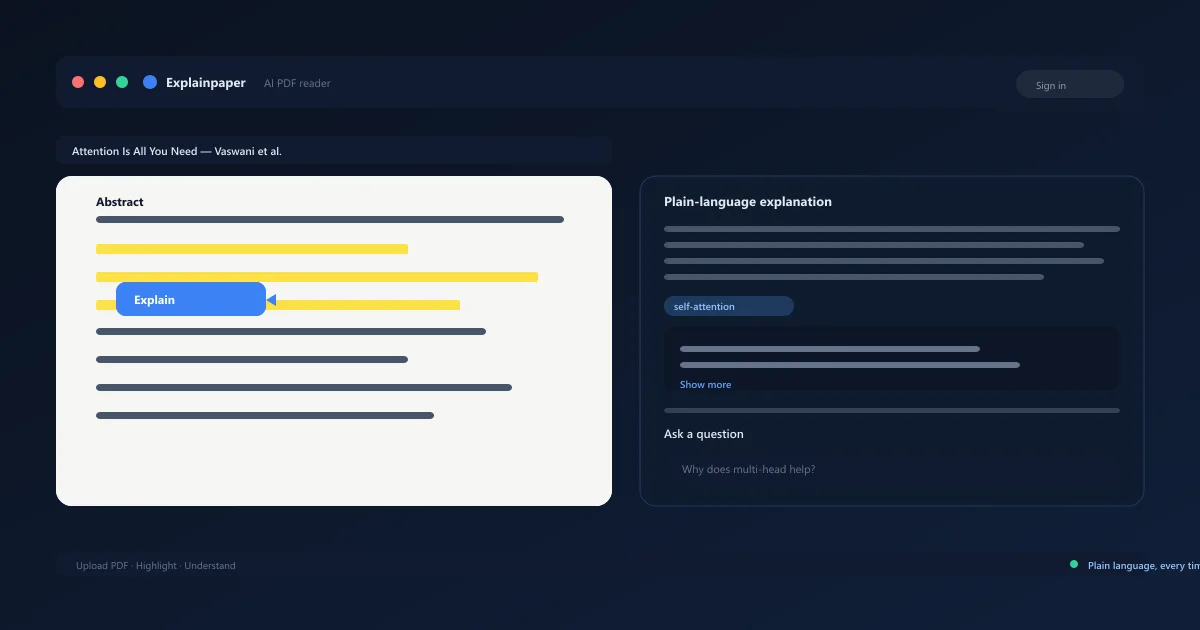
Explainpaper is an AI-powered reading tool that turns unreadable research papers into understandable text. After you upload a paper, it renders the document in a clean reader view. When you highlight any sentence or paragraph, it explains that exact passage in simple language — and you can keep drilling into follow-up questions about the same section.
It works by pairing your highlighted text with the paper's context and sending it to a large language model, so explanations stay grounded in the actual document rather than being generic.
Built for students, researchers, and self-taught engineers, the app is especially popular with people reading machine learning papers like "Attention Is All You Need" for the first time. It fills the gap between finding a paper and actually understanding it.
It launched in 2021 and has grown a community library of popular papers alongside the ability to upload your own PDFs.
Researchers often pair it with the tools that come before and after reading: an engine to find papers, a synthesis tool to summarize evidence across studies, and this app to actually power through the full text. Each fills a distinct step in the workflow, and none of them duplicates what the others do.
It is free to start, so there is no barrier to testing it on your next paper.
Explainpaper AI PDF Reader
The reader is a clean, distraction-free way to open research papers. PDFs render like a real document, with smooth scrolling and inline annotations, so reading feels familiar rather than like using a chatbot.
Any paper you upload stays in your library, and the community library ships with popular machine learning and AI papers pre-loaded. It is the front door to every other feature in the app.
Annotations stay attached to the text, so your notes and explanations travel with the document rather than living in a separate app. That makes it easy to revisit a paper months later and pick up exactly where you left off, without re-reading from the top.
- Clean document-style PDF reader
- Upload and organize your own papers
- Community library of popular ML papers
- Inline highlights and annotations
Explainpaper Highlight to Explain
Highlight-to-explain is Explainpaper's signature feature. Select any passage — a dense equation, a jargon-heavy paragraph, or a confusing proof — and the app returns a plain-language explanation of that exact text in seconds.
Explanations define unfamiliar terms and acronyms in context, so you learn the vocabulary as you go. Because each explanation is grounded in the highlighted passage, it stays relevant to what you're actually reading.
The feature shines on papers with heavy notation, where a single line can hide a page of intuition. Repeated highlighting across a document builds a working glossary of the paper's core concepts over time.
The model behind it responds quickly enough that explanations appear as you work, keeping the reading flow uninterrupted.
- Select any passage for an instant explanation
- Jargon and acronyms defined in context
- Explanations tied to the exact highlighted text
- Drill deeper with follow-up questions
Explainpaper Summary Generator
The summary generator distills a paper into its key ideas. Instead of reading the whole text, you can get an overview of what the paper does, its main findings, and why it matters — a great way to triage a reading list.
Summaries keep the citations and section references intact, so you can jump to the part of the paper behind any claim. That keeps it useful as a starting point rather than a replacement for reading.
Summaries scale with the reader's needs: short overviews for triage, more detailed breakdowns when you need the reasoning behind the conclusions. You can adjust the depth to match how much you already know about the topic.
Over a long semester, these overviews double as a searchable outline of everything you have read.
- Key ideas and findings at a glance
- Section-level references to verify claims
- Triage long reading lists fast
- Plain-language overviews
Explainpaper Ask Questions to PDF
Ask-questions-to-PDF turns reading into a conversation. Once a paper is open, you can ask questions about the full text and get answers drawn from the document, with the relevant passages highlighted as you go.
This is where the tool goes beyond simple summaries: you can interrogate methods, assumptions, and results, and the answers point back to the source text. It works on your own uploaded PDFs as well as library papers.
Because answers cite passages, follow-up questions build on each other without losing context. In practice, it turns a static PDF into a document you can interrogate until the ideas actually click.
- Chat with the full paper content
- Answers grounded in the document
- Highlighted source passages
- Works on uploaded and library PDFs
Explainpaper Pricing — Free vs Premium Plans
The free tier is genuinely useful: upload papers, highlight text, and get a limited number of AI explanations each day. It's enough to decide whether the workflow fits how you read.
Premium removes the daily limits with unlimited explanations and follow-up questions, plus faster responses and priority support. Pro is roughly $8/month billed annually, with no per-paper caps.
There are no per-paper costs on either tier, and uploading papers is always free. The paid plan exists purely to lift the explanation ceiling for heavy readers.
Compare Plans & Pricing
Free tier to try; Pro from ~$96/yr ($8/mo billed annually)
Free
Try highlighting and explanations on uploaded papers.
- Upload & read PDF papers
- Highlight for AI explanations
- Limited daily explanations
- Community paper library
Pro
Unlimited explanations for serious paper reading.
- Unlimited highlights & explanations
- Full-text follow-up questions
- Faster AI responses
- Priority support
Explainpaper vs SciSpace
SciSpace is a broader academic platform: it combines a paper search index, AI explanations, citation management, and tools for writing and publishing. It covers more of the research lifecycle in one place.
The app is more focused — a distilled reading experience built around highlight-to-explain and chat with a single paper. If you want a full research workspace with search and citation features, SciSpace bundles more; if your bottleneck is simply understanding dense PDFs, this tool does that one thing exceptionally well.
The practical test is straightforward: open the same dense paper in both and compare how quickly you understand the methods section. Most readers find the focused experience here easier to learn from for day-to-day reading.
Explainpaper vs Humata AI
Humata AI is a document-chat platform aimed at professional users — lawyers, analysts, and consultants — who want to query lengthy contracts, reports, and PDFs with citations back to the source.
The app is optimized for academic reading, with a reading view and highlight-to-explain workflow that suits students and researchers. Humata leans toward general document analysis at scale; this tool leans toward genuinely learning what a paper says.
Teams dealing with mixed document types may find Humata's broader file support more convenient. Students and researchers reading a steady diet of academic PDFs will likely prefer the purpose-built reading flow here.
Pros and Cons
Before committing, consider where Explainpaper delivers and where it asks you to compromise.
Weight the trade-offs by how much reading you do — heavy paper readers will quickly justify the premium tier, while casual readers can stay free.
Try the free tier on a paper you've already read: if the explanations match your own understanding, the tool will be a reliable study companion. If not, a deeper research platform may suit you better.
Pros
- Highlight any text for plain-language explanations
- Upload and annotate your own PDFs
- Defines jargon and complex terms
- Saves hours reading dense papers
- Ideal for students new to research
Cons
- Explanations can oversimplify
- Limited depth on advanced math
- Smaller library of preloaded papers
- No dedicated mobile app
Best For
Recommended use cases and scenarios where Explainpaper shines.
Frequently Asked Questions
Common questions about Explainpaper, answered.
What is Explainpaper?
It's an AI reading tool that explains research papers in plain language. Upload a PDF, highlight any passage, and get an instant explanation with definitions of complex terms.
Is Explainpaper free?
Yes, with limits. The free tier lets you upload papers and get a limited number of AI explanations each day. Premium removes the limits for roughly $8/month billed annually.
Does Explainpaper summarize papers?
Yes. The summary generator distills a paper's key ideas and findings into a plain-language overview, with section references so you can verify claims against the full text.
Can I chat with my PDF?
Yes. You can ask questions about the full document and get answers drawn from the paper, with the relevant passages highlighted so you can check the source.
Is Explainpaper good for research?
It's excellent for reading and understanding individual papers, especially dense machine learning literature. It complements research search and synthesis tools rather than replacing them.
Reviews & Ratings
Loading reviews...
Explore More AI Research Tools
Browse the full AI Tools Vault directory to compare Explainpaper with every AI research and education tool, or line up your shortlist side by side.
Similar Tools
More Research & Education tools you might like

Socratic by Google
Google's AI homework helper app that uses your camera to read problems and explains answers across math, science, history, and more — 100% free.

Caktus AI
AI study platform for students with 25+ purpose-built tools - essay writer with citations, step-by-step math solver, humanizer, and research assistant.

Guides & Articles about Explainpaper
Read our detailed reviews and comparisons covering Explainpaper
 Guides & How-To
Best AI Tools for Students and Researchers in 2026
Six practical AI tools for students and researchers in 2026 — literature review, paper reading, study help, and writing polish, with verified pricing and honest first-hand notes.
 Jawad Fiaz
 Guides & How-To
AI Tools for Students: Which Tool Works for Which Task
Ten AI tools for students matched to real study tasks — research, notes, writing and math — with free tiers, limits and honest drawbacks.
Jawad Fiaz