
Figma AI Generator – AI-Powered Design Creation
Design & 3DFreemiumFigma AI generator turns text prompts into editable UI designs, wireframes, and prototypes inside Figma — plus AI search, smart editing, and design-to-code tools.
What Is a Figma AI Generator?
A Figma AI generator is the set of generative AI features embedded directly in Figma that let you create UI designs, wireframes, and prototypes from plain-text descriptions. Instead of drawing every frame manually, you describe what you want and get editable, native Figma objects on the canvas.
The AI runs on a shared credit system — every Figma seat receives monthly credits, and each generation or smart edit consumes a small number. That keeps it fast while remaining predictable to budget. The result is a design workflow where the gap between idea and editable prototype is measured in minutes rather than hours.
Figma AI Generator Features
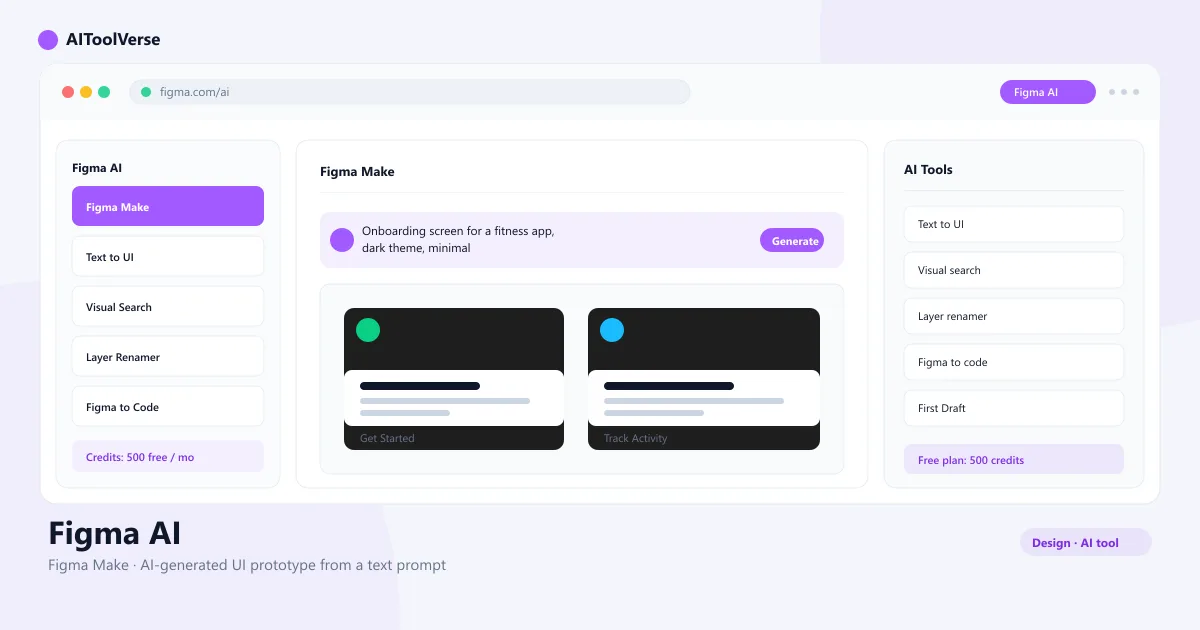
The core generation feature is Figma Make: you type what you want — “an onboarding screen for a fitness app” — and it produces a full, editable UI with layouts, frames, and components you can refine like any other Figma design. Because the output is native Figma objects rather than images, you can restyle it, add interactions, and build a working prototype on the spot.
Beyond generation, the platform offers visual search across your workspace, AI-powered layer renaming, text rewriting and translation, image generation and editing, and a design-to-code pipeline that exports CSS, Tailwind, and Flutter. The AI agent in design files handles bulk edits, design-system updates, and feedback summarization — making the generator more than just a prompt-to-screen tool.
- Generate editable UI, flows, and components from a prompt
- Native Figma objects, not images
- Visual search across all files and libraries
- AI layer renaming, text rewriting, and image editing
- Design-to-code export for CSS, Tailwind, and Flutter
Generate UI Designs with Figma AI
The AI UI design generator in Figma works through two main tools. Figma Make produces full screens and flows from a single prompt — describe the layout, the content, and the purpose, and you get a complete design you can iterate on. First Draft creates wireframes and basic designs that serve as starting points for more detailed work.
Both tools respect common layout patterns and can reuse your existing components, so the generated designs match your design language instead of generic placeholders. The AI agent in design files takes this further: it can generate multiple design directions in parallel, apply your design system at scale, and populate designs with realistic content.
- Figma Make generates complete screens from prompts
- First Draft creates wireframes and basic designs
- Respects your design system and component library
- Multiple design directions in parallel with the AI agent
Generate Prototypes with Figma AI
Figma AI generator helps you move from static designs to interactive prototypes faster. The Add Interactions tool automatically connects your frames into a working prototype, determining navigation flows and transitions without manual wiring. Figma Motion (new in 2026) lets you add animations and keyframe-based motion directly in your design files.
For rapid prototyping, Figma Make can generate a complete interactive prototype from a prompt, including connections and basic interactions. The AI agent can also animate elements, define timing and easing, and create motion systems that export as CSS, JSON, or React code for developers.
- Add Interactions auto-connects frames into prototypes
- Figma Motion adds animations with keyframes and easing
- Figma Make generates interactive prototypes from prompts
- Export motion as CSS, JSON, or React code
Generate Website Designs with Figma AI
Figma Sites (in beta) extends the AI generator into production-ready websites. You can design in Figma Design using AI tools, then import your work into Figma Sites for publishing — with SEO, image compression, responsive design, and no-code editing built in.
The AI agent can generate website layouts, landing pages, and multi-page structures from prompts. For teams that want to go from idea to live website without switching tools, the combination of Figma Make for design and Figma Sites for publishing creates a complete AI website design pipeline.
- Figma Sites publishes responsive websites from Figma designs
- AI generates website layouts and landing pages from prompts
- Built-in SEO, image compression, and responsive design
- Complete pipeline from AI design to live website
How to Use Figma AI Generator
Getting started is straightforward. Open Figma Design, click Actions in the toolbar, and select First Draft or Figma Make. Describe what you want in natural language — for example, “a pricing page for a SaaS startup” — and the AI generates an editable design on your canvas.
From there, refine the output using style controls (color, typography, spacing, border radius) or prompt for changes. The AI agent in design files handles more complex workflows: bulk edits, design-system updates, content population, and feedback summarization. For prototyping, use Add Interactions to auto-connect frames or Figma Motion to add animations.
- Open Figma Design and click Actions in the toolbar
- Select First Draft or Figma Make
- Describe your design in plain language
- Refine with style controls or additional prompts
- Use Add Interactions or Figma Motion for prototyping
Figma AI Free vs Paid Options
The free Starter plan includes 500 AI credits per month, enough to try the generator and basic features. Professional ($16/seat/month) unlocks 3,000 credits, unlimited files, and the full AI suite including Figma Make, the AI agent, and design-to-code tools.
Organization ($55/seat/month) adds shared design libraries and 3,500 credits, while Enterprise ($90/seat/month) includes 4,250 credits and advanced admin controls. If you run out of credits, extra ones cost $0.03 each pay-as-you-go. The AI agent is currently free during the open beta period.
- Starter: 500 AI credits/month (free)
- Professional: 3,000 credits, full AI suite ($16/seat/mo)
- Organization: 3,500 credits, shared libraries ($55/seat/mo)
- Enterprise: 4,250 credits, advanced admin ($90/seat/mo)
- Pay-as-you-go: $0.03 per extra credit
Figma AI Generator vs Other Design Tools
Figma AI generator is the strongest choice for design teams that already live in Figma — generation happens inside the real design tool, so output stays editable and collaborative. [Framer AI](/tools/framer-ai) is aimed at shipping actual websites from a prompt, while [Canva AI](/tools/canva-ai) is faster for marketing visuals, and [Adobe Firefly](/tools/adobe-firefly) is best for AI image editing and commercially safe asset creation.
Choose Figma for professional product and UI design, Framer when the end goal is a live website, Canva for quick social graphics, and Adobe Firefly when you need AI-generated imagery inside Creative Cloud. For teams that need both design generation and design system management, Figma's integrated approach is hard to beat.
Pros and Cons of Figma AI Generator
The biggest advantage is context: the AI generates directly inside the design tool your team already uses, with access to your design system, components, and collaborative workflow. Credit limits and beta features mean it augments designers rather than replacing them. For teams exploring AI-assisted design, this is the most integrated option available. Explore more AI design tools at [AI Tools Vault](/).
Pros
- AI built into the design tool teams already use
- Generate UI from text prompts with Figma Make
- Conversational search across your designs
- Make an editable design from a screenshot
- Free AI credits on every plan
Cons
- AI usage is metered by credits
- Some AI features are still in beta
- Full features need a paid seat
- AI is an accelerator, not a designer
Frequently Asked Questions
Best For
Recommended use cases and scenarios where Figma AI shines.
Frequently Asked Questions
Common questions about Figma AI, answered.
What is a Figma AI generator?
A Figma AI generator is the set of generative AI features built into Figma that let you create UI designs, wireframes, and prototypes from text prompts. The main tools are Figma Make (full screen generation) and First Draft (wireframes and basic designs), both producing editable native Figma objects.
How does Figma AI work?
You describe what you want in natural language inside Figma Design, and the AI generates editable designs on your canvas. It uses a credit system — every Figma seat includes monthly AI credits, and each generation or smart edit consumes a small number of them.
Can Figma AI generate UI designs?
Yes. Figma Make generates complete UI screens and flows from text prompts, while First Draft creates wireframes and basic designs. Both produce editable Figma objects that you can restyle, restructure, and turn into prototypes.
Can Figma AI create prototypes?
Yes. The Add Interactions tool auto-connects frames into working prototypes. Figma Motion (new in 2026) adds animations and keyframe-based motion. Figma Make can also generate interactive prototypes directly from prompts.
Is Figma AI free?
The Starter plan includes 500 free AI credits per month. Paid plans start at $16/seat/month (Professional) with 3,000 credits and the full AI suite. The AI agent is currently free during the open beta period.
Can Figma AI generate website designs?
Yes. The AI agent and Figma Make can generate website layouts and landing pages from prompts. Figma Sites (in beta) extends this into publishing, letting you go from AI-generated design to a live responsive website.
What are the best alternatives to Figma AI?
Framer AI builds full websites from prompts, Canva AI is better for marketing visuals, and Adobe Firefly is the choice for AI image editing. For no-code client portals and internal tools, [Softr](/tools/softr) is also worth evaluating.
Reviews & Ratings
Loading reviews...
Explore More AI Design Tools
Browse the full AI Tools Vault directory to compare Figma AI with every AI design tool, or line up your shortlist side by side.
Similar Tools
More Design & 3D tools you might like

Canva AI
Magic Studio AI design suite for creating graphics, presentations, and social posts in minutes.

Beautiful.ai
Beautiful.ai is the AI presentation design tool that auto-formats smart slides so anyone can build polished, on-brand decks.

Guides & Articles about Figma AI
Read our detailed reviews and comparisons covering Figma AI
 Guides & How-To
AI Agent Icon: What It Is and How to Choose One
An AI agent icon can name an agent, mark an AI feature, show live status, or point at a tool. Here is what the common symbols mean, where to find one, and what to check before you ship it.
 AI Tools Vault Team
 Guides & How-To
Best AI App Builders for Non-Coders in 2026
The best AI app builders for non-coders in 2026 — Lovable, v0, Bolt.new and Base44 compared for prompt-to-app development, pricing and free tiers.
AI Tools Vault Team