Most Shopify SEO advice arrives as a list. Sixty tips, forty steps, a downloadable checklist. Lists are easy to skim and hard to act on, because they treat every item as equally urgent, equally difficult and equally owned by you.
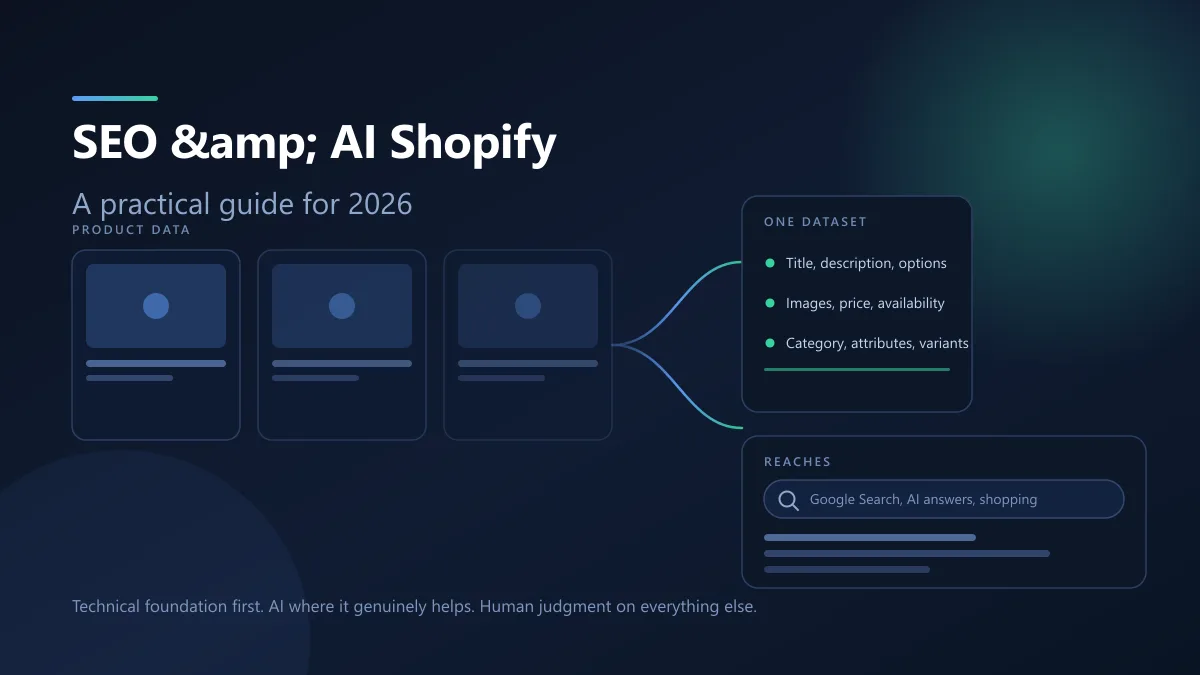
That framing also misses something that changed recently. AI channels are not a separate audience you go and satisfy after the SEO work is done. They read product data that your store already produces. Fixing that data is the same work whether the reader is a crawler or a shopping assistant.
So this guide is organised as a sequence rather than a catalogue, and it starts from a single idea that shapes everything after it.
The one-dataset principle
Shopify maintains a product record for every item you sell. That record holds the title, the description, the options and variants, the images and their alt text, the price, the availability, the category, and any custom fields you add.
Those same fields feed four separate consumers:
- Your own storefront.
- Google's web crawler, through the page your theme renders.
- Merchant Center, which feeds shopping surfaces and, according to Google, also helps products become visible in AI responses.
- AI channels such as ChatGPT, Google AI Mode, Gemini, Microsoft Copilot and Meta, which receive product data through Shopify Catalog.
That fourth one is the recent shift. Shopify describes Catalog as the authoritative product data feed to agentic channels, and states that products are listed with their title, description, options, images, price, availability and other key attributes, structured in a way AI agents can parse.
The practical consequence is simple. There is no such thing as "the product data work" and then later "the AI work". If a product's description says it is waterproof and it is not, that single error is simultaneously a bad sales page, a bad Merchant Center listing and a bad answer in an AI shopping assistant. If the description is accurate, specific and mentions the material, the compatibility and the limitation, one edit improved all four surfaces.
This is also why the fastest way to damage a store with AI is to generate descriptions in bulk from titles. You are not just writing weak copy. You are writing weak copy directly into the source that every downstream system trusts.
What Shopify already handles, and what you still own
Before optimising anything, separate the platform's defaults from your own work. Shopify's documentation lists a set of SEO elements it handles automatically: canonical tags are added to pages, sitemap.xml and robots.txt are generated, themes generate title tags that include your store name, SSL certificates are active by default, and structured data for products is built into themes.
One default deserves more attention than it usually gets. Shopify's default robots.txt disallows filtered collection URLs matching /collections/*+* and sorted collection URLs matching /collections/*sort_by*, because those pages duplicate the base collection. Faceted navigation, the thing a generic SEO article always tells you to fix, is already handled unless something has undone it.
There is a related trap. If your theme still contains a robots.txt.liquid template that outputs rule groups the default file no longer has, your store can be serving rules such as Disallow: /search or Disallow: /policies/ that Shopify would not include today. Shopify's guidance for getting back to the current default is to delete that template.
So the honest split looks like this.
| Shopify handles |
You still own |
| Canonical tags |
Which keywords each page targets |
| sitemap.xml |
SEO title and meta description per page |
| robots.txt, including collection filter and sort rules |
Product and collection handles |
| HTTPS |
Product descriptions and attributes |
| Title tags in the theme |
Alt text on every image |
| Product structured data in the theme |
Collection page copy |
| Product URL pattern |
Menus, internal links, redirects |
Two consequences follow. First, if a store is losing organic visibility, the cause is almost never a missing canonical or a blocked crawler. Second, the remaining column is entirely editorial and merchandising work, which is precisely the work that is easy to delegate badly.
Start with intent, not with a keyword list
Keyword research is useful only after you decide what each page is for. The most common structural error in Shopify stores is a single page being asked to satisfy several incompatible searches, or the reverse, several near-identical pages competing for the same one.
Map one primary intent to one page:
- A product keyword such as a specific model name belongs on that product's page.
- A category keyword belongs on a collection page.
- A comparison query such as "brand A vs brand B" belongs on its own article, not on either product.
- A problem or how-to query belongs on a guide that links down to the relevant collection.
- A brand or navigational query is not something you chase; you already own it.
The test for a healthy map is whether each page would still make sense if you removed every other page. A product page that only works because a blog post links to it is not a landing page, it is a link destination.
There is a second discipline here that matters more on Shopify than elsewhere: one primary keyword per page, not one set of keywords. Shopify lets you edit the SEO title and meta description per product, collection, page and blog post, and it is easy to treat those fields as a place to list variations. Search engines have handled synonyms and paraphrases for years, and Google's guidance on generative AI search makes the point explicitly, saying you do not need to worry about not having enough long-tail keyword variations. Write for the shopper who typed the query.
Product page SEO: the fields that do the work
A Shopify product page is assembled from a small number of inputs. The title, the description, the options, the images, and the SEO fields in the product's search engine listing.
Product title
Shopify uses the product title as the page heading and, by default, as the ingredient of the title tag. Put the thing a shopper would search for first, then the qualifier that distinguishes this item from its siblings. "Merino Crew Socks, 3-Pack" beats "Best Socks Collection — Item 14".
Product description
This is the field that most often fails, and the reason is almost never lack of effort. It is duplication. Manufacturer copy pasted into several products produces several pages that say the same thing, which helps nobody, tells a shopper nothing they did not already have, and gives an AI system no reason to recommend one over another.
A description earns its place when it contains specifics a shopper would otherwise have to email you to ask for:
- The actual materials, not "premium quality".
- Who it is for and the situation it suits.
- Verified compatibility, dimensions or fit.
- The limitation. Stating that a cable is USB-C only is more useful than silence, and it prevents the returns that a vague description creates.
- The one or two questions buyers ask before checkout.
Variants, size, colour, material and weight belong in structured fields, not baked into prose. Shopify Catalog Mapping exists specifically so that stores keeping data in metafields, metaobjects, tag prefixes or delimiters inside titles can source it correctly for agentic storefronts. A product whose category and attributes live inside its title is harder for every system to read, including yours.
The search engine listing
Shopify gives you a dedicated SEO title and meta description per product. Write them for the click, not for the crawler, and make sure the description is genuinely different from the product description above it. Rewriting the body copy into the meta field is not an optimisation.
Two inputs are left, and each gets its own treatment further down: the images and their alt text, and the related-product and collection links that a product page depends on.
Collection pages are where most stores leak
Collections get treated as product lists with a heading. That is a waste of the one page type that can rank for a whole category.
A collection page earns its place when it does something a grid of thumbnails cannot. It should say what the category contains, help a shopper narrow it, and connect the category to neighbouring categories.
Concrete work, in rough order of return:
- A short intro above the grid, written for the category, not the product line. Two or three sentences is enough.
- A title that matches how people describe the category, not your internal naming.
- SEO title and meta description set on the collection, same as products.
- Sub-collections, so the structure is category to subcategory to product rather than one flat list. Google's ecommerce guidance is explicit that menus should link to categories, categories to subcategories, and subcategories to products.
- Menu placement. A collection you publish but never link from a menu is hard for both shoppers and crawlers to reach. Shopify notes that making a collection visible to the Online Store channel does not add it to your menus.
Two collection mistakes are worth naming. The first is thin copy, where the page has a filter sidebar and a product grid and nothing else. The second is competing collections, where the same products appear under "Running Shoes", "Shoes" and "Men's Shoes", each with a near-identical intro. Both are structural, and both are fixed by deleting and merging rather than by writing more.
Faceted navigation deserves one clarifying note for Shopify specifically. Sorted and filtered collection URLs are already blocked in the default robots.txt. If a search and discovery app generates crawlable URLs outside those patterns, that is the case worth auditing, and the audit belongs in Search Console's crawl reports rather than in guesswork.
Technical Shopify SEO: a short list, deliberately
The technical work is shorter than most articles suggest, because the platform does a lot of it. What remains worth checking:
Indexability
Confirm in Search Console which pages are actually indexed. A product that is active, published and in the sitemap can still be excluded by a noindex tag in a custom theme.liquid, which Shopify documents as the way to hide specific pages. If you added that code years ago for one page, check whether it is now catching more than you intended.
Sitemaps
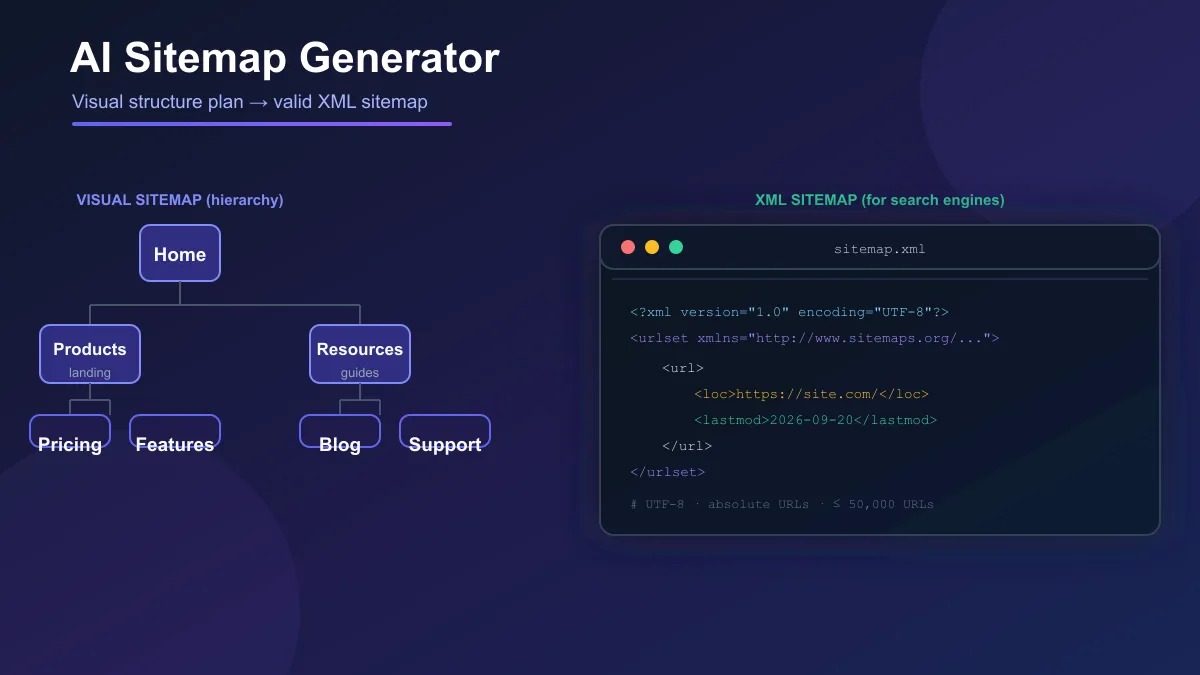
Shopify generates them. Google's guidance is that a single sitemap is limited to 50MB uncompressed or 50,000 URLs, that it must be UTF-8 encoded, and that fully-qualified absolute URLs should be used. If your catalogue is large enough to split, that is a Shopify-side job, not a content one. Our guide to AI sitemap generators covers the distinction between visual and XML sitemaps if you are still deciding which artefact you actually need.
URLs and handles
Shopify controls the pattern; you control the handle. Google's ecommerce URL guidance recommends descriptive words in paths, and for variants it accepts either a path segment or a query parameter, with the recommendation that if you use query parameters for variants, the canonical URL omits them. It also asks for a self-referencing canonical on indexable pages and consistent URL usage across internal links, sitemaps and canonical tags.
Redirects
Shopify allows up to 100,000 URL redirects, with a higher cap on the Plus plan. Two limitations cause most frustration: you cannot redirect Shopify's fixed paths such as /products, /collections or /collections/all, and a redirect will not work from a URL that still loads a valid page. If you rename a handle, create the redirect in the same sitting.
Speed and mobile
Worth fixing when it is genuinely slow, and worth checking on a real phone rather than assuming. Google's AI optimisation guidance treats page experience as part of the technical structure, covering display across devices, latency and making the main content easy to distinguish from everything else.
JavaScript
If an app injects content that is not in the initial HTML, check that it is actually being rendered. Google can process JavaScript but follows JavaScript SEO guidance, and storefront SEO is a more complicated problem on JavaScript-heavy themes.
How AI search actually reaches a Shopify store
This is where the genuinely new material sits, and it is worth separating three mechanisms that get conflated.
Syndication through Shopify Catalog
Agentic storefronts are active by default for eligible stores, and Shopify states products become available to AI channels through Shopify Catalog, or through the Google and YouTube sales channel for Google AI Mode and Gemini, and through the Facebook and Instagram sales channel for Meta. Products reach ChatGPT through Catalog. If direct checkout is activated for a channel, shoppers can complete the purchase inside the AI surface; with ChatGPT, the purchase completes on your Shopify checkout in an in-app browser. Orders appear in your admin with channel and referrer attribution.
Open-web crawling
AI crawlers may also reach your storefront directly. Shopify documents two layers of control here. The network layer is handled for stores on Shopify and needs no action from you; Shopify states it does not recommend a proxy in front of Shopify. The robots.txt layer is yours, by customising robots.txt.liquid to allow or block specific user agents. Shopify is direct about the limits: those rules are directional and advisory, and not all crawlers follow them.
Here is the part that surprises people. Blocking AI crawlers in robots.txt does not stop Shopify Catalog from sending your product data to the agentic storefronts you have activated. That setting is separate. If your goal is to control what is shared, change the Catalog access, not robots.txt.
Agent discovery files
Every Shopify store automatically serves /agents.md, described by Shopify as the canonical agent discovery URL, plus /llms.txt and /llms-full.txt for older crawlers that look for those conventions. By default all three return the same content, including your store name, store URL, sitemap link, store policies and discovery endpoints. You do not need an app to generate them.
Notice what that last point does not mean. Google states that llms.txt files are not used by Google Search and that creating them will neither harm nor help your visibility there. Shopify serving them is for other systems. It is not an AI SEO tactic, and treating it as one is a distraction from the fields that matter.
What Google says you can ignore
Google has published a mythbusting section specifically about generative AI search, and it is unusually blunt. The list of things you can skip is worth reading directly, because a large part of the current advice cycle is a variation on one of them.
- llms.txt and other special markup. Google Search does not use them.
- Chunking your content into small pieces. There is no requirement to break content up, and Google states there is no ideal page length. Make pages for your audience.
- Rewriting content specifically for AI systems. Systems understand synonyms and meaning, so you do not need to cover every phrasing of a query.
- Seeking inauthentic mentions across the web. Google's generative features surface what is genuinely said about products, and chasing manufactured mentions is not a substitute for quality.
- Overinvesting in structured data. Structured data is not required for generative AI search and there is no special schema to add.
The requirement that does exist is unglamorous. To be eligible for generative AI features, a page must be indexed and eligible to appear in Search with a snippet, and the site must be included in generative AI features in Search Console. Beyond that, Google states that meeting all requirements and policies does not mean content will be crawled, indexed or served.
That is the whole AI search story: eligibility is technical, and the differentiator is the content. Our GEO playbook covers the citation side in more detail.
AI for keyword research, without inventing numbers
AI is genuinely useful for the part of keyword work that is about organisation rather than measurement. It is unreliable for the part that is about data.
Good uses:
- Grouping a raw export of terms into themes that map to a page each.
- Naming the questions a buyer asks before they know your category vocabulary.
- Summarising what several competing pages actually cover, so you can see which subtopics are being skipped.
- Drafting a content brief from a theme, which you then edit.
- Spotting pages on your own store that are competing for the same intent.
Where it fails, and where you must go to real data: volume, difficulty, and whether a term converts. Do not accept a number an AI gave you. Do not describe a term as low competition or easy to rank without a current source. Treat generated keyword lists as raw material for clustering, and validate the shortlist in Search Console and in whatever keyword tool you already pay for.
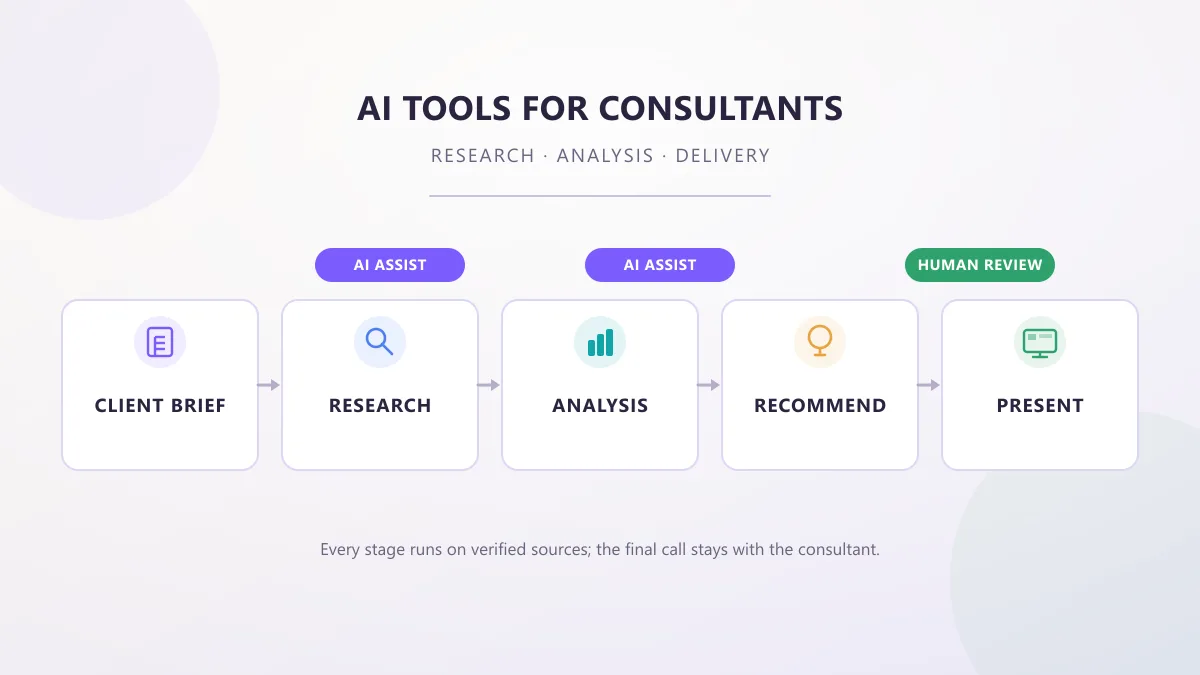
If you want to see how the current content tools differ, we compared Frase, NeuronWriter and Surfer SEO and the individual Surfer SEO and NeuronWriter reviews go deeper on each. Frase leans the other way, toward briefs. None of them answers the mapping question for you, which is why that section comes before this one.
Using Shopify Magic and Sidekick on SEO work
Shopify ships two AI tools, and both are genuinely capable of saving hours on the repetitive part of this work.
Shopify Magic is a suite of AI features available regardless of subscription plan, though Shopify notes that access and availability of individual features can vary. It generates text suggestions in blog posts, pages, product descriptions, Shopify Messaging email and Inbox replies, and it is integrated into the media editor for background removal, logo and banner generation.
Sidekick is an AI assistant that works in the context of your store. It can analyse data, edit products, create blog posts, product descriptions and images, and it presents changes for your review before applying them. It also remembers past conversations and recent admin activity to personalise later answers.
Shopify's own best-practice guidance for working with these tools is more useful than most third-party prompt lists, and it reduces to giving clear instructions, setting tone and format, adding store context, refining through conversation, and reviewing before applying. The template it offers is:
What you want, using which data, with any limits like a word count or budget, as the format and level of detail you want. Only change what is in scope, and confirm with me before making any changes that can't be undone.
Applied to SEO work, that becomes concrete. Instead of "write descriptions for my products", a request that produces something usable looks like this:
Rewrite the description for @Product Name using the material, weight and fit already in the product record, at 60 to 80 words, in a plain factual tone. Do not add any specification that is not already on the product. Show me a before-and-after table before you change anything.
Two Shopify-specific capabilities make this much more practical than a generic chatbot. You can mention a specific product, order or collection by typing @ followed by the resource, which stops the model inventing context. And in Target mode you can click a field directly in the admin and ask about that field, which is the right way to handle a bulk job.
For image work, Shopify Magic's media generation handles background removal and new assets. If you would rather do that in a dedicated tool, our PhotoRoom and Pebblely reviews cover the product-photography side.
One habit matters more than the prompt. Regenerating a description until it reads well is the wrong loop, because you are optimising for fluency rather than accuracy. The loop that works is: write what is actually true, then ask for the structure, then cut anything unsupported.
What AI must not do to your store
There is a short list of jobs where delegating to AI without review causes real damage, and on Shopify the damage is amplified because the output is syndicated.
Never let it invent specifications. A generated "waterproof to 30m" that nobody verified becomes a storefront claim, a Merchant Center attribute and an AI assistant's answer to a customer who then returns the product.
Never generate reviews or ratings. Google's structured data guidance is explicit that you must not mark up fake reviews, and the content policies apply. There is no version of this that is a grey area.
Never let it set prices or availability. It will not know your current state, and Shopify Catalog keeps pricing and inventory current precisely so that AI channels do not have to guess.
Do not mass-rewrite descriptions across hundreds of products in one pass. A single unchecked batch can take a catalogue that was thin and make it worse, because the new copy is thin in a more uniform way. Google's scaled content abuse policy targets using generative tools to generate many pages without adding value for users, and its own guidance points at the search quality raters' criteria for main content created with little to no effort or originality.
Do not let it choose your keywords without validation. Clustering is fine. Volume and difficulty claims are not.
Do not let it replace technical QA. robots.txt, canonicals, redirects and index coverage are things you verify by reading the actual response, not by asking a model what it probably says.
Do not publish legal or policy claims it wrote. Shipping windows, warranty terms, privacy commitments and returns policy are statements about your business. Only you can make them.
Images, alt text, and internal links
Three smaller items that repay attention.
Images. Descriptive filenames help, so merino-crew-socks-grey-3-pack.webp beats IMG_4821.webp. Keep dimensions appropriate to where the image renders rather than uploading camera originals everywhere. Compress, but not so hard that a fabric texture turns to mush on a zoom. Keep product photography honest, which is a content problem before it is a technical one.
Alt text. Shopify allows up to 512 characters and recommends 125 or fewer. Describe the image. For a product shot of grey socks in a box, "Grey merino crew socks, three pairs, shown in an open box" is useful to a screen reader user. "Grey merino crew socks best cheap wool socks sale" is not, and no one searching that way needs your help.
Internal links. The relationships that matter on a store are short and obvious: product to related product, product to its collection, collection to a neighbouring collection, guide to the products it discusses, buying guide to the category it explains. Use descriptive anchors, because "read the merino wool guide" tells both a reader and a crawler what is on the other side, and "click here" tells neither. Google treats internal link counts as a rough signal of a page's relative importance, and Googlebot does not generally submit searches into your search box, so a product only reachable through search is a product you are relying on the sitemap to find.
Structured data, and the AI labelling obligation
Shopify themes include schema markup for products, which is a good starting point. Beyond that, the types most relevant to a store are Product and ProductGroup for products, BreadcrumbList for hierarchy, and Organization for the business itself.
Two rules from Google are worth internalising. Structured data must describe content that is visible to the reader, and it must not misrepresent the main content of the page. Marking up reviews that are not displayed, or a price the page does not show, is a policy violation rather than an optimisation. Also worth setting expectations correctly: Google states that correctly marked-up structured data is not guaranteed to produce a rich result, because using structured data enables a feature rather than guaranteeing it.
The ecommerce-specific point, and the one most Shopify guides skip, comes from Google's guidance on using generative AI content. For ecommerce sites, Google states that AI-generated images must contain metadata using the IPTC DigitalSourceType TrainedAlgorithmicMedia metadata, and that AI-generated product data such as title and description attributes must be specified separately and labeled as AI-generated.
On other platforms that is a footnote. On Shopify it is a live operational requirement, because Shopify Magic can generate and edit product media inside the admin, and a team using AI imagery across a catalogue needs to know that the obligation attaches to the asset, not to the intention.
A 30-day Shopify SEO and AI plan
This is an order of operations, not a promise of movement. Google is explicit that satisfying its requirements does not guarantee crawling, indexing or serving, so treat this as work that makes you eligible and makes your catalogue legible, not as a ranking forecast.
Week 1: make the store legible
Check Search Console index coverage and fix anything unexpectedly excluded. Confirm your robots.txt matches Shopify's current default, which means deleting a stale robots.txt.liquid template if one exists. Read your current agentic storefront settings and decide what you want shared. Pull your sitemap.xml and confirm the counts look right.
Week 2: fix the pages that sell money
Take your top twenty products by revenue. For each, rewrite the title for search, write a real description with specifications and one stated limitation, fill in the attributes and metafields, set the SEO title and meta description, and write alt text on every image. Do collections second, starting with the categories those twenty products sit in.
Week 3: content and links, with AI as a drafting aid
Group your keyword export into themes, one theme per page. Publish or rewrite two or three guides that answer real questions and link down to the relevant collections. Use Magic or Sidekick for briefs and first drafts, with the scope-limited prompt pattern from earlier, and review every line against the product record.
Week 4: measure, then correct
Establish the baseline: impressions, clicks, average position, indexed pages, and your own conversion data. Then run Rich Results Test and URL Inspection on your twenty priority products. Check Merchant Center diagnostics. Look at the Generative AI performance report for direction. Write down what changed so the next cycle has something to compare against.
How to measure what changed
Most stores measure by feel, which is how a change that hurt gets kept for six months.
What to record, before and after:
- Search Console index coverage. Indexed pages, and any page that moved between states.
- Clicks and impressions by page group, not site-wide. Averages hide the pages you actually changed.
- Merchant Center diagnostics. This is where product data problems surface before they affect shopping surfaces.
- Rich Results Test and URL Inspection on a fixed sample of twenty URLs, so you are comparing like with like.
- The Generative AI performance report in Search Console, which reports performance in generative AI features on Google Search and Discover. Treat it as a directional signal, and be sceptical of any third-party tool that claims access to Google's internal AI systems, because there is no such access.
- Your own conversion data per template. A description rewrite that lifts impressions and drops conversion has told you something, and it is not a win.
What not to do: invent a benchmark. There is no defensible rule that organic conversion rate should rise by a given percentage, and anyone who gives you one is guessing. Compare your store against its own previous state over a comparable period.
Where stores go wrong
A short list, ordered by how much damage each one does.
Duplicated product copy. The same manufacturer text on twenty products. Every one of them is now competing with the other nineteen and none of them is worth citing.
Thin collection pages. A filter sidebar and a grid, with nothing that helps anyone decide.
One page chasing several intents. A product page written to rank for a category term it has no business owning.
Unnoticed filtering. A search and discovery app generating crawlable URLs that the default robots.txt rules do not cover.
Weak internal linking. Collections published but not linked from menus, products reachable only through the search box, guides that never point at anything commercial.
Generic AI copy. Descriptions written from titles, reviews nobody wrote, specifications nobody verified.
Metadata written for machines. A product title of "Item #4471 — Widget (Blue)" and an SEO title that is the same string again.
Structured data that overreaches. Ratings for a product with no visible reviews, availability that contradicts the page.
Poor images. Undersized product shots, missing alt text, filenames that mean nothing.
Ignoring Search Console. Not the monthly report, but the coverage and diagnostics reports, which are where the actual problems are.
Frequently Asked Questions
Do I need llms.txt or special AI schema to show up in AI answers?
No. Google's own guide on AI features states that existing SEO best practices remain relevant, that there are no additional requirements to appear in AI Overviews or AI Mode, and that no special optimizations are necessary. It also lists llms.txt files among the things you can ignore for Google Search, because Google Search does not use them. Shopify happens to serve /agents.md, /llms.txt and /llms-full.txt on every store by default, which is useful for other AI systems, but it does not change how Google ranks or cites you.
If I block AI crawlers in robots.txt, will my products stop appearing in ChatGPT?
Probably not. Shopify states that product data is syndicated to AI channels through Shopify Catalog independently of robots.txt. Blocking crawlers at the robots.txt or network layer affects open-web discoverability only. To change what is shared with agentic storefronts such as ChatGPT or Microsoft Copilot, you use the Shopify Catalog access settings, not robots.txt.
Should I use Shopify Magic to write all my product descriptions?
Use it for a first pass, not for a catalogue. Shopify Magic can generate product description text from information you provide, and Sidekick can edit products in the context of your store. Both are drafts that a person approves. Generating a description for every product from a product title alone is the fastest way to publish copy with invented specifications, and that is the pattern Google's scaled content abuse policy targets.
What is the single highest-impact Shopify SEO task?
Writing a specific, accurate description and filling in real attributes for the products you actually want found. Those fields are read by the storefront, by Google's crawler, by Merchant Center feeds and by AI channels through Shopify Catalog. It is the same edit, not four separate ones, and it is the field most often filled with thin or duplicated text.
Do I need to fix faceted navigation and filtered collection URLs myself?
Usually not. Shopify's default robots.txt already blocks filtered collection URLs matching /collections/*+* and sorted collection URLs matching /collections/*sort_by*, precisely because they duplicate the base collection page. You would only need to intervene if a search and discovery app creates crawlable URLs that the default rules do not cover, or if a custom robots.txt.liquid template you added earlier removed rules the default file used to include.
How do I know if AI search is actually sending me traffic?
Use the Generative AI performance report in Google Search Console, which reports how your content performs in generative AI features on Google Search and Discover. Treat it as a directional signal rather than a forecast, because Google states plainly that meeting every requirement does not mean content will be crawled, indexed or served. Pair it with Merchant Center diagnostics and your usual conversion data.
Are AI-generated product images a problem for Google?
Not automatically, but they carry a labeling obligation. Google states that AI-generated images must contain IPTC DigitalSourceType TrainedAlgorithmicMedia metadata, and that AI-generated product data such as title and description attributes must be specified separately and labeled as AI-generated. This matters more on Shopify than it does elsewhere because Shopify Magic can generate and edit product media directly inside the admin.
How long before any of this shows up in results?
This guide cannot answer that honestly, and neither can anyone else. Google states that meeting all requirements, best practices and policies does not mean content will be crawled, indexed or served. What you can control is whether the page is technically eligible, whether the product data is accurate, and whether you can tell the difference between a change that helped and a change that did not.
Sources
Everything factual in this guide is drawn from primary documentation rather than secondhand summaries.