A one-hour meeting rarely leaves an hour of useful notes. A decision hides in the middle, an action item gets assigned in passing, and a follow-up goes unwritten. Otter AI transcription exists for that gap: it turns the conversation into readable, searchable text with speaker labels, then stacks a summary and an AI assistant on top.
This is a look at how Otter behaves in real use, not at its marketing. It covers live meetings, uploaded recordings, the six transcription languages, verified 2026 pricing, and the situations where a different tool fits better. I also ran a 20-minute call through the free plan myself; the results are below. Everything else draws on Otter's official documentation, checked in October 2026.
What Otter Actually Does
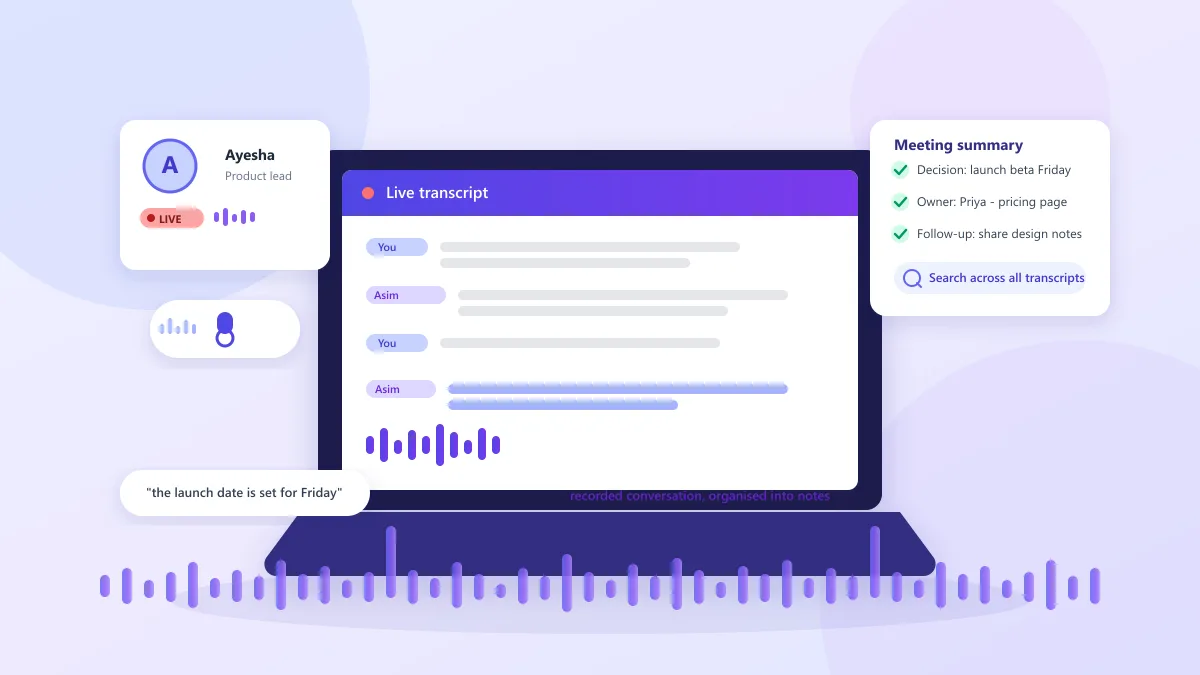
Otter turns spoken audio into text, then organizes it. Capture works three ways: an AI Notetaker joins your Zoom, Microsoft Teams, or Google Meet call as a participant and transcribes in real time; the Otter app records directly from your device, phone, or desktop; and you can upload an existing audio or video file for processing after the fact.
Every captured conversation produces the same core outputs: an editable transcript with speaker labels and timestamps, an automated summary with action items, a searchable archive, and AI Chat for questions about what was said. On supported calls it also captures shared slides and keeps highlights and annotations attached to the transcript.
Two boundaries matter from the start. Transcription runs in one language per conversation, chosen before you record, and the interface stays in English. The service also has no human transcription tier, so every transcript is machine-generated and worth checking before you treat it as a record.
How the Notetaker Captures Live Meetings
The standard setup lets the AI Notetaker attend the meeting: connect your calendar, and Otter auto-joins scheduled Zoom, Google Meet, and Teams calls, writes the transcript live, and posts the notes when the call ends.
A few behaviors matter here. The notetaker appears in the guest list like a regular attendee, usually named "Your Name's Notetaker (Otter.ai)"; it does not record invisibly, and a host or IT policy can block it. Concurrent meetings scale with plan: Basic handles one at a time, Pro two, Business and Enterprise three. Conversation length is capped too, at 30 minutes on Basic, 90 on Pro, and 4 hours on Business and Enterprise (see the pricing table). If you prefer no bot, the desktop app for Mac and Windows records audio from your own computer, and the mobile app and Chrome extension do the same on other devices. Live captioning is built into Google Meet, and Otter offers RTMP-based live transcription for broadcast setups at extra cost.
Because transcription runs live, the transcript is ready the moment the call ends — you can re-read a phrase seconds after it was spoken, search the conversation, or replay a specific line with synchronized audio.
Uploading Audio and Video Files
The upload path covers everything Otter did not record itself: a taped interview, a lecture from another platform, a voice memo, or a client call saved elsewhere. Upload the file and Otter returns an editable, searchable transcript with speaker labels, timestamps, and a generated summary. You can correct words, rename speakers, and export the finished text.
The real constraints are plan-based. Basic owners get 3 imports for the life of the account, Pro users 10 a month, and Business or Enterprise unlimited (Business also caps imported-file transcription at 6,000 minutes per user per month). Exports grow the same way: mp3 and txt on Basic, then pdf, docx, and srt from Pro up, with bulk export on Business and Enterprise.
Languages and Speaker Labels
Otter's official language support is deliberately narrow: English, Spanish, French, German, Japanese, and Chinese (Simplified), with German and Simplified Chinese still labelled in beta on Otter's supported-languages page. You pick one language before you record and Otter transcribes in that language alone. There is no automatic detection and no multi-language transcript; Portuguese, Arabic, Hindi, and Korean are simply absent. The single exception is a documented French-to-English auto-switch when your default is French. Transcription and translation are also separate: Otter Chat can translate a finished transcript and answer your questions in other languages, but that does not expand transcription support. A mixed English-German call is still processed in whichever single language you selected.
Speaker labels are the most useful part of the transcript. Otter attributes each line to a speaker, and from Pro up the "speaker identification by name" feature learns a person's voice across meetings, so you tag them once and the name keeps reappearing. The system is not perfect: overlapping voices or rough audio can merge or swap speakers, and the free plan keeps only your 25 most recent conversations. Custom vocabulary on paid plans helps with names, jargon, and acronyms — 5 terms on Basic, 100 names plus 100 other terms per user on Pro, more on Business.
Pricing and Monthly Limits (2026)
Prices below come from Otter's official pricing page, verified in October 2026, in US dollars. Annual billing cuts the Pro seat from $16.99 to $8.33 a month and Business from $30 to $19.99.
| Plan |
Price |
Monthly transcription |
Max per conversation |
File imports |
AI Chat |
| Basic |
Free |
300 minutes (shared pool) |
30 minutes |
3 lifetime |
20 per month (3 per conversation) |
| Pro |
$16.99/user/mo, or $8.33 billed annually |
1,200 minutes (shared pool) |
90 minutes |
10 per month |
50 per month |
| Business |
$30/user/mo, or $19.99 billed annually |
Unlimited live meetings and recordings |
4 hours |
Unlimited (6,000 imported min per user) |
200 per month |
| Enterprise |
Custom |
Unlimited |
4 hours |
Unlimited |
200 per month |
Fine print changes the maths:
- Minutes do not roll over. Unused transcription expires each month, and Pro's 1,200 minutes is roughly 20 hours of meetings — about an hour per working day.
- The free plan is a try-before-you-buy tier, not a working plan. A 30-minute per-conversation cap cuts most real meetings off early, and three lifetime imports rule out a steady upload workflow.
- Workspaces scale by plan: Basic supports 5 members, Pro 5 billed users, Business 25, Enterprise unlimited; advanced search, team vocabulary, templates, and admin controls sit on paid tiers.
- AI Chat queries are metered on every plan (3 per conversation on Basic). Otter's MCP server exposes the same meeting knowledge to AI assistants such as ChatGPT and Claude under the same limits; our MCP server explainer explains the architecture.
- Students and teachers get 20% off Pro with a qualifying .edu email, taking annual Pro to about $6.67 a month.
My Test: A 20-Minute Uploaded Call
I wanted to see how Otter handled a real conversation rather than a promotional sample, so I uploaded a 20-minute call with three people. The transcript was generally easy to follow, and searching for specific parts beat replaying the whole recording. The automatic summary and key points also saved real time when I only needed the gist of the discussion.
It was not perfect. One name came out wrong, and in two places Otter mixed up the speakers, so I checked those sections against the original recording before treating the transcript as accurate. Both problems are the kind the official documentation predicts: names are vulnerable, and attribution suffers when people talk over each other.
The call fit inside the free plan's 30-minute per-conversation limit, which confirms Basic can handle a short call but will not stretch to longer meetings. For occasional calls I would stay on the free tier; with regular meetings, the extra minutes and headroom on Pro make more sense. A single clean-audio call is a small sample, which is exactly why Otter's own guidance to review names and numbers matters.
Where Transcripts Get Things Wrong
Otter's speech-to-text FAQ is direct: the engine is fully automated and cloud-based, with no human transcribers, and accuracy varies with background noise, speaker accents, and the complexity of the conversation. Otter publishes no accuracy percentage; "95% accurate" claims come from vendor marketing or self-tests with incompatible methodology, so treat them as unverified.
In practice, overlapping voices, phone-quality audio, strong regional accents, and niche vocabulary degrade quality, and speaker attribution is where the silent errors happen on group calls. Custom vocabulary softens names, jargon, and acronyms, but the official advice stands: review and edit the transcript, especially when it carries names, figures, dates, decisions, or sensitive action items. My own test lined up with this — the summary was solid, the details needed a check.
A Practical Workflow
Here is a realistic loop for a weekly meeting, based on behaviors Otter documents.
Before the call, connect your calendar, decide between the AI Notetaker and the desktop app, set the correct transcription language, and confirm the notetaker is welcome — tell participants or ask the host so nobody is surprised.
During the call, the live transcript appears with speaker labels while slides are captured. Watch attribution in the first minutes; if names are wrong or speakers swap, correct them early so the rest of the transcript labels cleanly.
After the call, read the summary, fix names and numbers, confirm the action items name the right owners, search for anything half-remembered, then share only what is needed via a link, a channel, or an export. The upload workflow is the same minus the live parts: import, wait for processing, review, correct, and export as txt, docx, pdf, or srt depending on your plan.
Privacy, Recording, and the August 2026 Court Case
Otter routinely stores other people's speech, so privacy deserves a full section. On the technical side, Otter's privacy and security page documents storage on Amazon Web Services in the US West region: AWS S3 with server-side AES-256 encryption, encryption keys themselves encrypted under a rotated root key, and TLS plus AES-256 for real-time content in transit and at rest. Otter has completed a SOC 2 Type II audit, publishes a subprocessor list that includes AWS and Google Cloud Platform, and follows the ISO 27001/2 framework. Enterprise adds SSO and SCIM (each requires a 100-user minimum), custom data retention, domain capture, and HIPAA compliance as an add-on; two-factor authentication is available on every plan. Its privacy policy also states Otter may train its proprietary AI on de-identified audio recordings and transcriptions — worth knowing before you connect it to sensitive calls.
Then there is the litigation. In re Otter.AI Privacy Litigation, No. 5:25-cv-06911-EKL, is a consolidated class action in the US District Court for the Northern District of California. The plaintiffs allege Otter's notetaker joined virtual meetings and recorded, transcribed, and retained conversations without the consent required by law, captured voiceprints through speaker identification, and used the data to train machine-learning models. Otter argued the plaintiffs lacked standing and that its notetaker was effectively a party to each call, like a host's recording tool.
On August 13, 2026, Judge Eumi K. Lee granted Otter's motion to dismiss in part and denied it in part. The court allowed the federal wiretap (ECPA), California CIPA, and Illinois BIPA claims to proceed, reasoning that the complaint plausibly casts Otter as a third-party eavesdropper that independently collects, retains, and uses call data for its own commercial benefit. It dismissed other claims, including the federal CFAA and California CDAFA claims, some with leave to amend. This is a pleading-stage ruling, not a finding that Otter broke the law; liability has not been established, and the plaintiffs had 14 days to amend.
The practical takeaway: tell people a call is being recorded and transcribed. Announce the AI notetaker at the start, check client or employer policy, and remember consent rules vary by jurisdiction. This is not legal advice — for regulated or highly sensitive conversations, check with counsel before standardizing on any recording tool.
Where Otter Falls Short
Some limits shape the buying decision more than others. Otter is meetings-first: long-form audio works, but imports are rationed on lower plans. The notetaker bot is the default, and some clients, hosts, and organizations refuse it entry to calls. There is no human transcription service, so accuracy rests entirely on the automated engine. Six languages, one at a time, leave out teams working in Portuguese, Arabic, Hindi, or Korean. Per-seat pricing compounds fast at team scale, with the features teams want sitting on Business or Enterprise. And data is processed in the US, which rules Otter out where EU data residency is required.
Alternatives for Different Workflows
Otter earns its cost when scheduled meetings and a searchable archive are the deliverable. Outside that pattern, these tools cover specific gaps:
- Fireflies.ai is the closest full competitor: an AI notetaker with deep CRM integrations and 100+ languages claimed on its own site, a fit for sales teams that want call data in their stack. Pro costs $10 a seat a month billed annually ($18 month to month) on fireflies.ai/pricing. The tradeoffs are seats plus metered AI credits and a heavier setup. See the Fireflies AI directory entry.
- Fathom gives away unlimited recordings and transcriptions on a genuinely free individual plan, undercutting Otter for light users. Premium is about $20 a month for advanced summaries and action items; team plans start at $19 a seat with a two-user minimum. The tradeoff is that the free tier limits advanced summaries. Pricing is on fathom.ai/pricing.
- Notta transcribes two languages at once, the multilingual work Otter cannot touch. Its free plan gives 120 minutes a month with a hard 3-minute cap per recording; Pro runs $8.17 a month billed annually for 1,800 minutes and recordings up to 5 hours (official pricing). The catch is that the serious bilingual features are add-ons.
- tl;dv frames everything around timestamped video highlights and clips, and records without a bot. Its free plan stays free; Pro runs about $18 a seat a month billed annually ($29 month to month) per tl;dv's pricing materials. Teams that share meeting moments rather than records fit it better than Otter.
- Descript attacks speech-to-text from the editing side — you edit audio or video by editing the transcript — which podcasters and video teams need. Creator costs around $24 a month billed annually ($35 month to month) on descript.com/pricing. It is a content tool, not a notetaker, which is why some teams run both. See the Descript directory entry.
- For a professionally reviewed or verbatim record, a human transcription service still beats any automated tool, Otter included. No AI output replaces careful human review when the transcript is legally or medically load-bearing.
The AI meeting summary guide contrasts capture styles across tools, and our Zoom transcription guide covers the platform's built-in option versus dedicated assistants. The AI Tools Vault keeps a full Otter AI listing with plan details in one place.
Who Should Use Otter — and Who Can Skip It
Otter fits when your week is scheduled Zoom, Google Meet, or Teams calls and the transcript is the deliverable: consultants billing client calls, journalists working from interviews, educators recording lectures, and small teams that want one searchable system of record. Start on the free plan with your own meetings — your accents, audio setup, and vocabulary tell you more than any review.
Skip it when you are not on calls regularly and manual notes or your meeting platform's built-in summary covers the need, when conversations routinely cross languages outside Otter's six, when client or employer policy forbids recording bots, or when compliance demands EU data residency. None of those make Otter bad; they make it the wrong tool for that workflow.
Frequently Asked Questions
What is Otter AI transcription?
Otter AI transcription is a speech-to-text service that turns conversations into searchable text. The Otter app and its AI Notetaker produce a live transcript with speaker labels as a meeting happens, then add an automated summary, action items, and an AI Chat you can question about what was said.
Is Otter AI transcription free?
There is a free Basic plan with 300 monthly transcription minutes, a 30-minute cap per conversation, 3 lifetime audio or video file imports, and 20 AI Chat queries per month. Paid plans add far more minutes, longer meetings, more imports, and advanced search and exports.
What languages does Otter support for transcription?
Otter transcribes English, Spanish, French, German, Japanese, and Chinese (Simplified), with German and Chinese (Simplified) still labelled as beta. You select the language before recording, and Otter transcribes one language at a time. A separate feature, Otter Chat, can translate transcript content into other languages.
How accurate is Otter AI transcription?
Otter is a fully automated, cloud-based speech-to-text engine with no human transcribers. Officially, accuracy varies with background noise, speaker accents, and conversation complexity, so transcripts are best treated as a strong first draft. Reviewing names, numbers, and technical terms before sharing is recommended, and a custom vocabulary helps with jargon.
Can Otter transcribe uploaded audio and video files?
Yes. You can import pre-recorded audio or video, and Otter processes it into an editable, searchable transcript with speaker labels, a summary, and search and export options. Imports are limited on the free plan (3 for the lifetime of the account) and cheaper paid tiers (10 per month on Pro), with unlimited imports starting on Business.
What are Otter's main limitations to watch for?
The free plan caps conversations at 30 minutes and allows only three lifetime imports. Pro limits meetings to 90 minutes. Transcription covers six languages, one language at a time. Monthly minutes do not roll over, and the AI Notetaker joins calls as a visible participant, so you should tell other attendees when a call is being recorded.