Google's free AI drawing tool that turns rough sketches into clean, polished drawings in seconds — it works right in your browser on desktop and mobile, with no signup required.
AutoDraw is a free drawing tool made by Google's Creative Lab. It pairs machine learning with a library of professional artwork so anyone can turn a rough sketch into a clean, polished drawing in seconds. You do not need design skills, a paid plan, or even an account — you open the site and start drawing.
It launched in April 2017 as part of Google's AI Experiments program, built on the same sketch-recognition technology behind Quick, Draw!. That experiment trained a neural network on millions of doodles so it could guess an object before the drawing was finished. AutoDraw takes that same guessing ability and turns it into a practical tool for creating icons, diagrams, and simple illustrations.
How to Use AutoDraw
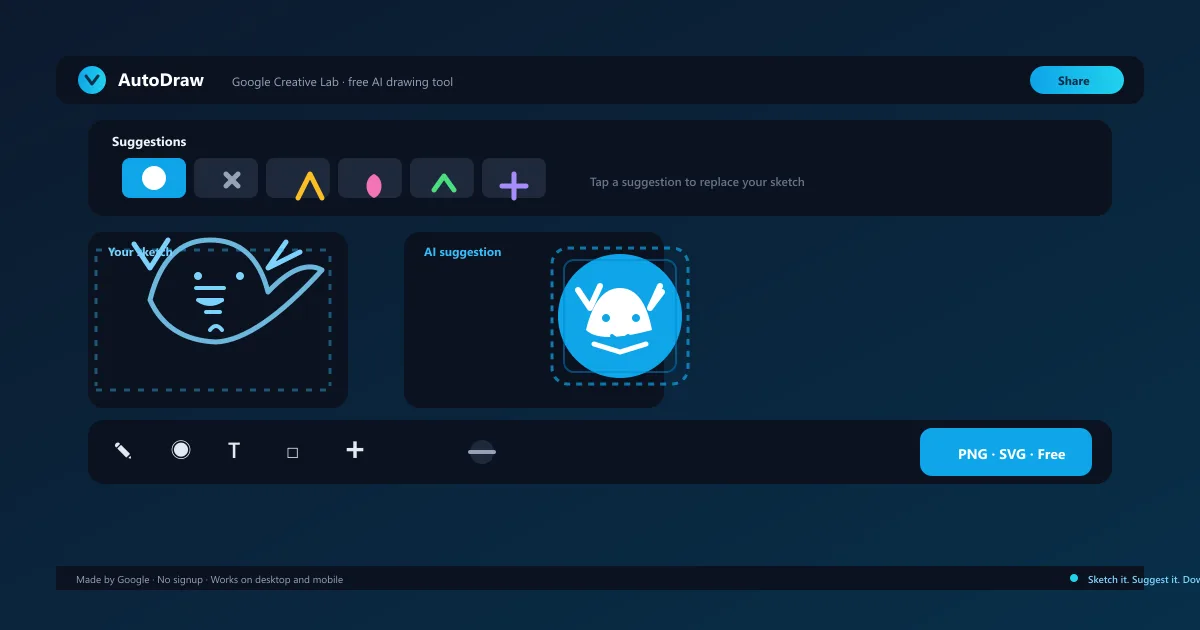
Using AutoDraw is as simple as drawing a doodle. Head to the site on any device, pick the pencil tool, and start sketching with your mouse, trackpad, stylus, or finger. As you draw, a bar of suggestions appears above the canvas, showing professional versions of what the AI thinks you are creating.
When one of the suggestions matches your idea, tap it and the rough sketch is replaced with a clean, artist-made illustration. From there you can recolor it with the fill bucket, add text or shapes, move and resize elements, and export the finished result.
Open the site — no signup or install needed
Sketch with pencil, mouse, touch, or stylus
Tap a suggestion to swap your doodle for clean artwork
Finish with fill, text, shape, eraser, and undo tools
How to Download Images from AutoDraw
When your drawing is ready, click the download button in the top-right corner. The tool lets you save your canvas in two formats: PNG for a high-quality raster image you can drop straight into documents, slides, or social posts, and SVG for a scalable vector file that stays sharp at any size.
SVG export is especially useful if you plan to reuse the drawing at different sizes — in a logo, a worksheet, or a large banner. You can also share a live link to your canvas so someone else can view or continue the drawing, all without leaving your browser.
AutoDraw for Teachers and Kids
Teachers use AutoDraw to build worksheets, flashcards, and classroom diagrams in minutes — no design experience needed. A teacher who needs an apple icon, a labeled map shape, or a science diagram can sketch it and get a professional-looking version instantly.
For kids, the tool is a friendly introduction to digital drawing. There are no accounts, no ads, and nothing to pay, so it is safe for classrooms and home use. Children can experiment with shapes and colors freely, and the AI feedback makes drawing feel like a game.
How to Make Logos and Icons with AutoDraw
While AutoDraw is not a full logo designer, it is a fast way to prototype icons and simple logo marks. Sketch the shape you have in mind — a leaf, a bolt, a bird — and let the AI surface a polished, professional version you can download as an SVG vector.
Because SVG files scale without losing quality, an icon made here can be resized for a favicon, an app badge, or a presentation without pixelation. For a finished brand identity, pair your concepts with a dedicated logo tool like Looka or assemble them in Canva.
AutoDraw Pricing — Completely Free
AutoDraw is completely free. There is no subscription, no paywall, no ads, and no watermark, and you do not typically need an account to use it or download your drawings. Google funds the tool as part of its AI Experiments showcase, which is why there is nothing to buy.
Unlimited sketches, unlimited suggestions, and every drawing and export tool are available to everyone. If you want more control, a full design suite, or custom AI image generation, that is where paid alternatives come in.
Compare Plans & Pricing
Free $0 — no account, no ads, no usage limits, no watermark
Most Popular
Free
$0
AutoDraw is entirely free. No account, no downloads, no ads, no watermark, and no usage limits.
Unlimited sketches and AI suggestions
Hundreds of professional illustrations in the library
Quick, Draw! is the Google game where players doodle an object in under 20 seconds while a neural network guesses what it is. AutoDraw uses the same recognition technology, but inverts the goal: instead of testing your sketch, it helps you finish it.
In Quick, Draw! you are scored on how well the AI recognizes your doodle. Here the AI suggests clean professional artwork that replaces your sketch, so the outcome is a usable image rather than a game score. Play Quick, Draw! for fun and learning; use AutoDraw when you actually need a drawing.
Best AutoDraw Alternatives
AutoDraw is the fastest way to clean up a simple sketch, but it is not a full design tool. Depending on what you are making, other tools cover different ground: stable-diffusion generates original images from text prompts, canva-ai builds full designs with templates and AI assistance, and looka specializes in professional logos.
For photorealistic or completely new artwork from a description, a text-to-image tool is the right fit. For polished layouts, brand assets, and marketing graphics, a design suite gives you layers, templates, and collaboration that this tool deliberately leaves out.
Stable Diffusion
Image GenerationFreemium
Best for: Free open-source image generation
Stable Diffusion is the free open-source AI image generator that runs locally or online, no sign-up required for basic use.
It is the fastest free way to turn a messy sketch into a clean, professional-looking drawing. Its limits are real — a fixed library of illustrations rather than custom AI generation, and simple editing tools — but for quick icons, classroom materials, and everyday graphics it is hard to beat.
Pros
Made by Google and completely free — no account or signup
Works on desktop, tablet, and mobile browsers
Turns rough sketches into clean professional artwork in seconds
Download as PNG or scalable SVG for any use
Cons
Fixed icon library — cannot generate brand-new custom art
Limited to simple drawings and shapes
Needs an internet connection for AI suggestions
Not a full design suite — no layers or advanced editing
Best For
Recommended use cases and scenarios where AutoDraw shines.
Yes. AutoDraw is completely free with no subscription, no ads, and no watermark, and you do not typically need an account to use it.
Does AutoDraw work on mobile?
Yes. AutoDraw runs in any modern browser on desktop, tablet, and mobile, and supports touch input, so you can draw with your finger on a phone.
How do I download my AutoDraw drawing?
Use the download button in the top-right corner to save your canvas as a PNG raster image or an SVG vector file that stays sharp at any size.
Who makes AutoDraw?
AutoDraw was created by Google Creative Lab and launched in 2017 as part of Google's AI Experiments program. It uses the same sketch recognition technology behind Quick, Draw!.
Can I use AutoDraw images commercially?
The library art is provided for free use. Most illustrations are available for personal and commercial projects, though you should check the specific license terms for artwork you plan to sell.
Reviews & Ratings
Loading reviews...
Explore More Image Generation Tools
Browse the full AI Tools Vault directory to compare AutoDraw with every image generation tool, or line up your shortlist side by side.