Luma vs Runway vs Pika: Which AI Video Tool Fits the Job
Luma vs Runway vs Pika compared for 2026: current models, checked pricing, free credits, controls and real tradeoffs — and when Veo, Kling or Hailuo deserve a look.

Luma vs Runway vs Pika compared for 2026: current models, checked pricing, free credits, controls and real tradeoffs — and when Veo, Kling or Hailuo deserve a look.
If you have been weighing Luma vs Runway vs Pika for a video project, advice from even a year ago is probably wrong by now. Luma ships Ray3.2 and has retired the Dream Machine name, Runway's current flagship is Gen-4.5, and Pika relaunched in September 2026 as a multi-model platform rather than a single in-house generator. Three AI video generators still deserve a side-by-side — they just no longer compete on the terms older roundups describe.
Every number and feature claim below was checked against official pricing pages, documentation and release announcements on 6 October 2026. Vendor benchmark results are labelled as vendor claims, and anything unverifiable against a primary source is left out. The result is a Luma vs Runway vs Pika comparison you can check line by line against the sources linked here. One section reproduces a single first-hand run of the same brief through all three tools — personal notes, because that is what they are: one prompt and an afternoon of iterations, not a controlled test.
Luma retired Dream Machine. Luma's official model documentation now names Ray3.2 as the current video model, released 9 June 2026, and marks Dream Machine and Ray2 as deprecated. Ray3.2 drives text-to-video and image-to-video generation, a video-to-video mode called Modify Video that accepts up to 20 seconds of source footage, and Reframe for changing composition after the fact. Luma's announcement documents multi-keyframe input of up to 16 keyframes, 1080p output, native HDR and 16-bit EXR export — specifications aimed at people who finish footage in Resolve or Nuke, not only at people posting social clips. The consumer workspace also mixes in outside models: the pricing page advertises seven-plus AI models, so "Luma" now names a workspace as much as a model.
Runway grew into a model marketplace. Gen-4.5 takes text or image input for 2-to-10-second clips at 720p and charges 12 credits per second. Aleph 2.0 edits existing footage. Alongside Runway's own models, the platform rents competitors' — Veo 3.1, Kling 3.0, Seedance and MiniMax H3 all appear across Runway's official pricing, product and API documentation.
Pika rebuilt itself. On 17 September 2026, Pika relaunched as video, image and sound apps sitting over a catalogue of models: its own Pika 2.5 and Pikaframes next to Seedance 2.5, MiniMax H3 and Wan 3.0. Plans, the company wrote, now differ only by credits and concurrency. That single sentence explains most of the pricing table later in this article.
In the Luma vs Runway vs Pika trio, Luma's argument is control. Multi-keyframe input of up to 16 keyframes, Modify Video for restyling existing footage, Reframe, and HDR/EXR output read as production features, and Luma pitches Ray3.2 at "production pipelines" in its own announcement. The workspace layers lip sync, extend and enhance tools on top, alongside third-party models on the same balance.
Billing runs on credit subscriptions: $9.99 per week (first subscription week $4.99), $49.99 per month, or $99.99 per year, with the credit pools listed further down. As of this check, Luma's pricing page shows paid plans only — there is no ongoing free tier to generate on. Every listed plan includes watermark-free exports and unlimited projects.
What it does well
Where it falls short
On budgeting — the practical half of any Luma vs Runway vs Pika decision — Runway publishes its math. Gen-4.5 takes text or image input for 2 to 10 seconds at 720p and charges 12 credits per second, and Runway shows the exact cost of a generation before you run it. Aleph 2.0, at 140 credits per 5 seconds, handles video-to-video editing in Edit Studio. Gen-4.5 can also export ProRes or a PNG sequence at generation time on Max, Unlimited (Legacy) and Enterprise plans, at five extra credits per second — details that matter once footage is heading to an editor rather than a feed.
Runway reports that Gen-4.5 reached 1,247 Elo at the top of Artificial Analysis's text-to-video benchmark. Treat that the way it is offered: a vendor-reported result from November 2025, not an independent verdict, and the leaderboard moves as other labs ship.
A one-time deposit, not a monthly allowance. Runway's pricing page states the Free plan includes 125 credits that do not expire, and the help documentation lists Gen-4.5 as a Standard-and-above model — so free credits are a tour of a selection of the platform's models rather than a Gen-4.5 trial. The distinction matters in any Luma vs Runway vs Pika budget. The commercial terms are friendlier than the credits: Runway states you own what you create on every plan, including Free, and Standard removes the watermark.
What works
What to watch
Pika's side of the Luma vs Runway vs Pika argument is breadth: the rebuild changed what a subscription buys. Every plan now opens every model and app — Create Video, Extend Video, Swap Anything, Motion Transfer, Product Ad, Character Creator — and plans differ only by credits and how many generations run in parallel. The catalogue mixes Pika's own models (Pika 2.5, Pikaframes, Pika's speech and music models) with Seedance 2.5, MiniMax H3, Wan 3.0 and Google's Omni Flash, all drawing from one credit balance.
For the Luma vs Runway vs Pika budget question, the pricing table is where the trade-offs show: a $0 Free plan with zero monthly credits — generation means buying a credit pack — Starter at $10 a month for 900 credits, Creator at $35 for 3,150 credits, and Fancy from $95. Watermark-free exports apply to every plan including Free; the commercial license starts at Creator. Credit costs vary by model, and Pika publishes them: a 5-second 720p Seedance 2.5 clip is listed at 122 credits, the same clip on Wan 3.0 at 33.
What it does well
Where it falls short
Controls, output and access compared
| Luma (Ray3.2) | Runway (Gen-4.5) | Pika | |
|---|---|---|---|
| Text and image to video | Yes, 5- or 10-second generations | Yes, 2–10 seconds, 720p | Yes; duration is set by the model (pricing examples use 5-second clips) |
| Video to video | Modify Video, up to 20 seconds of source | Aleph 2.0 in Edit Studio for editing existing footage | Swap Anything and Motion Transfer apps; some catalogue models take video input |
| Keyframe / reference control | Multi-keyframe input up to 16 keyframes | Keyframes control on existing models; Runway lists further Gen-4.5 inputs as coming soon | Extend Video and Character Creator apps |
| Audio | Lip sync plus audio models in the workspace | Music, voice and sound-effects generation from Standard up | Separate speech, music and sound-effects apps |
| Free access | Not listed — paid plans only | 125 one-time credits | $0 plan with 0 monthly credits, packs only |
| Commercial use | Check current terms | Runway states ownership on every plan, including Free | Creator plan and above |
| Finishing formats | 1080p, native HDR, 16-bit EXR | 720p; ProRes or PNG sequence export on Max and Enterprise-adjacent plans | Watermark-free exports on all plans |
In the Luma vs Runway vs Pika controls comparison, two patterns are worth naming. First, none of the three currently sells native in-clip audio — speech and music arrive as separate tools — while Veo and Kling render sound with the picture. Second, consistency work differs in kind: Luma leans on explicit keyframes, Runway on reference and keyframe modes plus its editing model, Pika on apps that extend or swap inside an existing clip. All three also default to short takes; a 15-second continuous shot is the territory Kling and chained Veo extensions were built for.
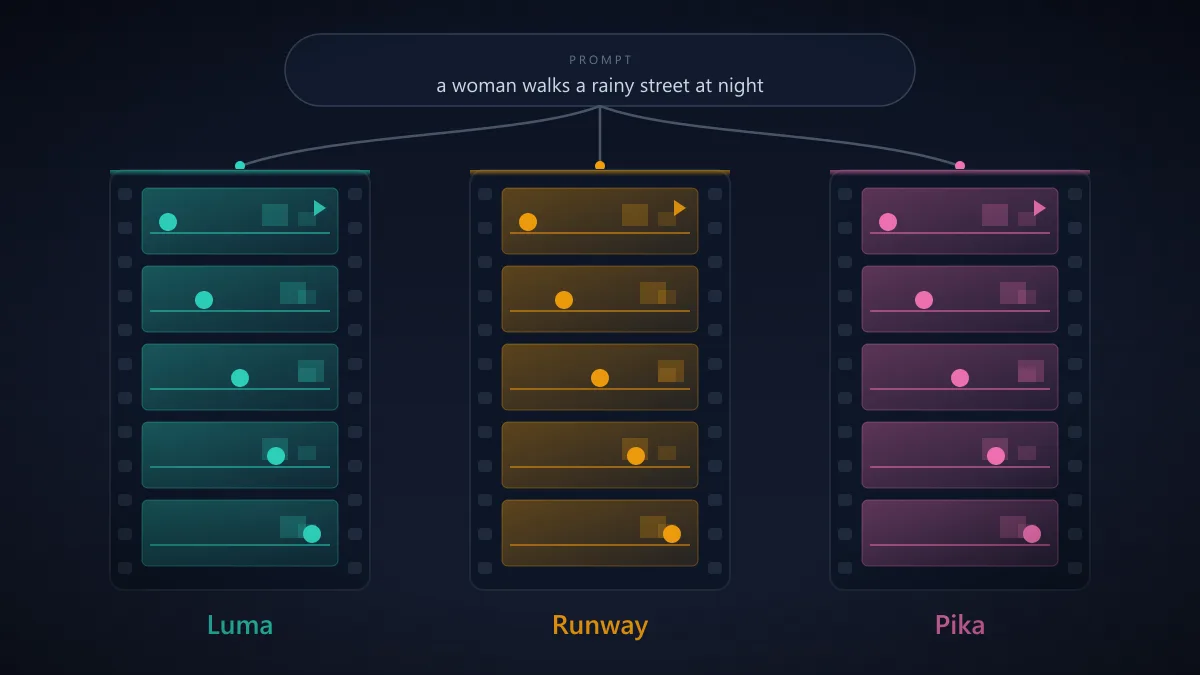
The most direct part of this comparison is also the smallest: one prompt, run through all three AI video generator tools by Jawad Fiaz in October 2026. These are one person's notes, not a benchmark — one scene, one session, no scoring.
I tested the three tools with the same idea: a woman walking through a rainy city street at night, with cars passing behind her and reflections on the wet road. Luma produced the most convincing result for me, particularly with the rain and reflections, although I had to generate the clip three times before I was happy with the woman's walking motion. With Runway, I got a better result after changing the prompt to include a "slow tracking shot following the woman as she walks" instead of simply asking for a woman walking through the street. Pika was faster to experiment with, and the first result was already usable, although it had brighter colors and a more stylized look than Luma. For my own use, I'd pick Luma for realistic scenes, Runway when I need more control over the shot, and Pika for quick social-media experiments.
One Luma vs Runway vs Pika run proves nothing on its own. What it shows is the pattern the rest of this article keeps pointing at: the same brief lands differently depending on how much control the platform hands you, and rewriting the prompt is part of the workflow whatever you subscribe to.
A wider Luma vs Runway vs Pika shortlist has to include the three model families that moved the category this year.
Google's Veo 3.1 arrived on 15 October 2025, with a cheaper Veo 3.1 Lite tier added in March 2026. It generates 4-, 6- or 8-second clips with synchronized dialogue, sound effects and ambient audio, accepts up to three reference images for character and style consistency, and can bridge a first and last frame or extend a scene inside Google's Flow. Google reports that human raters preferred its audiovisual output against other models in side-by-side tests — a vendor-reported result, exactly like Runway's Elo figure. Veo 3.1 is available in the Gemini API, Flow and the Gemini app, and inside Runway itself.
Kling 3.0, from Kuaishou, launched on 5 February 2026: up to 15 seconds with native audio across languages, multi-shot storyboards, and reference-video consistency for characters and scenes. Kuaishou then announced Kling 4.0 on 28 September 2026, with a Flash tier in early access and a wider rollout through October. Kling 3.0 is also rentable on Runway today.
Hailuo runs on MiniMax's H3, published 31 July 2026: up to 15 seconds at 2K with native stereo sound, taking text, image, video and audio as context. MiniMax states its per-second price at 2K is under a third of mainstream models' — the company's own claim, not an audit. H3 appears in Pika's catalogue and in Runway's API lineup.
Why they matter to a Luma vs Runway vs Pika decision: built-in audio and 15-second takes are precisely what the original three do not offer, and all three models are reachable without abandoning a platform you already pay for.
Idea to brief. Write the shot down first — subject, action, camera move, duration, mood. Prompts that name the camera ("slow tracking shot following the subject") outperform prompts that only name the subject; that was the single biggest improvement in the first-hand run above.
Reference and generation. Start from a still — a frame, a product shot, a storyboard panel — whenever the look must match something specific, then generate two or three variants instead of one.
Iteration and consistency check. Pick a take, then re-run only what failed, one variable at a time: motion first, then lighting, then duration. Watch for drift. Faces, reflections and background signage are where short AI clips give themselves away, so scrub the timeline before anything ships.
Edit, audio, export. Assemble — whichever side of the Luma vs Runway vs Pika split you land on — in Runway's editing tools or your usual editor, add music and voice — each platform sells those as separate tools — then export in the format the destination needs: H.264 for feeds, higher-bitrate masters for anything heading into a real edit.
Where the Luma vs Runway vs Pika trio sits in that pipeline: Luma covers generation and control, Runway covers generation through delivery, Pika covers fast low-cost iteration. Human review stays in the loop at three points — rights, frame-by-frame visual review, and whatever labelling rules apply where you publish. Google watermarks Veo output with SynthID, and disclosure requirements vary by platform and region.
Budget is where a Luma vs Runway vs Pika decision gets concrete. All figures come from each vendor's own pricing page on the date shown; re-check before paying, because this market moves monthly.
| Platform | Free access | Paid plans (monthly / billed annually) | Credit notes |
|---|---|---|---|
| Luma | None listed | $9.99/week (first week $4.99); $49.99/month; $99.99/year | 5,000 weekly, 20,000 monthly, 45,000 yearly as listed — check plan details before pre-paying |
| Runway | 125 one-time credits | Standard $15 ($12); Pro $35 ($28); Max $95 ($76) | 625 / 2,250 / 9,500 credits monthly; Gen-4.5 at 12 credits per second, 60 per 5-second clip |
| Pika | $0 plan: 0 monthly credits, packs only | Starter $10 ($8); Creator $35 ($28); Fancy $95+ ($76+) | 900 / 3,150 / 8,550+ monthly credits; Seedance 2.5 five-second clip listed at 122 credits |
There is no blanket "safe for commercial use" answer for Luma vs Runway vs Pika, and the three platforms do not agree.
Underneath all three sits the same rule: a subscription licenses the tool, not the material. Footage you upload, music you include, and brands or people you depict remain your responsibility, and models rented inside these platforms carry that platform's terms for the generation.
A Luma vs Runway vs Pika comparison looks like three ways to type a prompt and get a clip back; it is really three different billing and control philosophies. Luma sells generation control — keyframes, video-to-video, HDR and EXR — on time-based subscriptions with no free tier. Runway sells a budgetable pipeline: published per-second credit costs, editing and delivery tools, and rented third-party models, with a one-time 125-credit look before you pay. Pika sells breadth and speed: every model and app on every plan, no watermark, cheap iteration — but the free plan generates nothing without a purchased pack, and commercial rights start at Creator.
Match the constraint that actually binds you, and the Luma vs Runway vs Pika choice follows from it. If the budget must be predictable per finished second, Runway's published credit math maps directly onto a spreadsheet. If shot-level control and finishing formats matter most, Luma's control surface is the argument. If the job is high-volume, low-stakes experimentation on a small budget, Pika's bundles go furthest. And if a clip needs sound baked in or a 15-second continuous take, Veo, Kling and Hailuo deserve the slot instead. None of those choices is universal — which is why the honest answer to this comparison is a workflow question, not a leaderboard.
Five questions this comparison keeps running into.
What changed in Luma's current models?
Luma now names Ray3.2, released 9 June 2026, as its current video model and marks both Dream Machine and Ray2 as deprecated, so older comparisons are measuring a retired product line. Ray3.2 adds multi-keyframe input of up to 16 keyframes, a video-to-video Modify mode that takes up to 20 seconds of source footage, Reframe, 1080p output, native HDR and 16-bit EXR export.
Is Runway's 125 free credits monthly?
No. Runway's pricing page describes a one-time deposit of 125 credits that does not expire, while paid plans carry the monthly allowances — 625 credits on Standard, 2,250 on Pro and 9,500 on Max. Runway's help documentation also lists Gen-4.5 itself as a Standard-and-above model.
Does Pika still have a free plan?
Yes — a $0 plan — but it includes no monthly credits since the September 2026 rebuild, so generating anything requires a paid plan or a credit pack. Free and Starter accounts can use every model and export without a watermark; the commercial license begins at the Creator plan, $35 per month or $28 billed annually.
Are Veo 3.1, Kling and Hailuo worth considering?
They target the two gaps in the original trio: sound baked into the clip and longer continuous takes. Google's Veo 3.1 builds synchronized dialogue and effects into 4- to 8-second clips, Kling 3.0 generates up to 15 seconds with native audio, and MiniMax H3 — Hailuo's current model — does up to 15 seconds at 2K with stereo sound. You can also reach them without a new subscription: Runway rents Veo 3.1 and Kling 3.0, and Pika lists H3.
Which platform is easiest to budget for?
Runway publishes per-model credit rates and shows each generation's cost before you run it, so cost per finished second is the most predictable of the three — assuming a paid plan, since Gen-4.5 requires Standard or above. Pika's plans are flat credit bundles that include every model, but the free plan includes no credits. Luma sells weekly, monthly and yearly subscriptions with set credit pools, which suits steady use better than occasional experiments.
The Luma vs Runway vs Pika picture moves fast: model names and prices here were checked on 6 October 2026, and where a vendor page disagrees with this article, the vendor is right. The rest of the field lives in the full tool directory.
Get our best AI tool reviews and guides delivered to your inbox each week. No spam, unsubscribe anytime.

Written by
The AI Tools Vault editorial team researches, tests, and reviews the best AI tools across every category.
More reading on comparisons
 Comparisons
A practical comparison of the top AI avatar tools for podcast video snippets — HeyGen, Synthesia, D-ID, Colossyan, Captions, Descript, OpusClip and quso.ai, with 2026 pricing and workflows.
 AI Tools Vault Team
 Comparisons
Seven AI agent frameworks compared for 2026 — LangGraph, CrewAI, LlamaIndex, OpenAI Agents SDK, Google ADK, Microsoft Agent Framework, and PydanticAI — with current status, real trade-offs, and how to choose.
AI Tools Vault Team Comparisons
AI shopping assistants are reshaping how shoppers research products, compare prices, and check out. Here are the ones worth knowing in 2026.
AI Tools Vault Team