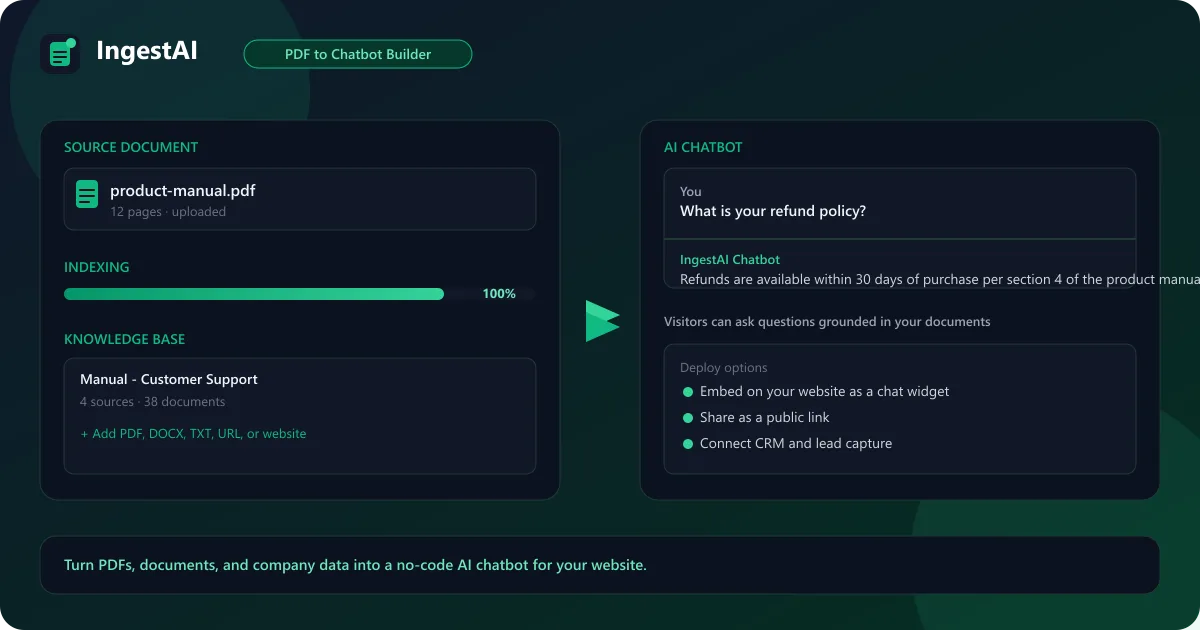
It is a tool for converting documents, PDFs, and company data into a working chatbot. Instead of answering from general knowledge, your chatbot answers exclusively from the content you connect, which keeps responses accurate, on-brand, and grounded in your own material.
It launched in 2023 as a no-code knowledge base platform and is now used by startups and enterprise teams to turn support docs, sales collateral, and internal wikis into conversational assistants that handle questions around the clock.
How to Convert PDF to Chatbot with IngestAI
Converting a PDF to a chatbot takes four steps. Create a knowledge base, upload your PDFs, let the platform index and embed the content, then embed the finished chatbot on your website or share it as a public link. No code is involved at any point.
The same flow works for DOCX, TXT, spreadsheets, single URLs, and full website crawls, and OCR support means scanned documents become searchable too. Each source can be updated independently, so the chatbot always reflects your latest documentation. Rebuilding after a file change is a one-click re-index rather than a manual process.
PDF, DOCX, TXT, and spreadsheet uploads
Single URLs and full website crawling
OCR support for scanned documents
One-click re-index after source updates
IngestAI No-Code Knowledge Base
The no-code knowledge base is the core selling point for non-technical business users. You never touch a terminal or an API key: everything happens in a visual dashboard, from uploading sources to previewing the chatbot before it goes live. A sales manager can ship a trained assistant in an afternoon.
Each knowledge base is independent, so you can train separate chatbots for support, sales, HR, or product documentation and update them individually. The platform handles the chunking, embedding, and retrieval automatically, so accuracy depends mainly on the quality of the sources you connect.
How to Chat with Internal Documents Using AI
Internal teams use document AI chat every day: onboarding staff on policy docs, letting analysts query reports, and helping support agents find answers in a help center. The chatbot returns citations from the source material, so anyone can verify an answer in seconds rather than trusting it on faith.
Because answers come from internal documents rather than general training data, results stay consistent with company process and don't drift into off-brand responses. That grounding is what separates a document AI chatbot from a general-purpose assistant.
The practical payoff is fewer interruptions: a support agent can ask a question and get a sourced answer instantly, a new hire can learn the handbook without pestering colleagues, and an analyst can pull figures from a report without reading the whole file.
Answers include citations from the source document
Consistent responses grounded in company process
Suited to onboarding, support, and analyst queries
IngestAI Pricing — Free vs Paid Plans
It is freemium. The free plan includes 50 queries per month, which is enough to build and test a real chatbot before paying anything. Basic costs $25/month for 1,000 queries, Pro costs $60/month for 3,000 queries, and Business starts around $125/month for custom volumes and enterprise features.
Pricing is metered by queries rather than pages or seats, so costs track actual usage and a small team never subsidizes a large one. That usage-based model is the main reason free and paid setups coexist so cleanly. Upgrading is a billing change, not a migration: the same knowledge bases and widget keep working on every tier.
Compare Plans & Pricing
Free plan with 50 queries/mo; Basic $25/mo for 1,000 queries; Pro $60/mo for 3,000 queries; Business from $125/mo for custom volumes
The most popular free IngestAI alternatives come from adjacent categories. Notion AI brings document answers to teams already living in Notion, Otter AI transcribes meetings and makes them searchable, and Make automates document workflows across hundreds of apps on a generous free plan.
None of them is a one-for-one chatbot builder, but together they cover the three most common reasons people evaluate the tool: finding answers in documents, capturing team knowledge, and moving data between tools automatically. If your real need is a customer-facing assistant trained on PDFs, a dedicated builder still does the job better.
Notion AI
ProductivityFreemium
Best for: Notes, summaries & workspace writing
AI-powered workspace assistant integrated into Notion for writing, summarizing, and organizing.
IngestAI, Chatbase, and SiteGPT all solve the same problem: turning your content into a chatbot customers can talk to. It leans on query-based pricing and a no-code knowledge base, Chatbase is known for fast setup and granular analytics, and SiteGPT focuses on website-wide crawling for support teams.
For a custom AI chatbot for your website, any of the three works well. IngestAI tends to win on flat, usage-based pricing, while Chatbase and SiteGPT stand out on polish and site-crawl coverage. The deciding factor is usually how you want to be billed and how much of your content lives on your site versus in documents.
Pros and Cons
One of the quickest ways to turn a pile of PDFs into a working customer-facing chatbot, with pricing that follows real usage and a setup process anyone on the team can manage. Support, sales, and product teams each get a distinct knowledge base, and the free tier is a genuine, running product rather than a teaser. The trade-offs are the query cap on the free plan and the fact that output quality mirrors the documents you feed it.
Pros
No-code setup from PDFs, URLs, and knowledge bases
Answers grounded in your own documents
Deployable as a website chat widget or public link
Lead capture with CRM and email integrations
Pricing scales on queries, not pages
Cons
Free plan limited to 50 queries per month
Higher-tier plans needed for large teams
Complexity and quality depend on your source content
Less suited to open-ended creative chat
Best For
Recommended use cases and scenarios where IngestAI shines.