Best AI Image and Video Generation Tools in 2026
The best AI image and video generation tools in 2026 — Midjourney, ChatGPT Images, Ideogram, and Runway compared for quality, features, and pricing.

The best AI image and video generation tools in 2026 — Midjourney, ChatGPT Images, Ideogram, and Runway compared for quality, features, and pricing.
The best AI image and video generation tools in 2026 turned "describe it, get it" from a party trick into daily production. A sentence becomes a photorealistic portrait; a script becomes a polished clip with motion and sound. The choice you make now decides whether you ship stunning content in an afternoon or spend weeks wrestling the wrong tool. This guide covers four current tools and flags two well-known ones that are no longer available, so you don't waste time on them.
A note on testing: I personally tried ChatGPT's image generation and Ideogram with one prompt each, and I've shown the results below. The other tools in this guide are researched overviews based on published plans and features, not my own hands-on tests.
In this guide we compare four tools: Midjourney, ChatGPT Images and Ideogram for images, and Runway for video. DALL-E and Sora, which older guides still recommend, are no longer available (see the notes below).
AI image generation tools turn a text prompt into finished artwork, while AI video generation tools go further and animate it into motion with camera movement, lighting, and scene changes. Both are powered by diffusion and transformer models trained on vast visual datasets, and both let you iterate by describing what you want to change.
They matter because they compress the longest part of creative work — the gap between the idea and the artifact. Instead of commissioning a shoot or sketching by hand, you generate a first draft instantly, then refine it. The tools in this guide differ mainly in output quality, control, and where they sit in your existing workflow.
Creators adopted AI generation tools because the payoff is immediate and measurable: faster turnaround, cheaper iteration, and the ability to explore directions that would be too expensive to art-direct by hand. Three patterns explain the momentum:
The tradeoff is that quality still varies by tool and by prompt — which is exactly what the comparisons below are for.
Here's how the three AI image generation tools in this guide compare, with pricing and limits based on our current directory data.
Midjourney is the gold standard among AI image generation tools — the one every other image generator gets compared against. Ask for a cinematic shot of a lighthouse in a thunderstorm and it returns something that looks like it belongs on a movie poster; its blend of photorealism and artistic style is unmatched in the category.
Key features: it runs through Discord and the web app, supports upscaling, inpainting, style references, and — since the latest model updates — surprisingly good text rendering. The community and constant model improvements mean it rarely sits still for long.
Pricing: no free tier. Basic is $10/mo, Standard $30/mo, Pro $60/mo, and Mega $120/mo. The Standard plan is the sweet spot for most creators. Read the full Midjourney review.
Best for: designers, artists, and marketers who want premium, portfolio-grade images.
ChatGPT Images is OpenAI's current way to make images inside ChatGPT. You describe what you want in a normal conversation, ask for changes, and get a new version, with no separate tool to learn.
I tested ChatGPT's image generation on a free account on October 5, 2026 with a simple poster prompt: a minimalist coffee shop poster with the text "OPEN DAILY 7AM" in bold letters, warm colors, flat design. The text came out spelled correctly in bold lettering, and the result matched the flat, warm-toned style I asked for, with a coffee cup, steam and a plant.
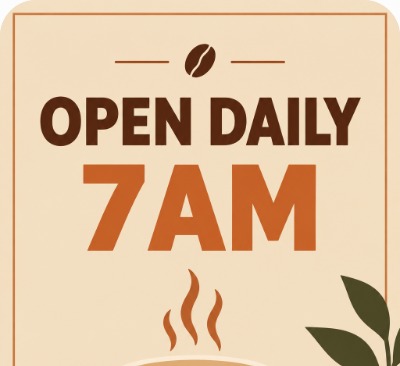
ChatGPT image generation, free account, October 5, 2026. Prompt: minimalist coffee shop poster with the text OPEN DAILY 7AM.
A note on DALL-E: many older guides still list DALL-E as the image tool in ChatGPT. OpenAI removed the DALL-E 2 and DALL-E 3 models from its API on May 12, 2026, and is retiring the official DALL-E GPT inside ChatGPT on August 30, 2026. Image generation continues through ChatGPT Images, which runs on OpenAI's newer image models.
Key features: conversational prompting, the ability to edit or regenerate parts of an image, and everything else you already do in ChatGPT, such as drafting the copy that goes with the image.
Pricing: available on free ChatGPT accounts with limits, with higher limits on paid plans. Check OpenAI's current plan page for exact limits and prices.
Best for: beginners, content teams and anyone who wants solid images with no new tools.
Ideogram built its name on something most image models still struggle with: rendering legible text inside images. Logos, posters, greeting cards, and UI mockups with real words come out crisp, which makes it the practical pick for design and marketing work.
Key features: strong text rendering, style presets, and a clean web interface that's far friendlier than Discord. It's also among the more generous free tiers in the category.
Pricing: Free, Plus at $20/mo, Pro at $60/mo, and Team at $30/seat/mo. Read the full Ideogram review.
Best for: marketers and designers who need typography and branding to render correctly.
I tried Ideogram on a free account on October 5, 2026 with a photorealistic prompt: an elderly fisherman mending a net at sunrise, natural light, 35mm lens. One generation returned multiple images, and the Generate button showed a cost of about 12 credits. The results looked photorealistic, with a fisherman on a wooden dock, a net, boats and soft light. I only ran this one portrait prompt, so I can't speak to how it handles other styles.
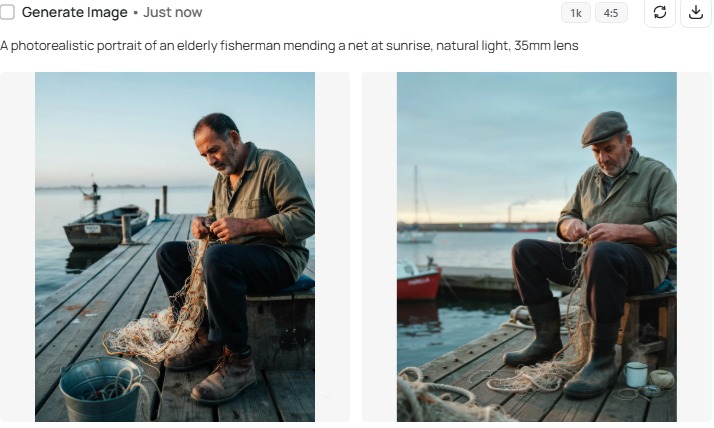
Ideogram, free account, October 5, 2026. Prompt: photorealistic portrait of an elderly fisherman mending a net at sunrise.
Here's the current video tool in this guide, plus a note on Sora, which is no longer available.
Runway is the creative professional's pick and the most complete AI video generation tool for editors. Its Gen-4 models generate clips with strong consistency, and the toolkit goes far beyond text-to-video: motion brushes, camera controls, frame interpolation, and green-screen effects that slot into a real editing pipeline.
Key features: text-to-video, image-to-video, motion and camera controls, and an editor that treats AI clips as footage to refine rather than finished output.
Pricing: a free plan with 125 credits/mo, Standard at $15/mo for casual creators, and higher tiers for teams. Read the full Runway review.
Best for: editors, motion designers, and anyone who wants control over the final cut.
Sora was OpenAI's AI video tool, but OpenAI announced in March 2026 that it was shutting down the Sora app and API. Older guides, including earlier versions of this one, still list it as a top pick, so don't plan a workflow around it. If you want a Sora-style alternative, Google's Veo and ByteDance's Seedance are two competitors often mentioned alongside it. We haven't reviewed either here, so check their current plans and terms yourself.
Match the tool to the output, not the hype:
Start with the free tier of whichever matches your first real project, generate twenty things, and only pay once the tool has proven itself. The right pick is the one that disappears into your workflow — not the one with the longest feature list.
| Tool | Type | Free tier | Entry paid plan | Link |
|---|---|---|---|---|
| Midjourney | Image | None | $10/mo Basic | Review |
| ChatGPT Images | Image | Yes, with limits | Paid ChatGPT plans (check current price) | |
| Ideogram | Image | Free plan | Plus $20/mo | Review |
| Runway | Video | 125 credits/mo | Standard $15/mo | Review |
Pricing changes often and varies by region, so always check the current plans before committing. ChatGPT Images is built into ChatGPT, Midjourney is the premium image option with no free tier, and Ideogram and Runway both offer free plans. Sora is not listed because it has been discontinued. Start free, run one real project, and pay only once the tool earns it.
What is the best AI image and video generation tool? Midjourney leads among AI image generation tools for artistic quality, ChatGPT Images for effortless generation inside ChatGPT, Ideogram for images with accurate text, and Runway for creative video control. Pick by your output, not the hype.
Which is better, Midjourney or ChatGPT Images? Midjourney produces more artistic, cinematic images but has no free tier. ChatGPT Images is easier to use inside ChatGPT, understands conversational prompts well, and is available on free accounts with limits, so the choice comes down to peak quality or simplicity.
Is Sora still available? No. OpenAI announced in March 2026 that it was discontinuing the Sora app and API. Runway is the video tool covered in this guide, with motion brushes, camera controls and effects for editors. Check OpenAI's current announcements for any related video features inside ChatGPT.
Are there free AI image and video generation tools? Yes. ChatGPT Images is available on free accounts with limits, Ideogram has a free plan, and Runway offers limited free credits. Midjourney starts at $10/month.
Can I use AI-generated images and videos commercially? It depends on the tool and plan, so read each tool's current license before using output commercially, and don't assume a free plan allows it. Avoid prompting for a specific artist's style.
The bottom line: There's no single best AI image and video generation tool — the right one depends on the job. Start with the free tier that matches your output, then compare your shortlist in the AI Tools Vault directory or side by side with the compare tool. Most of these tools let you test the core experience before you pay, though Midjourney requires a paid plan from the start.
Get our best AI tool reviews and guides delivered to your inbox each week. No spam, unsubscribe anytime.

Written by
The AI Tools Vault editorial team researches, tests, and reviews the best AI tools across every category.
More reading on guides & how-to
 Guides & How-To
Six free AI photo enhancers, six different deals. What each free tier really allows, what AI cannot recover, and how to check a result before trusting it.
 Jawad Fiaz
 Guides & How-To
Zoom transcription turns meeting audio into text. Learn the difference between transcripts, captions, and AI summaries, how to enable them, and when to use third-party tools.
Jawad Fiaz Guides & How-To
An AI agent icon can name an agent, mark an AI feature, show live status, or point at a tool. Here is what the common symbols mean, where to find one, and what to check before you ship it.
AI Tools Vault Team