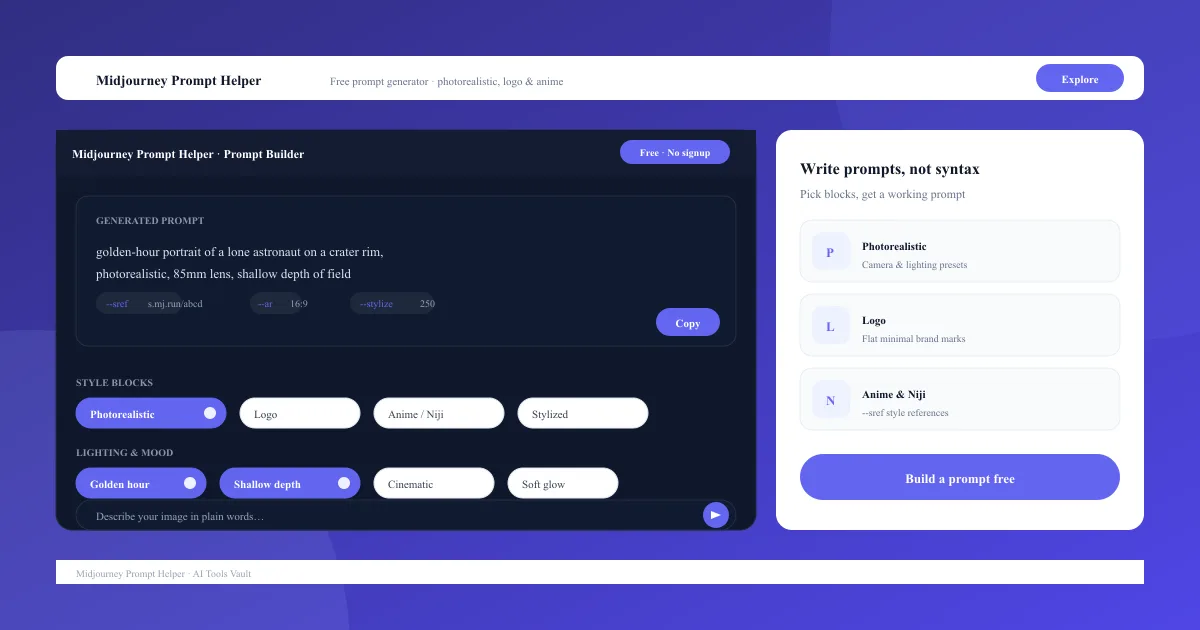
A Midjourney prompt helper is a browser tool that writes detailed Midjourney prompts for you. Instead of memorizing syntax, parameters, and style keywords, you pick from curated building blocks — subjects, art styles, lighting, mood, camera settings, and quality terms — and the tool assembles a complete, ready-to-paste prompt. It is a writing aid for Midjourney, not a replacement for the image generator itself.
The payoff is better prompts in less time. Because the helper handles structure and flags for you, beginners stop guessing and regular users spend their creative energy on the idea rather than the syntax. It runs entirely in the browser, needs no account, and never charges for the prompts you build.
Curated blocks for subjects, styles, and lighting
Correct parameter syntax every time
Copy-and-paste output for Midjourney
Free, with no account required
How to Use the Midjourney Prompt Generator
Using it takes about thirty seconds. Describe the image you want in your head — a subject, a mood, a style — then select matching blocks in the generator. Choose the output type, photorealistic, logo, or anime, set a few parameters, and the Midjourney prompt generator prints a formatted prompt you can paste straight into Midjourney.
You can also tweak advanced flags directly. Aspect ratio, stylize, chaos, and style-reference codes all have labeled fields, so the tool outputs clean syntax every time. Most people use it for a handful of prompt types, then reuse their favorites as the starting point for new ideas.
Pick a subject and style block
Choose photorealistic, logo, or anime output
Set parameters in labeled fields
Copy the finished prompt into Midjourney
Midjourney Photorealistic Prompt Builder
For realistic images, the helper loads camera and lighting blocks — golden hour, shallow depth of field, an 85mm lens — that turn a flat description into a believable scene. Selecting these blocks is what separates a generic render from a photorealistic one.
Combine a clear subject with photographic terms and the tool orders them the way Midjourney expects. Paste the result into Midjourney and the photorealistic builder has effectively written the prompt for you, leaving only the aspect ratio and a couple of quality flags to decide.
Camera and lens settings built in
Lighting and mood presets
Photorealistic style keywords
Works with --ar and --stylize
Midjourney Logo Prompt Generator
Logos need a different prompt style: flat design, minimal shapes, a strong color palette, and clean typography. The logo prompt generator templates all of that, so you can describe a brand idea and get a logo-ready prompt instead of a muddy illustration.
It works well for logo concepts, app icons, and brand marks. The helper keeps the structure minimal and adds the style cues that stop Midjourney from over-decorating a simple mark, which is the most common reason logo renders fail.
Flat and minimal logo styles
Color palette suggestions
Brand mark and icon templates
Consistent, reusable outputs
Anime and Niji Style Prompt Helper
Midjourney has a dedicated anime model, Niji, with its own visual language. The anime and Niji preset builds prompts tuned to that model — cel shading, expressive eyes, studio compositions — so results match the Niji look instead of the default photorealistic style.
Pick Niji mode, describe the character and scene, and the Midjourney prompt helper adds the style tokens and parameters the model expects. It is the fastest way to get consistent anime output without learning Niji's quirks for yourself.
Niji model presets
Cel shading and anime style tokens
Character and scene blocks
Matches the Niji aesthetic
Midjourney Prompt Helper Pricing — Free vs Paid
The helper itself is free. There is no paid tier, no account, and no limit on how many prompts you build. The only real cost is the Midjourney subscription you pair it with — Basic at $10 per month is enough to start generating images from the prompts you create.
That makes the value easy to justify: the helper improves the subscription you already pay for and costs nothing extra. If you are still comparing options, the free plan is genuinely full-featured, so nothing is gated behind an upsell.
Compare Plans & Pricing
Free $0 — the helper itself has no paid tier; pairing it with a Midjourney subscription starts at $10/mo
Most prompt helpers fall into two groups: standalone generators like this one, and prompt libraries where you copy prompts written by others. A helper that builds prompts from your own words is more flexible than copying, because it produces unique phrasing instead of reused lines that everyone else is already running.
A few tools worth comparing: Prompthero is a prompt library with a small generator, MidLibrary focuses on saved prompts, and Noonshot pairs prompt generation with a gallery. For most users this tool wins on speed — one click assembles a structured, unique prompt — while libraries are better when you want inspiration from thousands of examples.
ChatGPT vs Midjourney Prompt Helper
ChatGPT can write Midjourney prompts too — you describe the image and it drafts a paragraph of prompt text. The tradeoff is consistency. A Midjourney prompt helper applies a fixed, validated template every time, so you know the syntax and parameter order will work before you paste it into Midjourney.
ChatGPT is better for open-ended creative brainstorming and one-off ideas. This tool is better when you generate images regularly and want the same reliable structure, plus templates for photorealistic, logo, and anime work. Many creators use both: brainstorm in ChatGPT, then build the final prompt in a helper.
Pros and Cons
The tool is the easiest way to write structured prompts, and at free with no account it costs nothing to try. Its limits are the flip side of its focus: it does not generate images and it is built around Midjourney's format.
Pros
Free with no account or signup required
Photorealistic, logo, and anime prompt templates
Assembles correct Midjourney syntax automatically
Supports modern parameters like --sref
Cons
Does not generate images itself
You still need a Midjourney subscription
Templates favor Midjourney's format only
Not an image editor
Best For
Recommended use cases and scenarios where Midjourney Prompt Helper shines.
Common questions about Midjourney Prompt Helper, answered.
Is the Midjourney prompt helper free?
Yes. It is completely free, with no account and no usage limits. You build prompts in your browser and copy them into Midjourney.
How do I use a Midjourney prompt generator?
Select blocks for your subject, style, lighting, and mood, choose photorealistic, logo, or anime output, then copy the assembled prompt and paste it into Midjourney. Parameters are formatted for you.
Can the prompt helper generate images?
No. It writes prompts only. You need a Midjourney subscription to generate the images; the helper just makes your prompts better.
What is --sref in Midjourney?
--sref is the style-reference parameter introduced around Midjourney v6/v7. It lets you reuse a visual style across images. A good prompt helper includes a field for it, so you can paste a style URL without memorizing the flag.
Do I still need Midjourney itself?
Yes. The helper is a companion tool, not a substitute for Midjourney. It helps you write prompts; Midjourney generates the images.
Reviews & Ratings
Loading reviews...
Explore More Image Generation Tools
Browse the full AI Tools Vault directory to compare Midjourney Prompt Helper with every image generation tool, or line up your shortlist side by side.