

Skip to content
Moonbeam Writing AI tool logo

Moonbeam AI Review: Long-Form Content From Notes to Finish

WritingFreemium
Best for: Long-form essays, blogs, articles, and newsletters written with Moonbeam AI

Moonbeam AI is a long-form writing assistant that turns your notes into structured outlines and polished drafts with its Luna engine.
Founded 2022
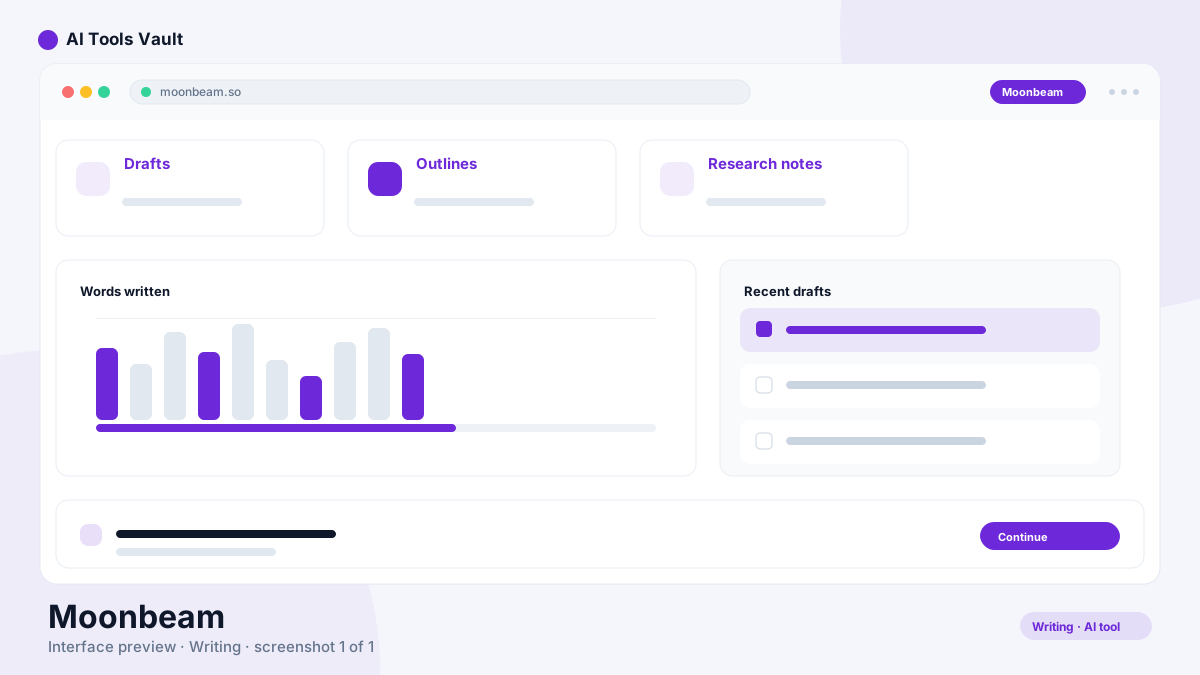
Moonbeam AI editor showing a long-form article outline with sections ready to draft

What Is Moonbeam AI?

Moonbeam AI is a long-form writing assistant built for essays, stories, articles, blogs, newsletters, and long-form threads. Instead of a chat box, it gives you a writing workspace where notes become a structured outline, and the outline becomes a full draft.
The product launched in 2022 and is the project of founder John Shahawy, run by a small, independent team. At its core is Luna, the writing engine that drafts paragraphs and sections in your chosen style, plus the Wizard, which automates the notes-to-outline-to-draft pipeline.
Where short-copy tools generate captions and ads on demand, it stays with you through a whole piece, from first idea to finished article — which is why long-form writers, not social teams, form its natural audience.
  • AI writing assistant for essays, stories, articles, blogs, and newsletters
  • Notes-to-outline-to-draft workflow in a single workspace
  • Luna engine drafts paragraphs and sections in your chosen style
  • Launched in 2022 by founder John Shahawy

How It Works

You pick a content type and drop in your notes or a topic. It generates a structured outline you can reorder and revise before any prose is written — the moment most long-form projects either hold together or fall apart.
From there you draft section by section, or run the Wizard for a full first pass. Luna writes to the structure, the Custom Style generator keeps the voice consistent, and edits happen inline or through Smart Chat.
The result mirrors how humans actually produce long-form work: plan, structure, draft in sections, then revise with a second set of eyes on the text.
  • Choose a content type and add notes or a topic
  • Review and reorder the outline before drafting
  • Draft section by section or use the Wizard for a full pass
  • Refine inline or via Smart Chat and Ask Luna

Key Features

Everything below lives inside the editor, so outlining, drafting, researching, and revising happen without leaving the document.

Long-Form Writing

The editor is built around long-form output: a piece is structured into sections, each one drafted independently inside the outline, and Boss Mode drafts every section of a work at once when you want the full first pass in one shot. The tool does the heavy drafting while you keep control of structure and flow.
  • Genre-aware outlines for essays, stories, articles, and blogs
  • Boss Mode drafts every section of a piece at once
  • Section-by-section drafting keeps the structure honest
  • Public drafts for easy sharing and feedback

Templates and Writing Workflow

Rather than a blank page, you start from a template suited to the format — essays, blogs, how-to guides, technical guides, newsletters, and threads. The Wizard collects your topic, notes, and tone, then returns an outline in seconds, and the Custom Style generator learns from your writing samples so the output matches your voice on the first pass.
  • Templates span essays, blogs, how-to guides, technical guides, newsletters, and threads
  • Wizard turns topic, notes, and tone into an outline in seconds
  • Custom Style generator learns from your own writing samples
  • New templates ship in beta as the library grows

AI Editing and Refinement

Smart Chat is powered by GPT-4: highlight any passage and ask it to rewrite, polish, improve, or shorten with pre-defined prompts. Ask Luna fields questions about your existing text, so you can interrogate what is already on the page instead of starting over.
  • Smart Chat (GPT-4) refines highlighted passages on demand
  • Pre-defined prompts for rewrite, polish, improve, and shorten
  • Ask Luna answers questions grounded in your text
  • Edits stay inline and in your writing flow

Research and Content Development

Content Cluster turns a keyword into ten or more content ideas, post outlines, and full blog posts, grouped into folders for planning. For early-stage research, it can quickly pull together a concise outline of a topic for you to review before committing to a draft.
  • Keyword to content ideas and post outlines in a couple of clicks
  • Folders keep topic clusters organized
  • Quick research summaries for early outlines
  • Built for editorial and content-planning workflows

Collaboration and Other Features

A collaboration mode brings Google Docs-style real-time editing for teams that write together. Drafts can be published as public pages for feedback, rich media can be embedded in the editor, and a free Chrome extension keeps your notes close at hand while you browse.
  • Real-time collaboration mode for shared writing sessions
  • Public draft publishing for sharing and feedback
  • Rich media embedding inside the editor
  • Chrome extension for capturing notes as you browse

Moonbeam AI Pricing

Moonbeam AI starts with a free plan that includes the core writing tools, so you can run a real piece through the workflow before paying. Paid access comes as Pro and Team, both covered by a 30-day, 100% money-back guarantee.
Pro is billed yearly at $49 per month and unlocks unlimited long-form writing, unlimited social posts, all of the AI writing tools, Boss Mode, Moonbeam Chat, Ask Luna, the Wizard, the custom style generator, and every template, for a single user.
Team is $99 per seat per month and adds collaborative real-time editing, integrations with your tools, multiple users, and priority support. It is quoted through the contact details on the official pricing page.

Compare Plans & Pricing

Moonbeam AI offers a free plan for core writing tools. Pro is billed yearly at $49 per month; Team is $99 per seat per month. Paid plans carry a 30-day 100% money-back guarantee.

Most Popular

Pro

$49/ month

The full Moonbeam writing toolkit with unlimited long-form writing for a single user, billed yearly.

  • Unlimited long-form writing
  • Unlimited social posts
  • All AI writing tools (Boss Mode, Moonbeam Chat, Ask Luna)
  • Moonbeam Wizard
  • Custom style generator
  • All templates
  • Billed yearly, 1 user
Start with Pro

Team

$99/mo seat

Everything in Pro plus real-time collaboration, integrations, and priority support for teams.

  • Everything in Pro
  • Collaborative real-time editing
  • Integrate with your tools
  • Multiple users
  • Priority support
Contact Us

Who Should Use It

It suits writers whose day is long-form: bloggers producing weekly articles, educators writing essays and lesson plans, marketers drafting in-depth guides, and authors working on stories. If you need two thousand words of structured, in-your-voice prose, this is built for exactly that.
It is a weaker fit for social teams that mainly need short copy, and for enterprise publishing teams that depend on heavy editorial workflow governance. Those buyers usually get more from short-copy tools or platform-grade writing suites.
  • Bloggers publishing long articles and in-depth guides
  • Educators writing essays, lesson plans, and assignments
  • Marketers drafting long-form storytelling and SEO content
  • Authors working on stories and book-length projects

Security and Privacy

Moonbeam's privacy policy is operated by Go Moonbeam LLC and was last updated in August 2022. It states that the company collects names, email addresses, and contact preferences, and that payment data is processed by the payment provider Stripe.
The policy does not claim certifications such as SOC 2 or ISO 27001, and it explicitly notes that no method of transmission over the internet can be guaranteed as 100% secure. It also states the product is not intended for anyone under 18, and that closing your account removes your information from active databases, with retention possible where the law requires.
Writers handling sensitive or unpublished material should review the current privacy policy before submitting confidential drafts: as of the August 2022 revision, the policy does not clearly specify how AI inputs and generated content are stored or whether they inform model training.
  • Privacy policy operated by Go Moonbeam LLC (last updated August 2022)
  • Payments processed by Stripe
  • No SOC 2 or ISO 27001 certification claimed in the policy
  • Account deletion with legal-retention caveats
  • Product not intended for users under 18

Moonbeam AI Alternatives

Close comparisons inside the directory are other long-form writing assistants. Sudowrite is a fiction-focused tool for novels and stories. MyEssayWriter.ai targets academic essays with research-backed drafting. Rytr and Writesonic are general writing assistants oriented toward content generation across formats.
Where Sudowrite leans into fiction craft and MyEssayWriter into academic structure, Moonbeam AI sits in the middle: a long-form assistant that handles essays, blogs, and articles with a notes-to-draft pipeline. Non-fiction long-form writers get the fastest fit here.
Sudowrite AI tool logo

Sudowrite

WritingFreemium
Best for: Fiction writing and novel creation

Sudowrite is an AI writing tool built specifically for fiction writers and novelists, offering brainstorming, drafting, and revision tools that help create novels from outline to final draft.

Rytr AI tool logo

Rytr

WritingFreemium
Best for: Affordable AI copywriting & content generation

An AI writing assistant that generates blog posts, emails, ads, and social copy in seconds across 35+ languages with a generous free plan.

Writesonic AI tool logo

Writesonic

WritingPaid
Best for: AI content writing & search visibility

AI writing platform now focused on AI Search Visibility (GEO) to help brands get cited by ChatGPT, Gemini, and other AI answers.

MyEssayWriter.ai AI tool logo

MyEssayWriter.ai

Research & EducationFreemium
Best for: Cited academic essay drafting

AI essay writer that drafts research-backed essays with real scholarly sources, formatted citations, and a 30-tool writing suite.

Moonbeam AI Pros and Cons

The strengths are the structured notes-to-draft workflow, the Luna engine's long-form drafting, a genuinely usable free plan, and custom styles that keep machine prose in your voice. For content-first writers, it removes the blank-page problem entirely.
The trade-offs are the premium price point, the narrow long-form focus at the expense of short copy, and lighter team features compared with enterprise suites. Individual long-form writers tend to get the most value; volume short-copy teams are better served elsewhere.

Pros

  • Purpose-built for long-form writing, not short copy
  • The Wizard turns notes into a structured outline and a full first draft
  • Luna engine drafts entire sections in your chosen style
  • Smart Chat (GPT-4) refines passages by highlighting text
  • Content Cluster turns a keyword into content ideas and post outlines
  • 30-day money-back guarantee and a free plan to test the workflow

Cons

  • Pro at $49 per month billed yearly sits at the premium end of writing assistants
  • Long-form focus means weak short-copy and ad generation
  • Team plan requires contacting sales rather than self-serve checkout
  • Free-plan limits are not spelled out, so scaling means deciding between Pro and Team
  • Drafts still need a human pass for facts and personal details before publishing

Best For

Recommended use cases and scenarios where Moonbeam shines.

Frequently Asked Questions

Common questions about Moonbeam, answered.

What is Moonbeam AI?

Moonbeam AI is a long-form writing assistant that turns your notes into a structured outline, then drafts full essays, blogs, articles, and newsletters with its Luna engine.

How does Moonbeam AI work?

You add notes or a topic, review the generated outline, then draft section by section or run the Wizard for a full first pass. Luna writes in your chosen style, while Smart Chat and Ask Luna handle editing and questions.

What can you write with Moonbeam?

Essays, stories, articles, blogs, newsletters, lesson plans, and long-form threads. It is trained for long-form content rather than short marketing copy such as captions or ads.

Is Moonbeam AI free?

There is a free plan with the core writing tools, so you can test the workflow before paying. Pro is $49 per month billed yearly, and Team is $99 per seat per month, both with a 30-day money-back guarantee.

How much does Moonbeam AI cost?

Pro is $49 per month billed yearly for one user with unlimited long-form writing. Team is $99 per seat per month and adds real-time collaboration, integrations, multiple users, and priority support.

Who founded Moonbeam?

Moonbeam was founded by John Shahawy and launched in 2022. It is run by a small, independent team.

Is Moonbeam AI good for long-form writing?

Yes. It is purpose-built for long-form work with outlines, section-by-section drafting, Boss Mode, and custom styles. Fiction-focused writers may still prefer Sudowrite for novel drafting.

Reviews & Ratings

Share your experience

Your rating

Loading reviews...

Explore More Writing Tools

Browse the full AI Tools Vault directory to compare Moonbeam with every writing tool, or line up your shortlist side by side.

Similar Tools

More Writing tools you might like

Grammarly AI tool logo

Grammarly

WritingFreemium
Best for: Grammar, spelling & tone correction

AI writing assistant for real-time grammar, spelling, tone, and style correction across the web.

QuillBot AI tool logo

QuillBot

WritingFreemium
Best for: Paraphrasing & grammar checking

It is the AI paraphrasing and grammar tool that rewrites, checks, summarizes, and humanizes your writing in one suite.

Wordtune AI tool logo

Wordtune

WritingFreemium
Best for: AI rewriting, paraphrasing & summaries

An AI writing assistant that rewrites and rephrases text in place, checks grammar, adjusts tone, and summarizes documents and videos.