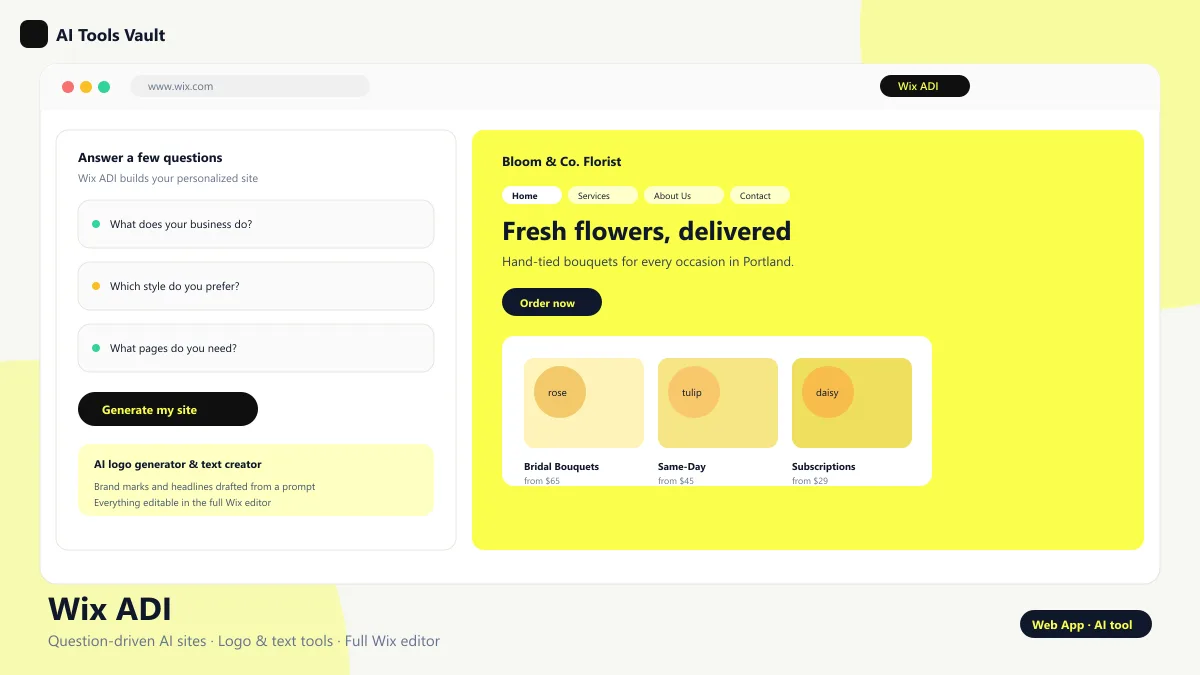
The name stands for artificial design intelligence; it is Wix's AI website builder. Instead of a blank canvas, you answer a short series of questions about your industry, goals, and style, and the AI assembles a personalized site with relevant sections, copy, and imagery matched to your business.
The key difference from most AI builders is what happens next: the generated site is handed to you inside the complete Wix editor, where every element stays editable. You get the speed of an AI-first tool with the control of a traditional website builder underneath.
How Wix ADI Builds Your Website
The process starts with a short onboarding flow: you describe your business type, pick a general direction, and answer a couple of questions about the pages you need. From those answers, the artificial design intelligence proposes a layout, selects images, and drafts text for each section, producing a coherent first version in minutes.
After generation, you move into the standard Wix editor and can change anything — colors, fonts, sections, and copy — using drag-and-drop tools. Because the underlying platform is the full Wix product, adding apps like booking, e-commerce, or analytics is a native step rather than a workaround.
Question-driven site generation
Industry-matched sections and imagery
Drafted copy you can edit
Continues in the full Wix editor
Wix ADI Logo Generator and Text Creator
Alongside site generation, Wix offers an AI logo maker that builds a brand mark from a few prompts, plus text-creation tools that draft headlines and page copy. For a new business, that removes two of the most common outside costs: logo design and copywriting.
The generated logo can be refined in the editor and reused across the site, and the text tool drafts content for pages and campaigns in the same workspace. Quality is strong for small-business needs, and everything stays consistent with the design already generated.
Wix ADI Limitations and Problems
The honest limitations matter before you commit. The free plan publishes on a Wix subdomain with Wix ads and branding, the AI design is a starting point rather than a finished layout, and the full editor is powerful enough to feel overwhelming for complete beginners.
Some users also find the generated structure harder to bend than building from scratch — moving sections and restructuring pages takes more effort than the AI pitch suggests. If you need maximum speed or bundled business tools, standalone builders like Durable AI or Hostinger AI are often the better fit.
How to Switch from Wix ADI to Standard Editor
Switching to the standard Wix editor is straightforward. In the Wix dashboard, open the site you built, look for the edit option, and choose the classic editor view. Your pages, text, and images carry over, so you are not starting over — you are trading the AI-guided flow for full manual control.
The reverse move matters too: if you start in the standard editor, Wix can use your existing content to generate an ADI-style draft for comparison. Neither switch deletes your work, which makes the tool unusually safe to experiment with.
Wix ADI Pricing — Is It Free to Use?
The builder itself is free: answering the questions and generating a site costs nothing, and the permanent Free plan lets you publish on a Wix subdomain. The trade-off is Wix ads and a Wix-branded URL, which is how the free tier pays for itself.
Paid plans remove the ads and add a custom domain: Light at around $17 per month and Core at around $29 per month on annual billing, with more storage and business apps at higher tiers. If your question is simply whether the builder is free to use — yes, it is, and the free plan is genuinely permanent.
Wix ADI vs Durable AI
The two tools both generate websites from answers, but they aim at different owners. The first hands you a site inside the full Wix editor with a huge template and app ecosystem, which suits people who want to keep designing after the AI start. Durable AI focuses on instant sites with invoicing, CRM, and logo tools bundled for small service businesses.
Choose the Wix option when design freedom and app depth matter more than speed. Choose Durable when you want a small business online in minutes with the operational tools included. For a purely local service business, Durable is usually the simpler call; for anyone who wants to grow a design-heavy brand, the Wix option has the edge.
Wix ADI vs Hostinger AI
The two come at website building from different angles. The Wix option is a question-driven generator that drops into the full Wix editor and marketplace. Hostinger AI is a hosted bundle — the Horizons builder, Kodee assistant, AI writer, SEO agent, and logo tools in one low-priced subscription that includes hosting.
The Wix option wins on editor maturity and ecosystem depth, with a permanent free plan as a bonus. Hostinger AI wins on price and on having hosting, email, and AI tools in one bill. Budget-focused owners who want everything bundled will prefer Hostinger; owners who want the most flexible editor will prefer the Wix option.
Best Wix ADI Alternatives
The best alternatives depend on what you want from the builder. For instant sites with bundled invoicing and CRM, Durable AI is the closest match. For a low-priced hosted bundle with AI writing and SEO, Hostinger AI is the strongest option. For prompt-to-website building with a different design system, TurnCage is worth comparing, and for maximum control the full Wix Editor itself remains the fallback.
Durable AI
Web & App BuildersFreemium
Best for: Instant AI websites for small businesses with invoicing and CRM built in
Durable AI is an all-in-one small business platform — instant website building, AI copywriting, logo generation, invoicing, and CRM in one place.
Best for: Affordable AI-built websites with hosting included
Hostinger AI is the website builder and AI toolkit inside Hostinger's platform — the Horizons builder, Kodee assistant, AI writer, SEO agent, and logo generator in one cheap, hosted subscription.
Best for: Fast small business websites with SMS editing
TurnCage AI builds a complete website from 20 simple questions — no coding, free hosting, and a unique SMS text editing feature to update your live site from your phone.
The strengths are a permanent free plan, full editor control after AI generation, and an unmatched app ecosystem for e-commerce, booking, and marketing. The weaknesses are Wix ads on the free tier, an editor that can intimidate beginners, and an AI design that serves as a starting point rather than a finished product. For owners who want AI-assisted setup without surrendering design freedom, the trade-off is worth it. Sites generated this way load quickly and rank reasonably for local search terms because the section structure and image sizes are handled for you. Keep in mind Wix prices renew at the standard rate after the first billing period, so the advertised monthly figure is an introductory rate on annual plans. The dashboard centralizes site editing, app installs, and billing, which keeps account management in one place.
Pros
Permanent free plan
Full Wix editor after AI setup
Huge template and app ecosystem
E-commerce and booking built in
Cons
Free site shows Wix ads and branding
Editor can feel overwhelming
AI design is a starting point, not a finish line
Best For
Recommended use cases and scenarios where Wix ADI shines.
Yes. Generating a site is free and the permanent Free plan publishes on a Wix subdomain. Paid plans starting at Light for $17 per month add a custom domain and remove Wix ads.
What are the main limitations to know about?
The free plan shows Wix ads and branding, the AI design is a starting point rather than a finished layout, and the full editor can feel overwhelming for beginners. Restructuring generated pages also takes more work than building from a blank canvas.
How do I switch to the standard editor?
Open the site in the Wix dashboard, choose edit, and select the classic editor view. Your pages, text, and images carry over, so you are refining rather than starting over.
Is a logo generator included?
Yes. The AI logo maker builds a brand mark from a few prompts, and it can be refined in the editor and reused across your site.
Is the tool still available in 2026?
Yes. It remains available as the question-driven onboarding flow in the Wix editor, alongside newer AI tools, and new sites can still be generated from it.
Reviews & Ratings
Loading reviews...
Explore More Web & App Builders Tools
Browse the full AI Tools Vault directory to compare Wix ADI with every web & app builders tool, or line up your shortlist side by side.



 Comparisons
 AI Tools Vault Team
 Guides & How-To
 Comparisons